Your LMS platform already holds detailed records of student progress, quiz results, and course interactions. Yet it still delivers the same lessons to every learner, regardless of how quickly they pick up concepts or where they struggle.
That gap is one reason many teams now choose to integrate AI into LMS platforms. Instead of serving fixed content, the system starts adjusting based on how each learner behaves in real time.
You do not need to rebuild your platform to make this happen. Most AI features can be added on top of your existing setup.
In this guide, we look at where AI fits, which use cases deliver real value, and the steps you can follow to integrate AI into LMS environments without disrupting your current system.
Your current LMS already captures a wealth of information about how learners interact with courses. Yet without smarter tools, much of that data sits unused, while instructors spend hours on repetitive tasks and students move through content that does not always match their needs.
Integrating AI into LMS changes this dynamic. It turns your platform into a more responsive system that reads patterns, spots gaps, and adjusts in real time. The experience becomes more aligned with how each learner progresses.
Here is exactly why forward-thinking teams make the move:
This naturally leads to the key use cases and the steps required to implement them.
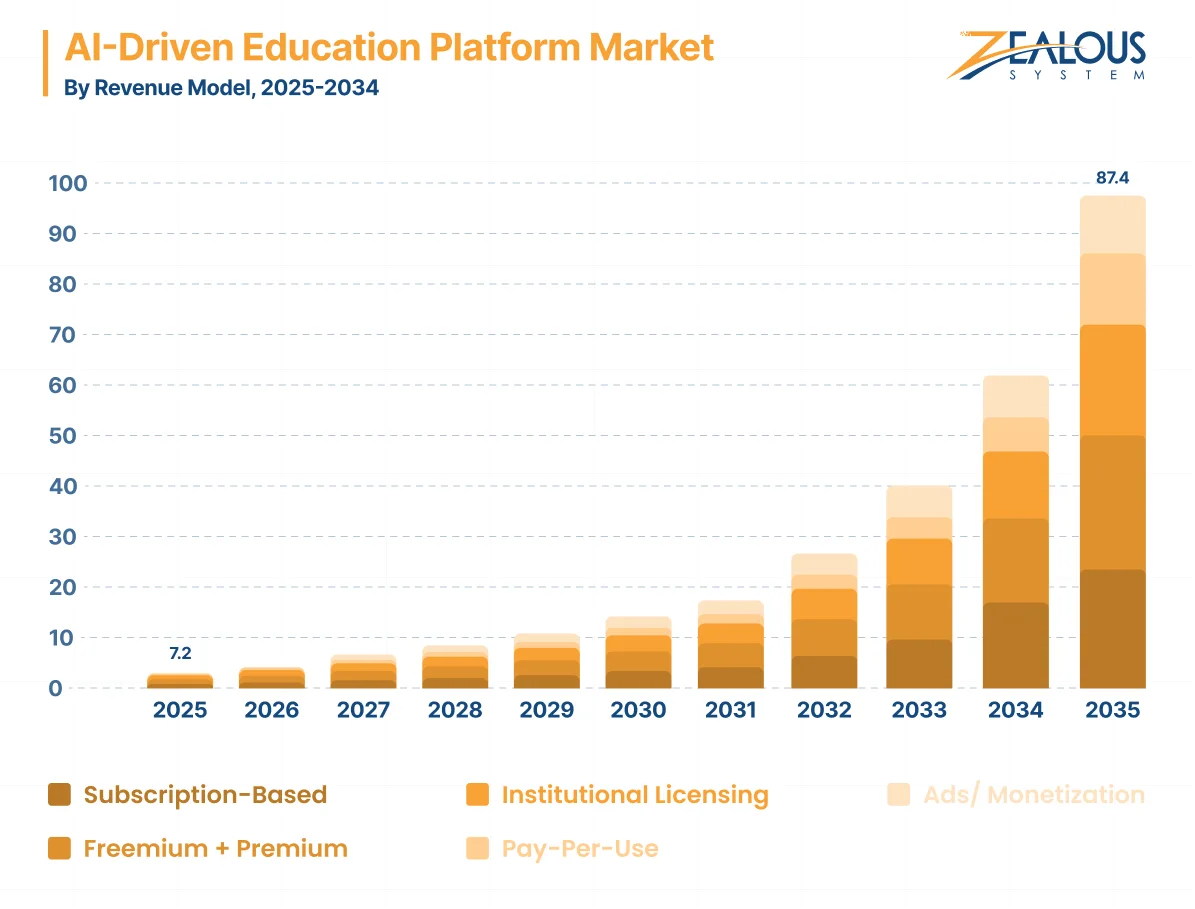
Source: Dimension Market Research
The global AI-driven education platform market was estimated at around USD 7.2 billion in 2025 and is expected to grow to USD 87.4 billion by 2034, at a CAGR of 32.0%. This growth reflects rising demand for personalized learning, adaptive education systems, and data-driven learning analytics across both academic and corporate training environments, as seen in the broader adoption of AI in education across institutions and platforms.
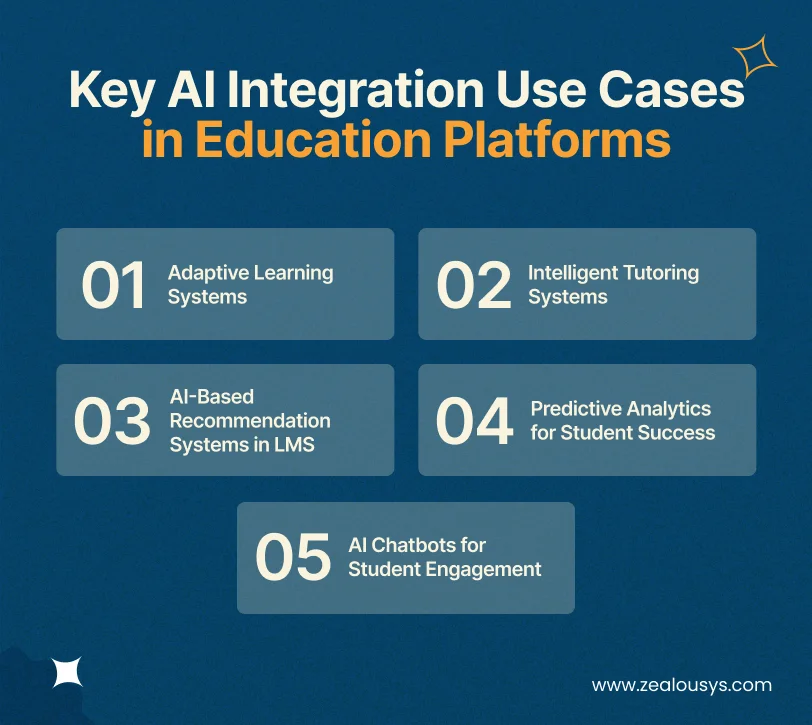
When teams decide to integrate AI into LMS platforms, they usually focus on features that address everyday friction for students, instructors, and administrators. The strongest use cases build on your existing data and content, so there is no need for a full rebuild. Each one improves how learning is delivered, managed, and experienced.
These systems track how a learner moves through material and adjust difficulty or sequence as needed. A student who masters a topic quickly can move ahead, while another receives additional practice where required. Your platform continues to deliver the same core content, but the path becomes more flexible for each learner.
An intelligent tutor works alongside the course and supports learners as they progress. It explains concepts in different ways, asks guiding questions, and offers hints based on previous responses. Instructors also get better visibility into where learners struggle without reviewing every submission manually.
These systems suggest the next module, resource, or course based on a learner’s activity, interests, and goals. In corporate L&D environments, this often means surfacing relevant training at the right time. For product teams, it helps reduce drop-offs and improve course completion rates.
The platform reviews patterns across quizzes, activity, and time spent to identify learners who may fall behind. Early signals allow instructors or advisors to step in before small gaps turn into larger issues. Teams can also use these insights to refine course design over time.
Many student queries tend to repeat. Deadlines, assignments, and access issues. Chatbots handle these instantly, even outside working hours. Engagement stays high because learners receive answers at 2 a.m. without waiting for office hours.
These use cases show how targeted AI features support both learning outcomes and day-to-day platform use. The next step is understanding how to bring these capabilities into your existing system.
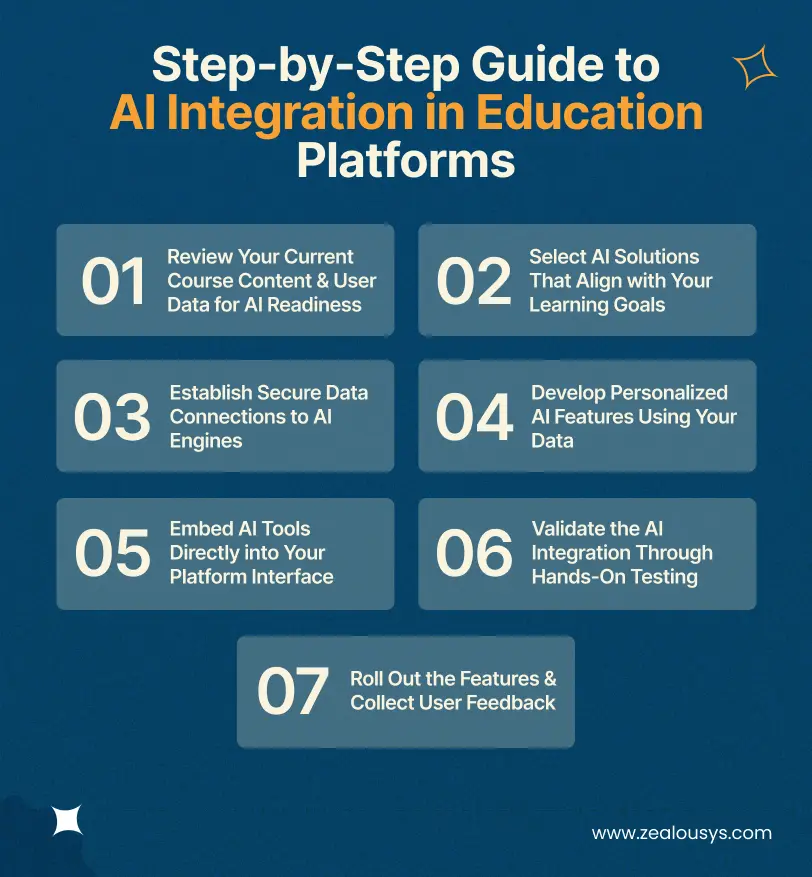
This section outlines a practical roadmap for how to integrate AI into an existing LMS platform. The focus is on building on your current setup, rather than replacing it. The goal is to introduce useful AI features without disrupting day-to-day operations for learners or instructors.
The first step is to take stock of exactly what your platform already holds. This includes student interaction logs, quiz results, completion rates, and how your modules are structured. This helps you identify which data can be used directly and where small gaps may need attention before moving forward.
Choose AI tools based on the outcomes you want to achieve. This could include recommendation engines, chatbots, or adaptive learning systems. It also helps to evaluate how easily these tools connect with your LMS and whether they meet your data privacy and compliance requirements.
Once the tools are selected, the next step is connecting them to your LMS. This usually happens through APIs, where the AI system accesses only the data it needs. Most implementations keep this controlled and encrypted, without moving the entire database, especially when following established LMS integrations patterns.
At this stage, you begin shaping the AI capabilities that will be part of your platform. Models are trained on anonymized learner data, so they reflect your course structure and audience. This is where features like dynamic learning paths and recommendations take form.
The next step is adding these features to the interface your users already know. This might include recommendation panels, chatbot widgets, or progress insights. Keeping them within familiar workflows makes adoption easier for both learners and instructors.
You test everything with a small group of real students and instructors before full release. Run scenarios that check accuracy, response times, and how well the AI handles unexpected inputs. This hands-on validation catches issues early and confirms that the features actually improve the learning experience.
Once everything is in place, you can introduce the features to a wider audience. Gathering feedback from instructors and learners helps refine performance and ensures the system continues to improve after launch.
These steps provide a clear path for step-by-step AI integration in eLearning platforms. Each stage builds on the previous one, allowing you to add AI features to LMS platforms with minimal disruption.
We, at Zealous System, work with teams that want to integrate AI into LMS platforms without rebuilding everything from the ground up. Our experience includes custom LMS development for corporate training and a generative AI course creator that helps automate content creation and module updates within existing learning systems. This hands-on work in the education space gives us a clear understanding of how to add features that fit into real workflows and deliver measurable results for learners and instructors.
Our approach stays practical. We review your current setup, connect the right AI tools through secure APIs, and refine everything using your own data so the new capabilities feel like a natural part of your platform. The focus remains on education-specific needs, from adaptive learning paths to recommendation systems, while maintaining control over security and user experience.
Here is what sets us apart when organizations look for AI integration services for education software:
This makes it easier to introduce AI capabilities into your education platform with clarity and control. The conclusion and FAQs that follow bring everything together.
Integrating AI into an existing LMS platform gives you a clear way to improve how learning is delivered without rebuilding your entire system. The use cases and steps covered here show how to move from a static setup to one that responds more effectively to learner behavior.
The approach keeps your existing content and data at the center, while adding features that make the platform more useful for both learners and instructors.
At Zealous System, we support teams through this process with a focus on practical implementation and long-term usability. As an LMS Development Company with experience in Custom Education Software Development, we ensure the integration aligns with your goals and fits into the systems you already use.
With the right approach, your LMS can adapt as learners progress, making the overall experience more responsive without adding unnecessary complexity.
1. How do I integrate AI into an existing LMS platform without major disruptions?
Start with a focused review of your current content and user data to see what is already ready for AI. From there, connect AI tools through secure API integrations and roll out features gradually. In most cases, the core interface stays the same, so students and instructors can continue using the platform without interruption.
2. What are the most effective AI use cases for education platforms right now?
Adaptive learning systems that adjust content based on real-time progress tend to deliver strong results. Intelligent tutoring, AI-based recommendation systems in LMS, predictive alerts for at-risk learners, and chatbots for instant support are also widely used across universities, corporate L&D teams, and EdTech platforms.
3. How does AI create personalized learning experiences in eLearning platforms?
AI tracks each learner’s pace, strengths, and areas where they struggle, then adjusts the next steps accordingly. One learner may receive additional support on certain topics, while another moves ahead to more advanced material. This keeps the learning experience aligned with individual needs without changing the core course structure.
4. What steps should I follow to add AI features to LMS platforms securely?
Focus on setting up encrypted data connections and using anonymized data where possible. Test the features with a smaller group before expanding access. This helps protect sensitive information while confirming that the AI features work as expected.
5. Do I need to rebuild my whole platform to implement AI in online learning?
Not at all. Most teams integrate AI into LMS platforms through APIs and targeted updates. Your existing modules, user data, and overall structure remain in place, while AI features are added on top.
6. How can EdTech teams build a practical AI integration strategy for their platforms?
Start with one or two features that address a clear need, then expand gradually. Involving your internal team early helps ensure smoother adoption and keeps the implementation aligned with how your platform is actually used.
Our team is always eager to know what you are looking for. Drop them a Hi!

Pranjal Mehta is the Managing Director of Zealous System, a leading software solutions provider. Having 10+ years of experience and clientele across the globe, he is always curious to stay ahead in the market by inculcating latest technologies and trends in Zealous.




Comments