Integrating AI into your Laravel applications is simpler than most developers expect. You connect to established AI services, add the features you need, and skip the overhead of building or maintaining models yourself.
This guide walks you through how to integrate AI APIs with Laravel in clear, practical steps. Laravel’s clean HTTP client, built-in queuing, and solid caching options make the process reliable and easy to maintain.
The focus stays on features your users will actually notice. Smarter chat responses, personalized suggestions, automated content creation. Follow along and you will have a clear picture of the decisions that keep your codebase clean and your app ready for real traffic.
AI API integration in Laravel means connecting your application to external AI services through simple HTTP requests. You send data to these services and receive smart responses back. Laravel handles the heavy lifting with its built-in HTTP client and queuing system, so you focus on building features rather than managing AI infrastructure.
This approach keeps your code clean and scalable. You skip the complexity of training models and tap into AI capabilities that are already built and ready to use.
Each of these features is within reach for any Laravel developer. You are working with APIs, not raw machine learning code, which keeps the process manageable and the results tangible.
Several proven AI services connect cleanly to Laravel through standard HTTP calls. Each one exposes its capabilities through REST endpoints that your app can reach in minutes. Laravel’s HTTP client handles the heavy lifting, so you spend less time on setup and more time building what your users actually need.
OpenAI stands out for text-based tasks. It handles chat completions, text generation, and embeddings that turn words into meaningful vectors. Laravel developers often use it to power conversational interfaces or smart search features.
Google Cloud AI delivers strong results in vision, speech, and natural language processing. You can analyze images, convert speech to text, or extract insights from written content. These tools fit well into Laravel apps that process user uploads or voice inputs.
AWS AI services cover machine learning needs like forecasting and personalization. You gain access to image recognition, sentiment analysis, and recommendation engines without managing your own models. Laravel apps benefit from these when scaling predictive features across large user bases.
| AI Service | Key Features | Best Use Cases in Laravel Apps |
|---|---|---|
| OpenAI | Chat completions, text generation, embeddings | AI chatbots, content creation, semantic search |
| Google Cloud AI | Vision analysis, speech-to-text, natural language processing | Image processing, voice interfaces, content understanding |
| AWS AI Services | Machine learning models, forecasting, personalization | Recommendation engines, predictive analytics, user behavior insights |
This table helps you match the right API to your project goals. Pick one based on the specific AI features you want to add, then move forward with integration.
Before you start, a few essentials need to be in place. These items ensure the connection works smoothly from the first request and save you from debugging setup issues later. Laravel already provides strong tools for HTTP calls and configuration, so the bar stays low.
Here is exactly what you need:
Check these off once and you are writing code, not troubleshooting setup. Works the same whether you are starting fresh or adding AI to an existing app. If your team needs help getting set up, our guide on the top Laravel development companies in India covers what to look for when hiring.
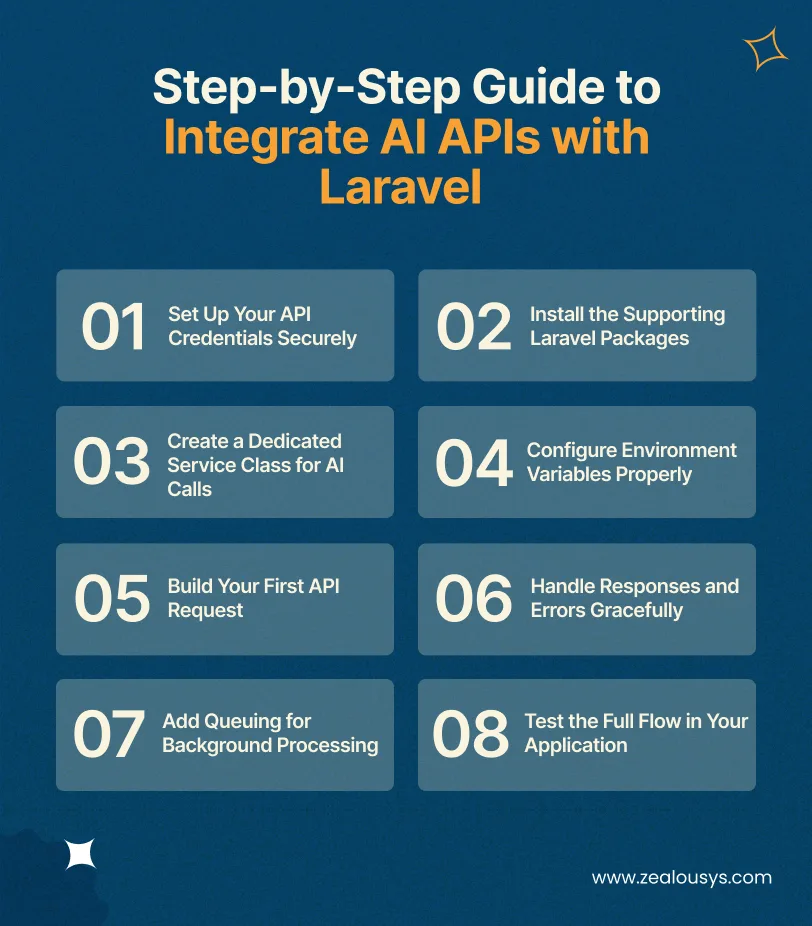
Now you reach the part that puts everything together. Eight clear steps, each building directly on the last. Stay with the sequence and you avoid most of the roadblocks that slow teams down.
The first step is to store your API keys safely. Create entries in your .env file for each service you plan to use. Laravel’s configuration system then pulls these values automatically, keeping sensitive information out of your source code and away from version control.
Next, you bring in the packages that make HTTP calls reliable. Run a simple composer command to add Laravel’s HTTP client enhancements if needed. These tools handle retries, timeouts, and formatting so your integration stays stable under real traffic.
In this step, you build a clean service class inside the app/Services folder. This class wraps all your AI logic in one place. It keeps your controllers light and lets you reuse the same connection code across different features without duplication. If you want a broader picture of how AI software development teams structure these projects, it’s worth reviewing before you scale.
Once your service class exists, you connect it to the keys you stored earlier. Laravel’s config files map everything neatly. This setup means you can switch between development and production environments without touching a single line of business logic.
Here is where you write the method that actually sends data to the AI service. You prepare the payload with your user input or app data, then fire off the request through Laravel’s HTTP facade. Keep the payload simple at first so you can verify the connection works end-to-end.
After the request goes out, you need to process what comes back. In this step, you check the response status and extract the useful content. You also add basic error handling so your app stays responsive even if the AI service returns an unexpected result or hits a rate limit.
Now you make the integration production-ready by moving heavier AI calls to a queue. Laravel’s queue system lets you dispatch jobs instead of waiting in real time. Your users get instant feedback while the AI work happens in the background, keeping page loads fast. Enterprises scaling this further often explore agentic AI workflows to automate multi-step processes end-to-end.
The last step is to wire everything into a real feature and test it thoroughly. You call your service from a controller or job, display the AI output, and check edge cases like network delays or invalid inputs. Run a few manual tests, then move to automated ones so the integration stays reliable as your app grows.
At this point, you have a working AI connection inside Laravel. Clean, expandable, and ready for real traffic.
Adding AI to a Laravel app moves faster than most teams expect. The core architecture stays intact. You are wiring in smart capabilities through clean service classes, not rebuilding from scratch. Here are three practical examples that show how this works in production.
Take a project management SaaS built on Laravel as an example. By connecting to an OpenAI chat endpoint, the team created a chatbot that answers common questions instantly and escalates complex tickets to human agents. Support response times dropped, and users stayed inside the app instead of searching external help pages.
An online store running on Laravel added product suggestions by sending user browsing data to an AWS personalization service. The integration analyzed past purchases and current session behavior, then displayed relevant items on the product pages and cart. Conversion rates improved because shoppers received suggestions that actually matched what they wanted.
A content management tool used Laravel to let clients generate draft blog posts and social media updates through a simple form. The OpenAI text API handled the heavy lifting, while the Laravel backend reviewed output for brand tone and scheduled posts automatically. Marketing teams saved hours every week and maintained consistent quality across hundreds of client accounts.
Different business goals, same clean approach. Start with one feature, prove the value, then expand.
A handful of habits separate smooth, production-ready AI features from fragile ones that break under load. You already have the tools inside Laravel. The key is using them consistently.
Start by treating every API key as sensitive data that never touches version control. Store it only in your .env file and pull it through Laravel’s config system. This single habit prevents accidental leaks and makes it simple to rotate keys when a service changes its policy.
Next, add caching for responses that do not need fresh AI generation every time. Laravel’s built-in cache facade works perfectly here. You store results for a short window, reduce repeated calls to the external service, and deliver faster experiences to your users.
Heavy AI calls should never block your user interface. Dispatch them to Laravel queues so the main request returns immediately. Your application stays snappy while the AI work happens safely in the background, and you avoid timeout issues on slower connections.
Plan for the moments when the AI service returns an error or hits a rate limit. Wrap your calls with clear checks and add automatic retries with a short delay. This approach keeps your feature reliable even when external services experience brief hiccups.
Finally, log every call along with its response time and token count. Laravel’s logging tools make this effortless. You spot patterns early, debug problems quickly, and gather the data you need to manage costs as your traffic grows.
Apply these from day one. They save far more time than they take.
Even solid plans hit snags. Most issues that come up during Laravel AI integration follow predictable patterns, and Laravel already has the tools to handle them. Spot them early, and you stop small problems before they reach your users. If you are still evaluating whether this approach fits your product, AI consulting can help map the right path before you build.
AI services often cap how many requests you can send in a short window. When traffic spikes, your app might hit those limits and start returning errors. The fix is to use Laravel’s rate limiting middleware combined with queues. You throttle calls at the job level and add a short retry delay so the system stays responsive without overwhelming the external service.
AI calls can take a few seconds to return, which feels slow to users waiting on a page load. This delay risks poor experiences or even timeouts. The solution is to move every non-essential AI request to a background queue right from the start. Laravel handles the async work while your controller returns instant feedback, such as a loading message or cached result.
You can see costs rise quickly when you send large payloads or repeat the same API calls without thinking. If you don’t track usage, even one busy feature can catch you off guard on your next bill.
Track usage directly in your service class by logging token counts or response sizes so you always know what’s happening. You can use Laravel’s caching to cut down on repeated calls. Also, set simple budget alerts in your monitoring tools to catch spikes early and keep everything under control.
Treat every user input as sensitive before sending it to an AI service. It’s easy for a basic integration to leak more data than you realize if you’re not careful.
Clean and validate inputs before they leave your app no shortcuts here. Encrypt anything you store using Laravel’s built-in tools, and take a close look at your AI provider’s data retention policy. That way, you stay in control of what data goes out and how long it sticks around.
APIs change. Providers tweak endpoints or hit brief outages, and suddenly your integration breaks without warning. One minute everything works, the next your AI features just stop responding.
Plan for that upfront. Add a fallback in your service class so your app can return a cached response or even a simple default message instead of failing outright. With Laravel’s exception handling and config-driven setup, switching between providers or fallback options stays clean and easy to manage.
None of these challenges are unique to your project. Every Laravel AI integration runs into them at some point. Use the patterns above and they stay manageable.
AI API billing is almost always usage-based. You pay for what you consume. The main variables are request volume, the size of your inputs and outputs, and how efficiently your Laravel app handles responses. For a broader view of how businesses are choosing between top AI solutions, the guide covers what to look for.
| AI Service | Typical Pricing Structure | Example Model Rates (per 1M tokens) |
|---|---|---|
| OpenAI | Token-based (input/output + caching) | GPT-5.4 nano: $0.20 input / $1.25 output |
| Google Cloud AI | Token-based for generative + compute for vision/speech | Gemini variants: $0.15–$1.25 input range |
| AWS AI Services | Token-based via Bedrock + per-hour for SageMaker | Varies by model (Claude/Llama/Titan): $0.15–$15 input range |
You use these cost factors to set a realistic budget before you go live. Start small, track real usage, and adjust as traffic grows.
FAQ
These questions come up often. Here is what you need to know.
Follow the eight-step process outlined earlier: store keys securely, install supporting packages, create a service class, configure variables, build the request, handle responses, add queuing, and test the full flow. Laravel’s built-in HTTP client keeps every step clean and predictable.
Create a dedicated service class that sends user messages to OpenAI’s chat completions endpoint using Laravel’s HTTP facade. Return the generated response to your controller or Blade view for instant display.
Connect your existing routes or Livewire components to a queued OpenAI service class. Users see a loading state while the background job processes the conversation and returns natural replies.
No. You only need basic Laravel skills and the API key. The AI service handles the complex model work while your code simply formats requests and processes responses.
Start by adding a service class for the chosen AI provider. Then wire it into your current controllers or jobs without changing your database or frontend structure.
Store keys in your .env file and access them through Laravel’s config system. Never commit keys to version control and rotate them regularly through your AI provider’s dashboard.
Rate limits, response latency, and rising costs appear most often. Use queues, caching, and basic logging inside Laravel to solve them before they affect users.
You now have everything you need to move from idea to a working AI feature inside Laravel. Every step, example, and practice here is built for real production use, not just theory. Laravel handles the plumbing. Your job is to build the features your users will actually notice whether you partner with a Laravel development company or choose to hire a Laravel developer for faster execution.
The patterns here hold whether you are adding one chatbot or building out a full recommendation system. Start with one integration, ship it, and grow from there. If you plan to scale quickly, working with a Laravel development company or deciding to hire a Laravel developer can help you move faster and avoid common pitfalls.
If you are building this inside a product team and want experienced hands on the implementation, Zealous System has worked with numerous Laravel teams doing exactly this in production.
Our team is always eager to know what you are looking for. Drop them a Hi!

Raj Kewlani is a Project Manager and Mobile & Open Source Development Lead at Zealous System, specializing in agile-driven digital solutions. He focuses on delivering high-quality mobile apps and open-source projects that align with business goals.


Comments