When businesses start planning a pickup and delivery app, the first real question is always about cost. And that is the right question to ask, because pickup and delivery app development cost is not just a budget line. It is a reflection of how complex your system needs to be, how many users it has to serve, and how much operational control you want over your own platform.
Whether you are a startup entering the on-demand delivery space or an established logistics company replacing manual systems, getting a realistic picture of what this build actually involves is the most useful place to start.
Cost is not a number you can answer in isolation. It depends on what you are building, for whom, how complex the system needs to be, and who builds it. Each of those variables is covered here, in enough detail to help you scope and budget with accuracy rather than guesswork.
The on-demand delivery market has been one of the fastest-growing segments in consumer and business technology over the past decade. And in 2026, it is still nowhere near plateauing.
According to Statista, global online food delivery revenue is projected to reach $1.51 trillion in 2026, growing at a CAGR of 6.24% through 2030. That single segment alone tells you how much money is moving through delivery infrastructure right now.
Last-mile delivery, same-day logistics, and hyperlocal courier services are seeing sustained investment from both startups and enterprise players. The global last-mile delivery market is estimated at $207.1 billion in 2026 and is projected to reach $378.6 billion by 2033 at a 9% CAGR, according to Coherent Market Insights.
Grocery chains are building proprietary delivery infrastructure. Retail brands are moving away from third-party logistics aggregators toward custom-built solutions they actually own and control.
Consumer expectations around delivery speed have permanently shifted. The courier pickup and delivery services market is forecast to add $93.09 billion in incremental revenue between 2025 and 2030, growing at a 7.3% CAGR, according to Research and Markets.
Businesses are realizing that depending on third-party delivery platforms comes with margin trade-offs and limited data ownership. And AI-based route optimization and dispatch automation have made it far more practical to run a delivery operation at scale without proportionally scaling headcount.
If you are evaluating whether to build a pickup and delivery app in 2026, the timing makes sense from both a market and technology standpoint.
At its core, a pickup and delivery app is a software platform that connects customers who need something picked up and delivered with drivers or couriers who fulfill that task. The app coordinates the entire journey: order placement, driver assignment, route navigation, status tracking, proof of delivery, and payment.
But that is the simplified version. In practice, a delivery app is an ecosystem of interconnected components. There is a customer-facing app, a driver app, an admin panel, and usually a set of backend APIs that power real-time data exchange between all three.
The workflow looks straightforward from the outside. A customer places an order. A driver picks it up. The customer gets it delivered. But underneath that, there are several systems working simultaneously.
When a customer places an order, the platform’s dispatch engine identifies available drivers nearby, scores them based on proximity, load, and route efficiency, and assigns the job automatically or surfaces it for manual dispatch. The driver receives the job on their app, navigates to the pickup location using integrated maps, completes the pickup, and heads to the delivery address.
Throughout this process, the system transmits real-time GPS data, pushes status updates to the customer, gives the admin team full visibility into every active order, and logs everything for analytics and billing.
That behind-the-scenes complexity is what you are paying for when you build a delivery app.
Not all delivery apps are built the same way. The type of service you are offering determines the features you need, the integrations required, and therefore the development scope.
1. Courier Delivery Apps:
These handle document pickups, small parcels, and same-day deliveries. Typically B2C or B2B, they prioritize speed, proof of delivery, and real-time tracking above everything else.
2. Grocery Delivery Apps:
These involve inventory management, slot-based scheduling, substitution handling, and integration with store systems. The complexity here is noticeably higher than a simple courier model.
3. Parcel Pickup Apps:
Often used by eCommerce businesses or return logistics providers, these apps need barcode scanning, bulk order handling, and warehouse or hub integration.
4. B2B Logistics Apps:
These serve enterprise supply chains: multi-stop deliveries, fleet management, driver performance tracking, and invoice generation at scale.
5. Multi-Vendor Delivery Apps:
Marketplace-style platforms where multiple businesses list products and services, and a shared driver fleet handles fulfillment. These are the most complex to build because they require vendor portals, separate payout management, and cross-merchant order coordination.
Features are where cost conversations get concrete. What you include in your app directly determines what you spend. Here is a structured breakdown of the feature sets across the three core modules.
The customer app is the front door of your entire operation. It needs to be fast, clear, and reliable. Anything that creates friction here costs you conversions and retention. It is also where scope creep tends to start. Small UX additions that seem reasonable in isolation can compound into significant development time.
The driver app is a workhorse. Drivers use it in motion, often with one hand, so the interface needs to be minimal and functional. The backend it connects to needs to be rock-solid because delivery businesses lose money every time a driver experiences a technical glitch. Features like offline mode, background GPS tracking, and low-bandwidth handling add hidden complexity that frequently gets missed in early scoping conversations.
The admin panel is where operations, finance, and business intelligence come together. A well-built admin panel reduces the need for manual coordination and gives your team real visibility into what is actually happening across your network. It is also the most consistently underestimated module in initial scoping, and the one that teams most often request expensive revisions to after launch.
AI has moved past being optional in delivery app development. In 2026, the platforms gaining market traction are the ones using AI not just for marketing but for actual operational efficiency.
Traditional routing assigns a driver and gives them a direction. AI routing considers traffic patterns, historical delivery times by neighborhood, driver behavior data, and real-time conditions to build multi-stop routes that consistently outperform manual planning. The fuel and time savings compound quickly at scale.
Uses machine learning to predict which driver is most likely to complete a job on time based on their current location, historical performance, vehicle type, and delivery zone familiarity. It reduces failed deliveries and improves ETA accuracy.
Helps operations teams prepare for volume spikes. By analyzing historical data, weather patterns, local events, and time-based demand cycles, the system can flag when to increase driver availability before shortages happen rather than after.
Increasingly critical for platforms that handle payments, driver verification, and customer accounts. ML models can flag unusual behavior patterns like GPS spoofing, fake delivery confirmations, or abnormal order patterns without requiring manual review of every transaction.
AI-based ETA models produce far more accurate estimates than simple distance-based calculations. Models that account for traffic, order complexity, driver speed profiles, and pickup wait times build customer trust and reduce support tickets.
AI assistants handle repetitive queries like “where is my order” or “how do I cancel” at scale, freeing up human support agents for escalations that actually need judgment.
Adding these features is not always a day-one requirement. But designing your architecture so that they can be integrated later without a full rebuild is worth planning for early.
This is the section most readers come here for, so let us be as practical as possible about it.
Delivery app development cost in 2026 ranges from approximately $15,000 to $150,000+, depending on the complexity of the platform, the number of modules, the technology choices made, and where the development team is based.
Here is a realistic breakdown by component:
| Component | Estimated Cost Range |
|---|---|
| Customer App (iOS + Android) | $8,000 – $25,000 |
| Driver App (iOS + Android) | $7,000 – $20,000 |
| Admin Panel (Web) | $6,000 – $18,000 |
| Backend / API Development | $10,000 – $30,000 |
| Real-time Tracking & Maps | $4,000 – $10,000 |
| Payment Gateway Integration | $2,000 – $5,000 |
| Push Notifications | $1,000 – $3,000 |
| AI Features (Route Optimization, Dispatch) | $10,000 – $30,000 |
| Testing and QA | $4,000 – $10,000 |
| UI/UX Design | $3,000 – $10,000 |
| Deployment and Infrastructure Setup | $2,000 – $5,000 |
These are development costs only. Ongoing costs such as server hosting, third-party API subscriptions (maps, SMS, payments), and maintenance are additional.
1. Offshore Development Teams (India, Eastern Europe)
Typically charge between $20 and $60 per hour. A mid-complexity delivery platform built by a skilled offshore team can land between $20,000 and $60,000.
2. Nearshore Teams (Latin America, Southeast Asia)
Ranges from $40 to $80 per hour. Budget roughly $40,000 to $90,000 for a comparable scope.
3. North American or Western European Agencies
Charge $100 to $200 per hour. The same platform could cost $80,000 to $150,000 or more.
The output quality, communication experience, and post-launch support vary significantly across these tiers. Choosing purely on hourly rate without evaluating delivery capability is a common and costly mistake.
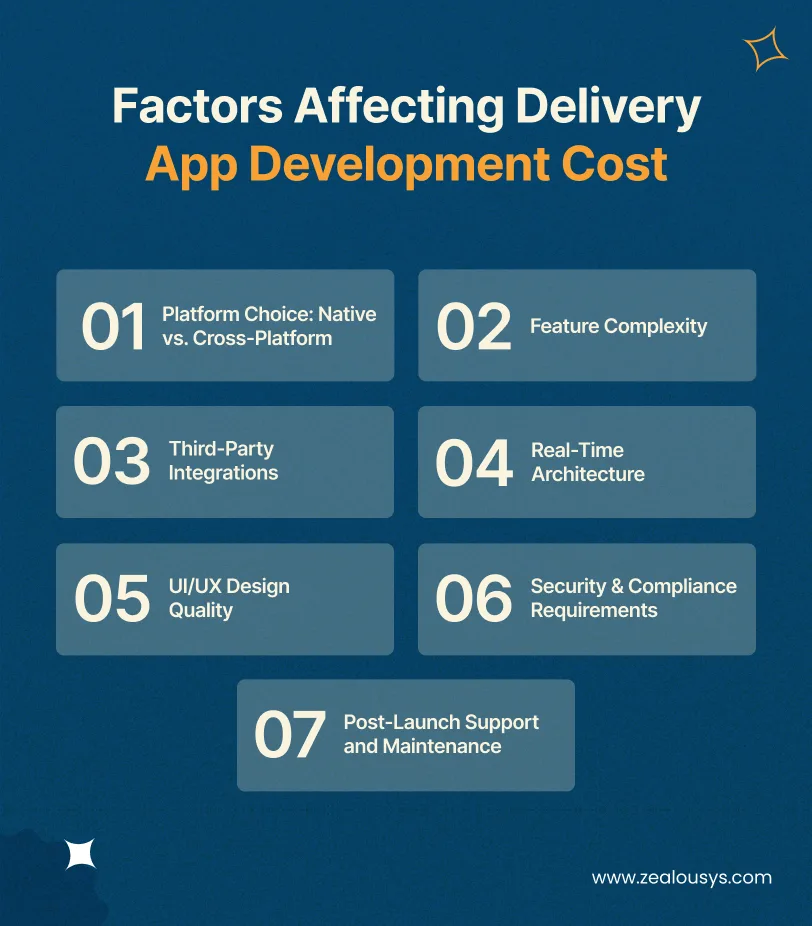
Several variables push costs up or down significantly. Understanding them helps you scope your project more accurately before you get into vendor discussions.
Building a separate native app for iOS and Android gives the best performance, but doubles the codebase and the cost. Cross-platform frameworks like Flutter or React Native let you build once for both platforms, reducing costs by 30 to 40 percent without a major sacrifice in user experience for most delivery use cases.
A basic app with order placement, tracking, and payments is a very different build from one that includes AI dispatch, multi-vendor support, fleet management, and custom reporting. Every additional feature adds development time, and development time is costly.
The more external services your app needs to connect to, the higher the development effort. Integrating a maps SDK is straightforward. Integrating with an ERP system, a warehouse management platform, or a custom inventory management system requires significantly more backend work and testing.
Delivery apps depend on real-time data: live location updates, instant status changes, push notifications, and live driver-to-customer communication. Building a reliable real-time layer using WebSockets, Firebase, or a similar solution adds complexity to the backend and requires careful attention to performance tuning.
A basic functional interface costs less to design than a polished, pixel-perfect user experience. For consumer-facing delivery apps where first impressions directly affect adoption, investing in design is usually worth it. For internal B2B tools, a functional design may be sufficient.
If your platform processes payments, stores personal data, or operates in regulated industries or regions, you need to factor in security audits, GDPR or local data privacy compliance, PCI-DSS requirements for payment handling, and potentially HIPAA if you are in healthcare or pharmacy delivery.
Delivery apps are live systems that interact with real drivers and real customers 24/7. Bugs do not wait for business hours. Factor in at least 15 to 20 percent of the initial development cost annually for maintenance, updates, and incident response.
The technology choices you make at the start of a project affect performance, scalability, cost, and how easy it is to hire developers who can maintain or extend the system later.
Timeline depends on scope, team size, and how clearly the requirements are defined before development begins. Here is a realistic phased breakdown.
This is where requirements are finalized, the technical architecture is designed, third-party integrations are scoped, and the project roadmap is created. Skipping or rushing this phase is the most common reason projects overrun on both time and budget.
This phase produces wireframes, user flows, and high-fidelity mockups for all three apps: customer, driver, and admin. It includes user testing and iteration rounds before development begins. Good design work at this stage reduces revision cycles later.
The core build phase. This is typically done in parallel with frontend and backend teams working simultaneously. Sprint-based delivery allows for regular review and adjustment. For a mid-complexity platform, expect 12 to 16 weeks for the primary feature set.
This phase covers third-party API integrations, end-to-end testing, performance testing under load, and security testing. Real-time systems need rigorous testing under simulated live conditions to uncover race conditions or latency issues that do not show up in unit tests.
This phase handles app store submissions, production server setup, monitoring configuration, and a soft launch or beta period before full rollout.
Total estimated timeline: 5 to 9 months for a full-featured platform. An MVP with a focused feature set can be built in 3 to 4 months.
Before committing to a custom build, it is worth being honest about whether you actually need one.
SaaS delivery platforms like Onfleet, Bringg, Tookan, or Circuit offer ready-made dispatch management, driver tracking, and customer notifications for a monthly subscription. For businesses that need to get operational quickly and are not building a consumer-facing product, these platforms can cover a lot of ground.
Many businesses start with a SaaS tool to validate, then migrate to a custom platform once they hit the ceiling. That transition is real and often painful, but it is a reasonable path. Knowing which phase you are in is what matters.
Building a delivery app is genuinely hard. Not because the individual technologies are exotic, but because the system needs to work reliably in real-world conditions where things do not behave as expected.
GPS signals drop. Internet connections become unstable mid-delivery. Push notifications fail silently. A system that works in testing can behave very differently when thousands of concurrent users are placing orders and dozens of drivers are updating their location every few seconds. In practice, the most common production failure is not a crashed server. It is a silent data lag where the driver’s location on the customer’s screen is 90 seconds behind reality, and neither side knows it.
Delivery apps often get deployed to a wide range of Android devices, including older, lower-spec phones that drivers already own. An app that performs well on a flagship device can be sluggish or crash-prone on a $100 phone. Testing on real hardware, not just simulators, is non-negotiable.
This is a use case that often gets under-specified. What happens when a customer is not available? What if a package is damaged in transit? What if the pickup address is incorrect? These edge cases need defined workflows in both the app and the admin system, and they add more development scope than they initially appear to.
Dispatch logic that works fine at 50 concurrent orders can break down at 5,000. The architecture needs to be built with horizontal scaling in mind from the start, not retrofitted later when the load reveals the cracks. The specific failure point is usually the assignment algorithm. What works as a synchronous database query at low volume becomes a blocking bottleneck the moment order density spikes.
Connecting to a payment gateway is usually straightforward. But integrating with a client’s internal ERP, a third-party warehouse system, or a legacy API that was never designed for real-time use requires significant engineering effort and robust error handling. The most consistently underestimated integration type is the client’s own internal system. The one that was built years ago has no documentation, and only one person in the company fully understands.
Zealous System has worked with delivery startups, logistics companies, and enterprise operations teams to build pickup and delivery platforms across various verticals, including grocery, courier, pharmacy, and B2B freight.
The team handles the full development lifecycle: from discovery and architecture design through development, testing, and post-launch support. The focus is on building systems that actually hold up in production, not just demos. That means real-time architectures tested under load, driver apps built for low-end hardware, and admin systems designed for the people who have to use them every day.
That combination of technical depth and vertical-specific experience is what separates a delivery app that holds up in production from one that needs to be rebuilt six months after launch.
The cost ranges from $15,000 to $150,000 or more, depending on features, platform choices, and where the development team is located. A focused MVP for a single market can be built for $20,000 to $40,000. A fully featured, AI-powered multi-vendor platform with a dedicated admin system will be at the higher end.
An MVP typically takes 3 to 4 months. A full-featured platform takes 5 to 9 months. The timeline is heavily influenced by how clearly requirements are defined before development starts and how quickly design feedback is provided.
The answer depends on your priorities. Flutter or React Native for mobile keeps costs down without sacrificing map performance or real-time functionality. Node.js handles high concurrency well, which matters for platforms with many simultaneous active orders. Python is the better backend choice when AI or ML features are in scope. For the database layer, PostgreSQL covers core transactional data, Redis handles real-time state, and Firebase or WebSockets power live tracking. Google Maps is the most reliable maps option; Mapbox is more cost-effective at high volume.
For internal operations and small budgets, a SaaS platform is usually the right call. For consumer-facing products, unique business models, or high transaction volumes where per-order fees add up, custom development makes more financial and strategic sense.
A working MVP needs customer registration, order placement with pickup and delivery address input, real-time driver tracking, push notifications, payment processing, a driver app with job acceptance and navigation, and a basic admin dashboard. Everything else can come in later phases.
Basic AI features like ML-based route optimization or intelligent dispatch typically add $10,000 to $30,000 to the development scope. More sophisticated systems involving predictive analytics or custom-trained models cost more. The return on this investment tends to show up in reduced operational costs over time rather than immediately.
Yes, and most delivery platforms do exactly that from day one. Cross-platform frameworks like Flutter or React Native let you ship a single codebase to both platforms, which reduces cost by roughly 30 to 40 percent compared to separate native builds. For most delivery use cases, the performance difference is not noticeable. The case for going fully native is when you are building a high-end consumer product where the UX needs to feel indistinguishable from a first-party OS app, and your budget supports maintaining two separate codebases long-term.
Building a pickup and delivery app in 2026 is a meaningful investment, and the range of what you can spend is wide. A minimum viable product to validate your market looks very different from a production-grade platform built to handle thousands of daily orders. Knowing where you are in that spectrum is the first thing to get clear on.
The most expensive mistakes in delivery app development rarely come from choosing the wrong framework. They come from under-specified requirements, underestimating real-time complexity, and launching without adequate load testing. Getting those fundamentals right matters more than any individual technology choice.
Zealous System has direct experience building delivery platforms across grocery, courier, pharmacy, and B2B freight verticals. For teams at the planning stage, that kind of domain-specific background makes a real difference when it comes to scoping accurately, avoiding architecture mistakes, and building something that actually holds up under production load.
Our team is always eager to know what you are looking for. Drop them a Hi!

Pranjal Mehta is the Managing Director of Zealous System, a leading software solutions provider. Having 10+ years of experience and clientele across the globe, he is always curious to stay ahead in the market by inculcating latest technologies and trends in Zealous.


Comments