
Quick Answer: Yes, you can add AI features to an existing mobile app without rebuilding it from scratch. The most practical approach is API-first integration, which means connecting your app to AI services like OpenAI, Google Gemini, or AWS AI through your existing backend. For offline or privacy-sensitive use cases, on-device frameworks like Core ML or TensorFlow Lite work without a full rebuild. Most AI features take 2-8 weeks to ship, depending on complexity.
Most product teams assume that adding AI to their app means starting over. New architecture. New tech stack. Six months of development. A budget that doubles overnight. That assumption is wrong, and it’s costing businesses time they don’t have.
The reality is that AI integration doesn’t require you to tear down what’s already working. Your app’s core functionality, user data, and existing infrastructure can stay exactly as they are. What changes is what sits on top of it: an intelligent layer that makes the experience smarter, faster, and more useful.
This guide covers exactly how to do that. You’ll get a clear picture of which AI features deliver the most value, how to integrate them step by step, what it realistically costs, and what to watch out for along the way.
The short answer: yes, absolutely.
Think of it like adding a smarter navigation system to a car. You’re not replacing the engine, the chassis, or the transmission. You’re adding an intelligent layer that works with what’s already there. The car functions the same way. It just makes better decisions about where to go.
AI integration works on the same principle. Your app’s foundation stays intact. What you’re doing is connecting new capabilities through APIs, SDKs, or lightweight on-device models.
This approach treats AI as an intelligent service layer rather than a structural requirement. Instead of rebuilding your app to be “AI-native,” you expose specific parts of your app to AI services that handle the intelligence. Your app calls the API, the API returns a smart response, and your users experience something genuinely better.
AI doesn’t need to own your architecture. It just needs access to the right data and the right hooks into your app’s UI or backend.
Spotify didn’t rebuild its entire platform when it introduced Discover Weekly. It layered a machine learning recommendation engine on top of existing listening data. Duolingo didn’t scrap its app to add personalization. It integrated adaptive learning models into an already-functioning product.
In both cases, the result was a meaningfully smarter experience built on top of an existing foundation, not a new one.
There are three practical reasons product teams keep landing on integration over a full rebuild.
A targeted AI integration can ship in weeks. A full rebuild takes months, sometimes a year or more. In a market where user expectations shift quickly, the ability to ship a meaningful AI feature in 3-6 weeks is a real competitive advantage. Rebuilding doesn’t give you that.
Rebuilding an app from scratch is expensive, and it carries significant risk. You’re essentially betting that the new version will work as well as the current one, only with AI added. Integration keeps most of that risk off the table. You’re making a bounded change, not rewriting everything.
Your users are already familiar with your app. They’ve formed habits around it. A major rebuild often disrupts those patterns: new UI, new flows, new bugs. Integration lets you improve their experience without breaking it.
AI-powered app downloads reached 3.8 billion in 2025, and a large portion of that growth came from established apps adding AI features, not brand-new AI-native products.
| Factor | AI Integration (Upgrade) | Full Rebuild |
|---|---|---|
| Cost | $10K-$100K+ depending on scope | $150K-$500K+ |
| Time to ship | 2-12 weeks | 6-18 months |
| Risk level | Low, scoped changes | High, full regression risk |
| User disruption | Minimal | Significant |
| Data continuity | Preserved | Often requires migration |
| Best for | Adding specific capabilities | Fundamental architecture change |
Not all AI features are equal. Some require months of custom model training. Others can go live in two weeks with a simple API call. Here are the six that consistently deliver the best return on investment.
What it does: Handles user queries, guides onboarding, answers product questions, and reduces support load, all within the app.
Implementation time: 2-4 weeks
Tools: OpenAI GPT-4o API, Google Gemini API, Dialogflow
Use case: A healthcare app adding a symptom checker that triages user questions before routing to a doctor. A logistics app giving drivers real-time route guidance through a chat interface.
What it does: Surfaces relevant products, content, or next actions based on individual user behavior rather than showing the same experience to everyone.
Implementation time: 4-8 weeks
Tools: AWS Personalize, Google Recommendations AI, Firebase Predictions
Use case: A retail app recommending products based on browsing and purchase history. An EdTech platform suggesting the next lesson module based on where a learner is struggling.
What it does: Moves search beyond keyword matching to understand what users actually mean. A user searching “something for a sore throat” gets relevant results even without exact keyword matches.
Implementation time: 3-6 weeks
Tools: OpenAI Embeddings, Elasticsearch with vector search, Pinecone
Use case: A real estate app where users search “quiet neighborhood near good schools” and get contextually matched listings. An eCommerce app where natural language queries return accurate product results.
What it does: Uses behavioral data to predict what a user is likely to do next and sends timely, relevant nudges rather than generic broadcast messages.
Implementation time: 4-6 weeks
Tools: Firebase ML, Amplitude AI, Braze Predictive Suite
Use case: A fintech app alerting users before they’re likely to overdraft, based on spending patterns. An on-demand service app predicting when a user typically reorders and prompting them before they need to search.
What it does: Lets users interact with the app through images or voice instead of typing. Includes document scanning, visual search, and voice commands.
Implementation time: 3-5 weeks
Tools: Core ML (iOS), TensorFlow Lite (Android), Google Vision API, Whisper API
Use case: A logistics app letting drivers scan delivery documents with their camera. A healthcare app extracting prescription details from a photo upload.
What it does: Automatically generates or summarizes content within the app: reports, product descriptions, call summaries, or personalized messages.
Implementation time: 2-3 weeks
Tools: OpenAI GPT-4o, Anthropic Claude API, Cohere
Use case: A real estate CRM generating property listing descriptions from data inputs. A fintech app summarizes monthly spending into a plain-language report for each user.
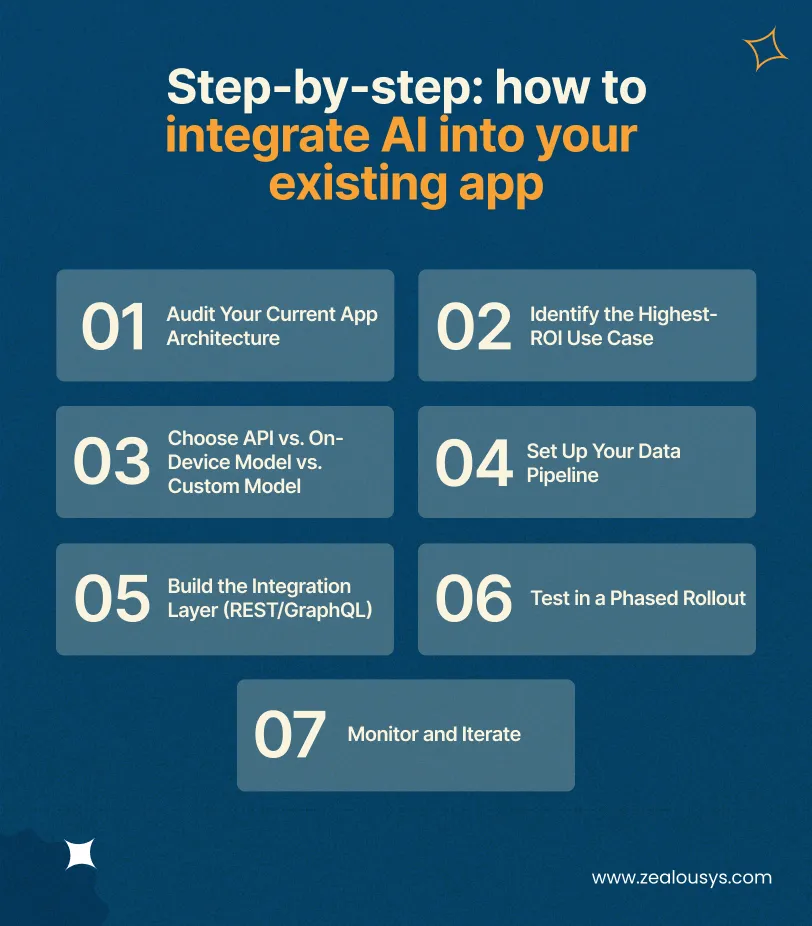
Before anything else, understand what you’re working with. Document your current tech stack, backend infrastructure, API structure, and data storage. The goal is to identify where an AI service can plug in without disrupting core functionality.
Don’t try to add five AI features at once. Pick the one that solves the most pressing user problem or closes the biggest business gap. Frame it as: “If we could make users 20% more likely to complete [action], what would that be worth?”
This decision depends on your latency requirements, data sensitivity, and budget. For most first integrations, a third-party API is the right starting point. It’s fast to deploy and easy to test before committing to something more complex.
AI is only as good as the data it receives. Make sure your app is logging the right events, user interactions, and contextual signals. If your data is siloed or inconsistent, clean it up before connecting it to any AI service.
Create the bridge between your app and the AI service. This typically means building API calls in your existing backend, managing authentication, handling rate limits, and mapping the AI response to your app’s UI components. This is standard backend work with no exotic architecture required.
Don’t release to 100% of users on day one. Start with 5-10% of users, monitor behavior metrics and error rates closely, and expand gradually. This limits exposure if something doesn’t perform as expected.
Set up observability from the start: latency, error rates, user engagement with the AI feature, and downstream conversion metrics. AI features that aren’t monitored tend to degrade silently as data patterns shift.
| Factor | API (OpenAI, Gemini, AWS) | On-Device (Core ML, TF Lite, Firebase ML) | Custom Model |
|---|---|---|---|
| Cost | Low upfront, ongoing API fees | Low ongoing, higher setup | High training and infrastructure costs |
| Speed to deploy | 2-4 weeks | 4-8 weeks | 3-6+ months |
| Offline support | No | Yes | Depends on deployment |
| Data privacy | Data sent to third party | Data stays on device | Fully controlled |
| Maintenance | Provider handles updates | Requires model updates | Full team responsibility |
| Best for | Most first integrations | Healthcare, finance, low connectivity | Unique use cases with proprietary data |
For most apps, the right answer for a first AI feature is a third-party API. It’s the fastest path to a working, testable feature. On-device models make sense when privacy or connectivity is a constraint. Custom models are worth it only when you have enough proprietary data and a use case that off-the-shelf APIs genuinely can’t handle.
| AI Feature | Estimated Timeline |
|---|---|
| AI chatbot via API (GPT/Gemini) | 2-4 weeks |
| AI-generated content or summaries | 2-3 weeks |
| Smart search with semantic embeddings | 3-6 weeks |
| Image/voice recognition (API-based) | 3-5 weeks |
| Predictive push notifications | 4-6 weeks |
| Recommendation engine (cloud-based) | 4-8 weeks |
| On-device ML model integration | 6-10 weeks |
| Custom ML model (training + deployment) | 3-6+ months |
These timelines assume a focused team, clean existing architecture, and a well-defined feature scope. Add 2-3 weeks if significant data cleanup is needed before integration can begin.
Cost depends heavily on what you’re building, how you’re building it, and whether you’re using existing APIs or training something from scratch. Here’s a practical breakdown across three tiers.
Cost: $50-$500/month ongoing, plus $5K-$20K to build
This covers using third-party AI APIs like OpenAI, Google Gemini, or AWS AI services. Monthly API usage fees vary based on call volume. This is the right starting point for most apps: low risk, fast to ship, and easy to scale up once the feature is validated.
Cost: $10K-$50K
This applies to features that need custom logic on top of an AI API or lightweight on-device model integration. Examples include a personalized recommendation engine with custom ranking logic, or an image recognition feature trained on your specific product catalog.
Cost: $50K+
This covers a comprehensive AI integration across multiple features or a custom model trained on proprietary data. Healthcare apps, fintech platforms, and enterprise logistics tools often fall into this tier because of compliance, accuracy, and data privacy requirements.
On ROI: AI implementations with a clear use case and a proper data foundation typically show measurable returns within 3-6 months. The most common metrics businesses track are user retention, support ticket deflection, and conversion rate on AI-influenced actions.
An AI feature connected to outdated or inconsistent data will produce bad results. Bad results erode user trust fast. Before integration begins, audit your data pipelines. Make sure the data your AI feature will use is accurate, current, and properly structured.
The first AI feature doesn’t need to be perfect. Teams that spend months perfecting a recommendation model before shipping miss the chance to learn from real user behavior. Ship something narrow and useful, measure what happens, then improve from there.
If your users are in markets with inconsistent network coverage, such as parts of Southeast Asia, Africa, or rural regions globally, an AI feature that requires a round-trip API call will feel broken. Either cache responses intelligently or consider on-device models for these cases.
Rolling out to your entire user base on day one is unnecessary risk. A phased rollout lets you catch issues before they affect everyone, and gives you clean A/B data to measure whether the feature is actually working.
AI models don’t stay accurate indefinitely. User behavior shifts, new data patterns emerge, and model performance drifts. If nobody is watching latency, accuracy, or engagement metrics post-launch, you’ll miss the moment a feature stops adding value.
Spotify introduced Discover Weekly in 2015 by layering a collaborative filtering model on top of existing listening data, with no platform rebuild required. The feature analyzed listening patterns across millions of users to generate weekly personalized playlists. It became one of the most-used features in Spotify’s history and drove a measurable increase in weekly active engagement, all built on infrastructure that was already there.
Duolingo added AI-driven personalization to an already functioning language learning app. By integrating a model that adapts lesson difficulty and pacing to individual learner performance, Duolingo reported a 12% increase in user retention. The core app structure didn’t change. What changed was how the app decided what to show each user next.
Instagram rolled out AI-based content moderation and feed recommendations incrementally over several years, not as part of a rebuild, but as layered additions to existing systems. The recommendation engine now drives a significant portion of content discovery on the platform, and the moderation system flags policy-violating content at a scale no human review team could match. Both were integrated progressively, feature by feature.
Adding AI to a live product is a different challenge than building something from scratch. The constraints are real: existing architecture to work around, live users to protect, and business logic that can’t break.
Zealous System approaches AI integration as an engineering problem first. The process starts with a technical discovery and architecture audit, moves into scoped feature prioritization, and rolls out in phases so each integration is stable before the next one begins.
The work covers healthcare apps where patient data privacy is non-negotiable, eCommerce platforms where recommendation and search features need to perform at scale, and real estate products where AI needs to support human decision-making without overcomplicating the experience.
The goal in every case is the same: a production-ready AI feature that users notice, backed by metrics that show it’s working.
Yes. Most AI features can be integrated into existing apps through third-party APIs or on-device ML frameworks without rebuilding the app. The key requirement is a stable backend and access to relevant user data.
It depends on the feature. A chatbot via API typically takes 2-4 weeks. A recommendation engine takes 4-8 weeks. A custom-trained ML model can take 3-6 months. Most first integrations fall in the 4-8 week range.
Using a third-party API such as OpenAI or Google Gemini is the lowest-cost entry point. API-based integrations typically cost $5K-$20K to build and $50-$500/month in ongoing usage fees, depending on call volume.
It can, if not implemented carefully. API calls add latency, especially on slower connections. Solutions include asynchronous processing, response caching, and on-device models for latency-sensitive features that don’t require a network call.
Not always. API-based features like chatbots or AI-generated summaries require very little of your own data. Recommendation engines and custom models need more. If your data is limited, starting with a pre-trained API model is the practical path.
AI integration adds new capabilities to an existing app without changing its core architecture. Rebuilding means replacing the app’s foundation entirely. Integration is faster, cheaper, and carries significantly less risk. It’s the right approach unless the current architecture is genuinely incompatible with what you need to build.
Adding AI to an existing mobile app is a practical, well-tested engineering approach, not a shortcut or a compromise. The businesses getting the most out of AI right now aren’t the ones that rebuilt everything. They’re the ones that identified specific problems, integrated targeted solutions, and iterated from there.
Zealous System brings the technical depth and cross-vertical experience to make that process straightforward, from the initial audit through to a monitored, production-ready AI feature.
Our team is always eager to know what you are looking for. Drop them a Hi!

Raj Kewlani is a Project Manager and Mobile & Open Source Development Lead at Zealous System, specializing in agile-driven digital solutions. He focuses on delivering high-quality mobile apps and open-source projects that align with business goals.


Comments