
An AI copilot is a context-aware AI assistant built on large language models (LLMs) that works alongside your team to handle tasks, surface insights, and automate repetitive workflows. Building one involves choosing the right LLM backbone, designing a retrieval-augmented generation (RAG) pipeline, connecting it to your business data sources, and wrapping it in a secure, scalable architecture. Costs typically range from $30,000 to $300,000+ depending on complexity. This guide walks you through everything: architecture, features, tech stack, build process, and cost breakdown.
There is a growing gap between businesses that use AI as a marketing talking point and those that actually put it to work inside their operations. AI copilots sit firmly in the second category.
Unlike standalone chatbots or generic AI tools, a custom AI copilot for business is built around your workflows, your data, and your team’s actual needs. Whether you are looking at custom AI copilot development for SaaS products, internal enterprise tools, or customer-facing applications, the core principle is the same: it fits into how your team already works, not the other way around.
This AI copilot development guide is written for technical leaders and product decision-makers who want a clear, grounded understanding of what it actually takes to build an enterprise AI copilot: from the first architecture decision to the final deployment.
The term “copilot” is borrowed from aviation: in a cockpit, the copilot does not replace the pilot but shares the load, handles critical checks, and steps in when needed.
An AI copilot is a context-aware AI assistant that works alongside a human user in real time. It understands context, responds to natural language, takes action based on instructions, and gets better the more it is used. It is not a replacement for human judgment. It is a system that removes friction from the work your team already does.
What separates an AI copilot from a basic chatbot comes down to three things:
It is also worth distinguishing AI copilots from AI agents. An agent operates more autonomously, completing multi-step tasks with minimal human involvement. A copilot keeps the human in the loop. The user directs, the copilot executes or assists. Think of it as a custom AI assistant for employees: always available, always in context, but never operating without direction. For most enterprise deployments, the copilot model is the safer and more practical starting point.
At a technical level, most modern AI copilots are built on large language model integration paired with a retrieval system that grounds the model’s responses in your specific data. Here is the basic flow:
This is retrieval-augmented generation (RAG) in practice. It is the reason AI copilots can give accurate, business-specific answers instead of hallucinating or producing responses that have nothing to do with your actual data.
The quality of that retrieval step is what separates a copilot that teams actually trust from one that gets ignored after the first week.
There is a practical reason this is gaining traction across industries: the cost of internal friction is enormous, and AI copilots directly address it.
Customer support teams spend hours searching for answers across disconnected knowledge bases. Sales reps lose time preparing for calls or writing follow-up emails. Engineers pause productive work to hunt down documentation. HR teams answer the same onboarding questions repeatedly. These are not edge cases. They are the daily texture of knowledge work in most organizations.
A well-built AI copilot handles all of these without adding headcount. As an AI productivity tool for business, the AI copilot ROI compounds quickly because it operates inside the tools your team already uses, not as a separate system they have to remember to switch to. The LLM-powered business assistant model is most effective when it fits into existing workflows rather than disrupting them.
The most impactful AI copilot use cases for businesses fall across functions where knowledge retrieval, drafting, and workflow decisions repeat daily. The use cases below are not theoretical. They represent areas where businesses are seeing the most measurable return.
Copilots surface relevant documentation and past ticket resolutions in real time, so support agents spend less time searching and more time resolving. They can also handle Tier 1 queries autonomously, routing only complex or sensitive cases to human agents. The result is faster resolution times and reduced load on support staff.
A sales copilot can pull CRM context before a call, draft personalized outreach based on deal history, summarize past interactions, and suggest next steps based on pipeline data. Sales reps spend less time on administrative prep and more time in actual conversations with prospects.
Employees ask questions about policies, benefits, onboarding steps, or IT requests in plain language. The copilot answers instantly using your internal knowledge base. HR teams stop fielding the same questions repeatedly. New hires get accurate answers on day one without waiting for someone to respond.
Developer copilots assist with code completion, documentation generation, bug explanations, and pull request reviews, all within the IDE or development environment. They can also answer questions about internal codebases, APIs, or architectural decisions that are documented but rarely easy to find.
Finance teams use AI copilots to generate summaries from raw data, flag anomalies in financial records, and produce draft reports without manual formatting work. Analysts spend time on interpretation and decisions rather than on assembling the data itself.
Legal copilots assist with contract review, clause extraction, compliance checking, and drafting standard agreements from existing templates. For teams managing high volumes of documents, this can meaningfully reduce review time without replacing the judgment of a qualified attorney.
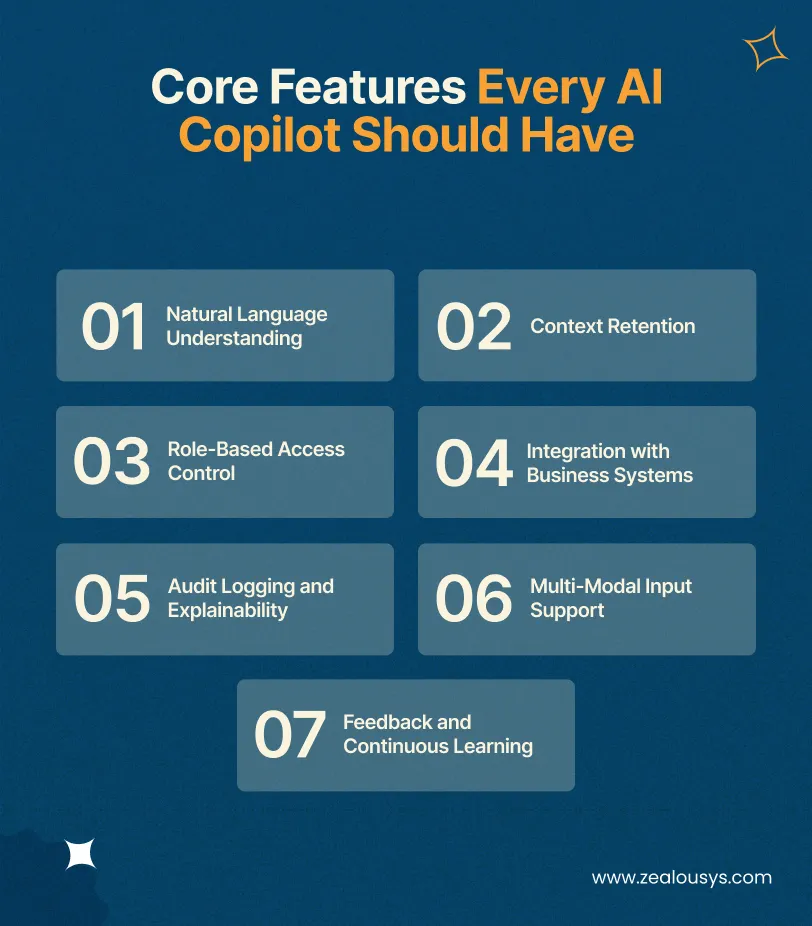
Not every copilot needs every capability, but certain features are non-negotiable if you want it to deliver real value in a business environment rather than a novelty that gets abandoned after a few weeks.
Users should be able to type the way they think, not in structured commands or search queries. The copilot needs to handle ambiguous phrasing, implicit references, follow-up questions, and multi-step instructions without losing context or requiring the user to restart.
The copilot should maintain conversation context across a full session. A user who says “now summarize that in bullet points” should not have to repeat what “that” refers to. Context retention is what makes interaction feel natural rather than mechanical.
Not every user should have access to every piece of data the copilot can retrieve. A sales rep should not be able to query finance records. A customer support agent should not see internal HR documentation. Role-based access control (RBAC) ensures the copilot only surfaces information that a given user is permitted to see.
A copilot that cannot connect to your CRM, helpdesk, ERP, or internal documentation is not operationally useful. It is a smarter search box at best. Deep integrations with the systems where your actual business data lives are what make a copilot worth building.
Enterprise environments require traceability. Every query and response should be logged, timestamped, and attributable to a user. For regulated industries, the system should also be able to explain how it arrived at a given answer, including which source documents informed the response.
Modern copilots can process text, images, PDFs, spreadsheets, and structured data. A multi-modal AI assistant handles workflows that go beyond plain text: a legal team reviewing contracts, a finance team working with Excel exports, or an operations team analyzing scanned reports all benefit from a copilot that can handle varied input formats without requiring the user to convert files manually first.
Users should be able to flag incorrect or unhelpful responses. That feedback loop is critical for long-term quality. It does not necessarily require full model retraining. Even feeding structured feedback into prompt refinement and retrieval improvements can meaningfully reduce error rates over time.
The architecture of an AI copilot has several distinct layers. Getting them right is the most technically complex part of the build, and the decisions made here affect performance, cost, security, and scalability for the life of the product.
This is where your business data enters the system. Documents, database records, emails, support tickets, and knowledge base articles are ingested, cleaned, chunked into retrievable segments, and prepared for indexing. At its core, what you are building here is the foundation for an AI knowledge base assistant: one that can surface the right information from your specific data, not generic answers from the public internet. The quality of your data at this stage directly determines the quality of the copilot’s responses. Poorly structured or outdated source data produces unreliable output regardless of how good the underlying model is.
Text chunks from your ingested data are converted into numerical representations called embeddings using an embedding model. These embeddings capture semantic meaning, not just keywords, and are stored in a vector database such as Pinecone, Weaviate, Qdrant, or pgvector. When a user submits a query, the system finds chunks that are semantically similar to the query rather than relying on exact word matches. This is what allows the copilot to return relevant results even when the user phrases things differently from how the source material is written.
The retrieval layer converts the user’s query into an embedding and runs a similarity search against the vector database. The most relevant chunks of information are retrieved and assembled into context that gets passed to the language model. The configuration of this layer, including how many chunks to retrieve, how to rank them, and whether to apply any reranking logic, has a significant impact on response quality and needs careful tuning.
The language model receives the user’s query along with the retrieved context and generates a response. The choice of model matters here across several dimensions: reasoning capability, speed, cost per token, context window size, and data privacy constraints. GPT-4o, Claude 3.5 Sonnet, Gemini 1.5 Pro, Llama 3, and Mistral all have different strengths, and the right choice depends on your specific requirements rather than which model is currently receiving the most attention.
For copilots that take actions rather than just answering questions, an orchestration layer manages tool use. Frameworks like LangChain, LlamaIndex, or Semantic Kernel allow the LLM to decide which tool to call based on the user’s intent, execute the call, and handle the response. This layer is what turns a conversational AI for enterprises into a genuine AI workflow automation engine. It defines what the copilot is capable of doing: creating a CRM record, sending a Slack message, querying a database, filing a support ticket, or triggering intelligent process automation across connected systems.
This layer handles authentication and communication between the copilot and your existing business tools. REST APIs, webhooks, OAuth flows, and middleware connectors are all built and managed here. Security is especially important at this layer: every integration point is a potential attack surface, and credentials, token management, and rate limiting all need to be handled correctly.
The interface where users interact with the copilot. This could be a chat widget embedded in your existing product, a sidebar inside Slack or Microsoft Teams, a standalone web application, or a custom-built interface designed around a specific workflow. The right choice depends on where your users already spend their time. Forcing users to switch to a new tool to access the copilot is one of the most common reasons adoption fails.
The specific stack depends on your use case, scale, existing infrastructure, and data privacy requirements. Here is a representative stack for a production-grade enterprise AI copilot:
| Layer | Common Choices |
|---|---|
| LLM | GPT-4o (OpenAI), Claude 3.5 Sonnet (Anthropic), Gemini 1.5 Pro (Google), Llama 3 (Open Source) |
| Embedding Model | OpenAI text-embedding-3, Cohere Embed, BGE |
| Vector Database | Pinecone, Weaviate, Qdrant, pgvector |
| Orchestration | LangChain, LlamaIndex, Semantic Kernel |
| Backend | Python (FastAPI), Node.js |
| Frontend | React, Next.js |
| Authentication & RBAC | OAuth 2.0, JWT, Role-Based Access Control (RBAC) Middleware |
| Cloud Infrastructure | AWS, Microsoft Azure, Google Cloud Platform (GCP) |
| Monitoring | LangSmith, Helicone, Custom Logging Pipelines |
One decision worth calling out is the choice between hosted model APIs and self-hosted open-source models. OpenAI API integration, for example, is one of the fastest paths to a working prototype: the infrastructure is managed, the models are production-ready and require less infrastructure management. However, it means your data passes through a third-party service, which is a dealbreaker in some regulated environments. Deploying an open-source model like Llama 3 on your own cloud infrastructure keeps data entirely within your control but adds operational complexity and requires more upfront investment.
Neither approach is universally better. The right answer depends on your compliance requirements, data sensitivity, and the engineering capacity you have available to manage infrastructure.
One more decision that comes up during stack planning is whether to fine-tune language models on your own data or rely entirely on RAG. Fine-tuning can improve performance on domain-specific tasks and terminology, but it requires labeled training data, compute resources, and ongoing maintenance when the underlying model is updated. For most enterprise AI copilot builds, RAG with well-structured prompt engineering for enterprise AI is the faster and more maintainable path. Fine-tuning becomes worth considering when the copilot needs to handle highly specialized language or when retrieval alone consistently produces unreliable outputs.
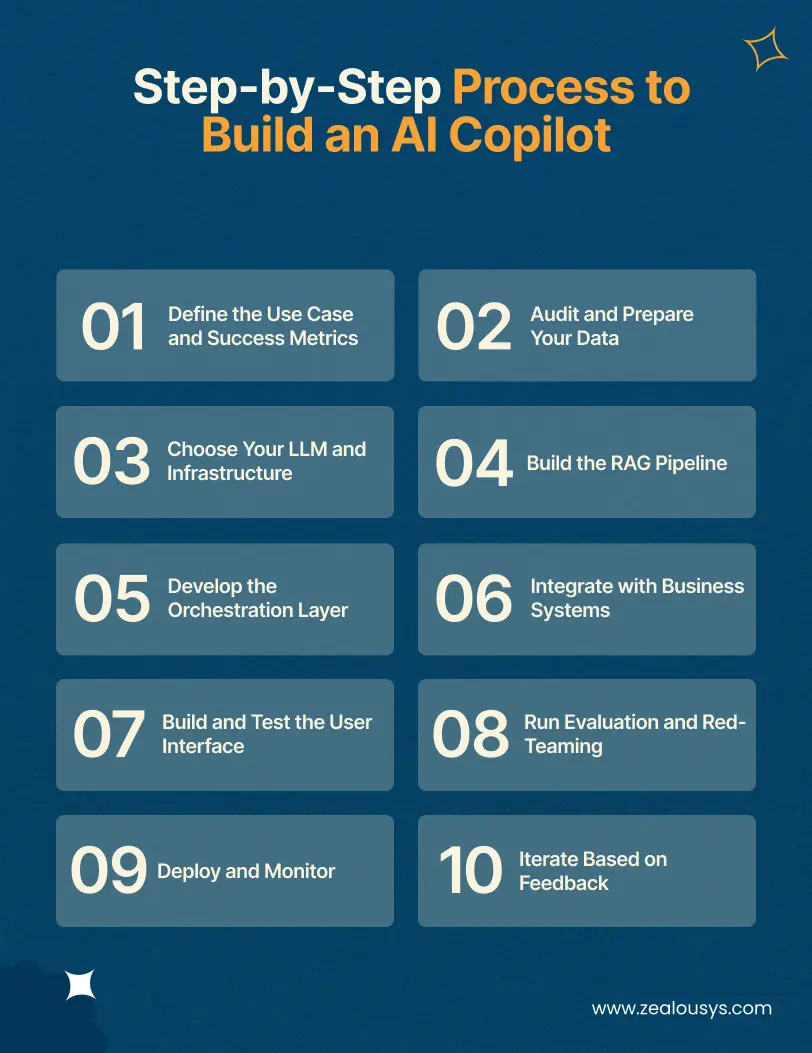
Think of this as your AI copilot implementation roadmap: a structured sequence that takes you from problem definition through to a production system your team will actually use. The steps below reflect how experienced teams approach this, not how it looks on paper.
Before writing a single line of code, be specific about what the copilot will do. “Make our team more productive” is not a use case. “Reduce average ticket resolution time by handling Tier 1 support queries autonomously” is. Define the measurable outcomes upfront, identify who the primary users are, and establish what success looks like at 30, 60, and 90 days post-launch.
The copilot is only as useful as the data it has access to. Audit your knowledge bases, internal documentation, and structured data sources. Identify gaps and outdated content. Decide what the copilot should have access to and what should remain out of scope. Data preparation consistently takes longer than teams anticipate and is worth starting before any technical build begins.
Evaluate LLMs based on your requirements: reasoning quality, cost per token, response latency, context window size, and data privacy constraints. Make the hosted API versus self-hosted decision at this stage, because it affects nearly every infrastructure decision that follows.
Set up your data ingestion pipeline, configure your embedding model, and deploy your vector database. Build the retrieval logic and test it against representative queries before connecting it to an LLM. The retrieval layer is where most early performance problems surface. Getting this right before adding the model layer makes debugging significantly easier.
If your copilot needs to take actions beyond answering questions, build the agent layer here. Define the tools the copilot has access to, the logic for deciding which tool to invoke, and how errors and unexpected outputs are handled. Test tool use extensively in isolation before integrating it into the full system.
Connect the copilot to your existing tools via APIs. Test data flow, authentication, and permission boundaries carefully. Each integration should be tested end-to-end, including what happens when the external system is slow, unavailable, or returns unexpected data.
Design the interface with the actual workflow in mind. A copilot embedded in a customer support platform has very different UX requirements from one built into a code editor or an HR portal. Run usability testing with real users from the intended user group before launch, not just internal team members who already understand how the system works.
Test the copilot systematically against adversarial inputs, edge cases, and out-of-scope queries. Evaluate response quality using a mix of automated metrics and human review. This phase should specifically check for hallucination rates, data leakage risks across RBAC boundaries, and latency under realistic query volumes.
Launch with a staged rollout, starting with a limited user group before expanding access. Monitor response quality, latency, user engagement, error rates, and retrieval accuracy in production. Set up alerting for anomalous behavior. Do not treat launch as the finish line.
Collect user feedback systematically from day one. Identify the most common failure patterns and address them through prompt refinement, retrieval tuning, or expansion of the knowledge base. The copilots that deliver lasting value are the ones that teams keep improving based on real usage data, not the ones that get declared “done” at launch.
There is no single number here. Cost depends heavily on use case complexity, integration depth, data volume, compliance requirements, and whether you build in-house or with a development partner. That said, here are realistic ranges based on project scope:
| Project Type | Estimated Cost Range |
|---|---|
| MVP / Proof of Concept | $30,000 – $60,000 |
| Departmental Copilot (Single Use Case) | $60,000 – $120,000 |
| Multi-Function Enterprise Copilot | $120,000 – $300,000+ |
These figures cover design, development, and initial deployment. They do not cover ongoing costs, which include LLM API usage that scales with query volume, cloud infrastructure, monitoring tooling, and the iteration work required to keep the copilot accurate and useful over time. Factor those into your total cost of ownership, not just the initial build.
A copilot that answers questions from a static internal knowledge base costs significantly less to build than one that takes multi-step actions across several integrated systems. The more the copilot needs to do, the more orchestration logic, tool integration, and testing is required.
Large volumes of heterogeneous data require more preprocessing, chunking, and indexing work before they can be used effectively. If your source data is poorly structured or spread across many incompatible formats, expect to spend meaningful time on data preparation before the core build even begins.
Using a proprietary API like GPT-4o is faster to deploy and requires less infrastructure management, but carries ongoing per-token costs that scale with usage volume. Deploying an open-source model on private infrastructure involves higher upfront engineering cost but lower marginal cost at scale and full data residency control. The right choice depends on your usage volume, compliance requirements, and long-term cost projections.
Each additional business system adds integration work, authentication complexity, and testing scope. A copilot connected to five systems takes meaningfully more time to build and test than one connected to a single knowledge base.
AI copilot security and compliance is a significant cost driver in regulated industries. Healthcare, finance, and legal environments require additional work around data encryption, access logging, audit trails, and compliance documentation. If your copilot needs to meet HIPAA, SOC 2, GDPR, or similar standards, those requirements should be scoped into the project from the beginning rather than retrofitted at the end.
Building a custom user interface from scratch is more expensive than embedding the copilot into an existing tool like Slack, Microsoft Teams, or your current product. If your users are already in those environments, embedding is almost always the faster and more cost-effective path to adoption.
LLMs and embedding models are updated by their providers regularly, and your internal data changes over time as well. Budget for continuous improvement: retrieval tuning, prompt updates, knowledge base maintenance, and model upgrades. A copilot that is not maintained will degrade in quality over months, even without any changes to the underlying code.
Building an AI copilot is not a conventional software project, and the challenges that arise are not always ones that experienced engineering teams expect. These are the issues that most commonly catch teams off guard.
LLMs can generate confident-sounding but factually incorrect responses. Without a well-tuned RAG pipeline and proper guardrails, this is not an edge case. It is a regular occurrence. In high-stakes domains like finance, legal, or healthcare, a hallucinated answer is not just unhelpful. It can cause real harm. Mitigation requires careful retrieval tuning, prompt design, output validation, and, in some cases, human review workflows for sensitive response types.
The quality of the copilot’s responses is bounded by the quality of the data it retrieves from. Outdated documentation, inconsistently formatted records, duplicated content, and missing information all find their way into the output. Data preparation is consistently underestimated in early project scoping, and teams that skip it pay for it during testing and after launch.
Response time matters for adoption. A copilot that takes five or more seconds to respond will not get used, regardless of how accurate the answers are. Achieving acceptable latency requires deliberate optimization across retrieval speed, embedding lookup, model inference, and the round-trip time for any external API calls. This needs to be tested under realistic load, not just in a development environment.
Enforcing proper access control across a retrieval system connected to multiple business data sources is one of the more technically demanding parts of the build. The copilot needs to respect the permission structures of every system it connects to, which means RBAC logic has to be applied at the retrieval layer, not just at the application layer. A misconfigured access control setup creates real security risks, particularly in multi-tenant or role-sensitive environments.
The most technically capable copilot fails if users do not trust it, do not know how to use it effectively, or find the interface disruptive to their existing workflow. Adoption is not a given. It requires thoughtful UX design, onboarding, communication about what the copilot can and cannot do, and a mechanism for users to report problems so they see that feedback is acted on.
LLM providers update their models regularly, and those updates can change response behavior in ways that are difficult to predict. A prompt that works well today may produce inconsistent results after a model version upgrade. Monitoring and regression testing pipelines need to account for this, and your team needs a process for detecting and responding to quality degradation in production.
Best Practices for Building a Successful AI Copilot
1. Start with One Well-Defined Workflow
Resist the urge to build everything at once. A copilot that does one thing exceptionally well builds more trust with users than one that does ten things with inconsistent quality. Start with the single highest-value workflow, get it right, and use what you learn from real usage to inform what you build next.
2. Invest in Data Preparation Early
The retrieval layer is only as good as the data behind it. Cleaning, structuring, and keeping your knowledge base current before building saves significant rework later. Treat this as a foundational project requirement, not a prerequisite that can be addressed “later” or in parallel with the build.
3. Build with Explainability in Mind
In enterprise contexts, users and administrators need to understand why the copilot said what it said. Source attribution, showing which documents informed a response, is one of the most effective ways to build trust. Design audit trails and citation mechanisms from the start rather than trying to add them after the fact.
4. Test with Real Users Early
Internal testers who understand how the system is built will not expose the same failure modes that actual end users will. Run structured pilots with people from the intended user group as early as possible. The feedback you get from real usage in week one is more valuable than weeks of internal QA.
5. Set Clear Expectations
An AI copilot is not infallible. Users who understand its limitations are more likely to use it effectively and less likely to lose confidence in it entirely when it makes a mistake. Be transparent about what the copilot is confident in versus where it might be uncertain, and give users a clear path to escalate when they need a human.
6. Design for Feedback Loops from Day One
Every time a user says a response was wrong or unhelpful, that is a signal. Capture it systematically. Use it to identify patterns in retrieval failures, edge cases the prompt does not handle, and gaps in the knowledge base. The copilots that get better over time are the ones built with feedback infrastructure from the start, not the ones that get feedback tacked on after the first complaints come in.
Building an AI copilot requires a team that understands both the AI infrastructure and the enterprise software layer it needs to connect to. These are often treated as separate competencies. In practice, they need to work together from the first architecture decision. Choosing the right AI copilot development company matters precisely here: the gap between a working demo and a production-ready AI assistant for enterprise is almost entirely an execution problem, not a model problem.
Zealous System has been building software since 2008, with over 1,200 projects delivered across more than 50 industries, including healthcare, finance, retail, logistics, and SaaS. That domain depth matters in AI development because the hardest problems are rarely about the model itself. They are about understanding the data, the workflows, and the edge cases specific to each business context.
On the AI side, Zealous has delivered solutions across natural language processing, machine learning, conversational AI, and intelligent automation. Their team has worked with clients on projects that required not just model integration, but the kind of deep system connectivity that an enterprise AI copilot demands: multi-platform deployment, CRM and ERP integrations, production-grade scalability, and compliance-conscious architecture. This includes delivering NLP, sentiment analysis, and conversational AI for a large-scale social media platform managing a diverse, high-volume user base, where accuracy, speed, and system integration were all non-negotiable.
What makes Zealous a practical choice for AI copilot development specifically:
Building an AI copilot is not a small undertaking, but it is one of the most direct ways to bring AI into your business with measurable, day-to-day impact. The organizations doing this well share a common approach: they start with a specific problem, invest seriously in their data infrastructure, and treat the copilot as a long-term product rather than a one-time project.
If you are at the stage of moving from evaluation to execution, the architecture decisions, cost factors, and development steps in this guide give you a concrete foundation. The next move is finding the right team to build it with.
If you are looking for a development partner who can handle the technical depth of this kind of build, Zealous System brings the cross-functional expertise to take it from architecture to deployment, and the operational experience to keep it performing well after launch.
Our team is always eager to know what you are looking for. Drop them a Hi!

Ruchir Shah is Technology Head at Zealous System with hands-on expertise in AI/ML, Microsoft Azure, .NET, Node.js, Python, React, and Angular. He leads enterprise software development, champions digital transformation, and mentors developers building the future of intelligent apps.




Comments