ElevenLabs offers one of the most expressive TTS APIs available today, with support for 29 languages, WebSocket streaming, and both instant and professional voice cloning. Integrating it securely requires server-side API key handling and backend proxying for both web and mobile apps. For real-time use cases, the Turbo v2.5 model with WebSocket streaming significantly reduces perceived latency. Compared to Google TTS and Amazon Polly, ElevenLabs costs more per character but leads clearly on voice quality and is the only one with accessible voice cloning at the developer level.
ElevenLabs did not set out to build just another text-to-speech API. The difference shows up the moment you hear the output. While most speech synthesis still has that unmistakable mechanical flatness, ElevenLabs voices hold rhythm, pause naturally, and adjust tone based on context. For developers, that distinction has real consequences on product quality.
The integration itself is not complicated, but there are enough decisions along the way that getting it wrong quietly costs you: leaked API keys, unnecessary character spend, audio that breaks on mobile, no fallback when the API goes down. This TTS API integration guide walks through each of those decisions clearly, covering web and mobile integration, streaming, voice cloning, cost control, and how ElevenLabs actually stacks up against the alternatives.
The quality gap between ElevenLabs and most other TTS APIs is most obvious in longer content. Short utterances like button labels or error messages are forgiving. But paragraphs of narration, conversational agent responses, or audiobook-style content expose how flat other engines sound by comparison. ElevenLabs voices carry natural stress patterns, adjust pacing mid-sentence, and handle punctuation the way a human reader would.
For developers, that translates into a specific decision: this is an AI voice API built for situations where the listening experience itself is part of the product. When you are building an AI app that relies on voice output, whether a real-time text-to-speech web app, a voice-enabled learning tool, or a customer support agent, the voice quality is not cosmetic. It affects completion rates, session length, and whether users come back.
Beyond voice quality, the developer experience is solid. ElevenLabs offers a clean REST API, official SDKs for JavaScript and Python, WebSocket streaming for low-latency use cases, and voice cloning at both the instant and professional tier. The free plan covers prototyping comfortably, and paid plans are structured by character volume rather than a flat seat fee.
This ElevenLabs API key documentation covers the three things you need before writing a single line of integration code: your account credentials, a secure way to store and use them, and the right SDK for your stack.
Sign up at elevenlabs.io, go to your profile settings, and find the API Keys section. Generate a new key and copy it immediately. ElevenLabs does not show it again after you leave that screen.
Keep this key out of your frontend code. Hardcoding API keys in a React component or a Flutter widget is a common mistake that exposes your credentials to anyone who inspects the network tab or decompiles your app.
The right pattern depends on your stack, but the principle is the same: your API key should only ever live on the server side.
For web apps, route TTS requests through your own backend endpoint. Your frontend calls your server, your server calls ElevenLabs, and the response flows back. The key never touches the client.
For mobile apps, the same applies. Do not embed the key in the app binary. Use environment variables on your server and call it from the app at runtime.
If you are using a platform like Vercel, Netlify, or Railway, store the key as an environment variable in your project settings, not in .env files committed to version control.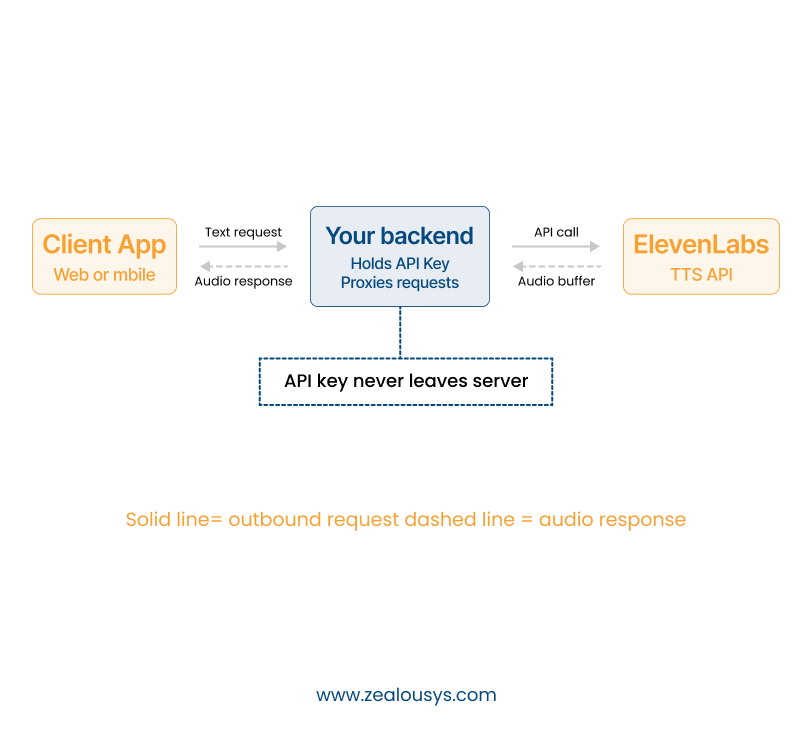
ElevenLabs offers an official JavaScript/TypeScript SDK and a Python SDK.
For a Node.js backend:
npm install elevenlabs
For Python:
pip install elevenlabs
The SDK handles authentication, request formatting, and response parsing. For most use cases, it is cleaner than calling the REST API directly.
A TTS request to ElevenLabs follows a straightforward pattern. You send text, a voice ID, and model parameters. ElevenLabs returns audio data. Your app plays it.
On the backend, you call the speech endpoint with your desired voice ID and the text you want spoken. The response comes back as an audio buffer, typically in MP3 format. You either stream that audio directly to the client or save it as a file and serve the URL.
If you are building this as part of a larger product, the audio layer is one component of a broader web app development services effort.
ElevenLabs offers several models. The two you will use most are:
Once your backend returns the audio data, your frontend can play it using the Web Audio API or a simple <audio> element. If you are streaming, you work with the MediaSource API or a chunked response handler to play audio as it arrives rather than waiting for the full file.
For React apps specifically, manage audio state carefully. Create a single AudioContext instance, avoid creating new ones on every render, and clean up properly when components unmount.
ElevenLabs provides a /voices endpoint that returns all available voices with their IDs, labels, and sample audio URLs. Call this once, cache the results, and use the voice ID in subsequent TTS requests. Hardcoding voice IDs directly is fine for fixed use cases, but if you want users to choose their preferred voice, this endpoint is how you build that feature.
Adding voice to a mobile app requires a few extra decisions that do not come up in web projects, and the approach differs between frameworks.
React Native does not have a built-in audio streaming API, so you need a library to handle playback. react-native-track-player and react-native-sound are the most commonly used options.
The integration pattern is:
If you are returning a URL, playback is straightforward. If you want real-time streaming, you pass the stream through your backend and pipe it to the player. Streaming adds implementation complexity, but for conversational use cases, the drop in perceived latency is worth it.
For Android, check audio focus handling. Poorly managed audio focus leads to your TTS clashing with music apps or notifications. On a platform where background audio behavior varies widely across device manufacturers, this is one of the more common sources of user complaints.
For ElevenLabs Flutter SDK integration, there is no official Flutter SDK, so you build around Flutter’s just_audio package, which is the standard choice for audio playback and handles both file URLs and streams well.
The application integration follows the same server-side pattern. Your Flutter app calls your API, gets back audio data or a URL, and feeds it to the player. Flutter’s http package handles the API call; just_audio handles playback.
Polling for a complete audio file before playback works, but users notice the delay. For anything conversational or interactive, streaming is the right approach. ElevenLabs TTS streaming in JavaScript is well-supported, and audio streaming in React apps specifically is manageable once you understand how the Web Audio API handles buffered chunks.
ElevenLabs exposes a WebSocket endpoint for streaming TTS. Instead of waiting for the entire audio file to generate, the API sends audio chunks back as they are ready. Your app starts playing the first chunk while the rest is still being generated.
The connection flow works like this: you open a WebSocket connection to the ElevenLabs streaming endpoint, send your text and configuration as a JSON message, and then receive a series of binary audio chunks followed by a completion signal.
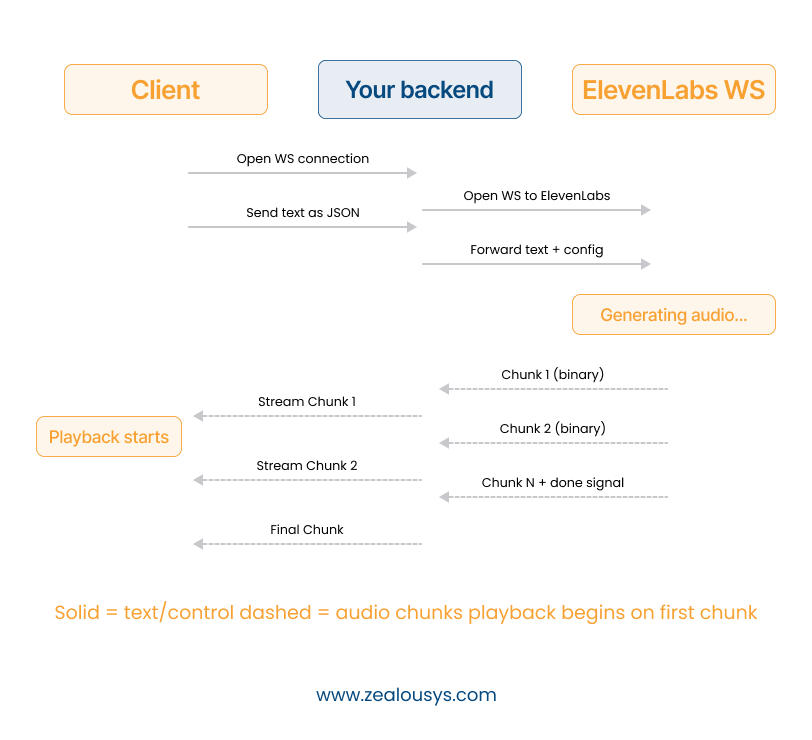
The safest approach is to proxy the WebSocket connection through your own backend. Your client connects to your server via WebSocket; your server connects to ElevenLabs via WebSocket. This keeps your API key server-side and gives you control over the stream (rate limiting, logging, error handling).
On the client side, you receive the binary chunks and feed them to a buffer. The Web Audio API’s AudioWorklet or ScriptProcessorNode (deprecated but still widely used) handles real-time playback from a buffer.
The biggest variable in streaming latency is not ElevenLabs itself. It is your server’s proximity to both the ElevenLabs API and your end users. Deploy your backend close to your users. If you are using a cloud provider, choose a region that minimizes round-trip time.
For conversational AI applications that chain LLM output into TTS, start the TTS request as soon as you have the first sentence from the LLM rather than waiting for the full response. This is one of the more impactful architecture decisions when building a real-time text-to-speech web app, and it reduces perceived latency substantially without any change to the ElevenLabs API call itself.
ElevenLabs offers two voice cloning approaches, and they are not interchangeable. If you are evaluating it specifically as a voice cloning API for mobile apps, the choice between instant and professional cloning affects both the implementation timeline and the output quality your users will hear.
Instant cloning takes a short audio sample (one minute is typically enough; more is better) and generates a cloned voice within seconds. The quality is good for many use cases. It captures tone, pace, and general character reasonably well.
The tradeoff is accuracy. Instant clones can drift from the source voice in expressiveness or in unusual sentence structures. They work well for personal projects, internal tools, and prototypes. For a production app where the cloned voice represents a brand or a real person, the limitations become noticeable.
Professional cloning requires more audio (ideally 30 minutes or more of clean, high-quality recordings) and takes longer to process. The output is significantly more accurate and consistent. Prosody, emotional range, and pronunciation are all closer to the source.
This is the right choice for audiobook narration, brand voice applications, or any use case where a specific person’s voice needs to be represented faithfully over extended content.
Before cloning any voice, you need explicit consent from the person whose voice is being cloned. ElevenLabs requires this as part of their usage policy. Beyond policy, recording someone’s voice without consent and using it in an application creates legal exposure in most jurisdictions. Build consent flows into your product if users can clone their own voices.
These are the three AI voice APIs for developers that come up most in evaluations. They are not really competing for the same use cases, and choosing the wrong one creates integration and cost problems that are annoying to unwind later.
| Feature | ElevenLabs | Google Cloud TTS | Amazon Polly |
|---|---|---|---|
| Voice Quality | Highest, most expressive | Good (Neural2 voices) | Good (Neural voices) |
| Latency | Competitive; best with streaming | Fast at scale | Fast at scale |
| Language Support | 29 languages (Multilingual v2) | 40+ languages, deep dialect support | 20+ languages |
| Voice Cloning | Yes, instant and professional | Enterprise only | Enterprise only |
| Pricing Model | Per character, tiered plans | Per character, volume discounts | Per character, free tier available |
| Cost at Scale | Higher | Lower | Lower |
| SSML Support | Partial | Full | Full |
| Best Fit | Quality-first apps, voice cloning, conversational AI | High-volume, multilingual, Google ecosystem | AWS-native workloads, SSML-heavy use cases |
ElevenLabs leads here, and it is not particularly close for long-form or expressive content. Google Neural2 and Amazon Neural voices are solid, but they tend to flatten out in longer sentences. ElevenLabs maintains natural prosody across paragraphs. For short, utilitarian speech like navigation prompts or UI alerts, the quality gap between all three narrows considerably.
Google Cloud TTS and Amazon Polly have an edge on raw request speed, largely because of their infrastructure scale. ElevenLabs WebSocket streaming closes that gap significantly for real-time use cases. If you are building a conversational AI product, streaming latency matters more than total file generation time, and ElevenLabs handles that well.
If your app needs broad language coverage beyond the top 29, Google or Amazon are safer choices. ElevenLabs Multilingual v2 covers the major global languages well, but the long tail of regional languages and dialects is where Google and Amazon have a clear advantage built over many years.
This is where ElevenLabs has no real competition at the developer level. Google and Amazon technically offer custom voice products, but they require enterprise agreements and lengthy onboarding. ElevenLabs instant cloning is an API call. That difference matters enormously for indie developers and startups.
At high character volumes, Amazon Polly and Google TTS are cheaper. ElevenLabs costs more per character, and that difference compounds at scale. The practical question is whether the voice quality drives enough user retention to offset the cost. For consumer-facing apps where voice is central, it often does. For internal tools or high-volume pipelines where quality is secondary, it may not.
ElevenLabs charges per character generated. In low-traffic prototypes that is rarely a concern, but in production, the costs compound quickly with repeated or high-volume requests.
If your app generates speech for the same strings repeatedly (UI labels, common responses, fixed narration), cache the audio files. Generate once, serve many times. Store them in an S3 bucket or equivalent, and serve via CDN. For apps with predictable, repeated content, this single change can cut your billable character count considerably, since you are only generating each unique string once regardless of how many users trigger it.
Turbo v2.5 costs less per character than Multilingual v2 and generates faster. If your use case does not require maximum expressiveness, use the turbo model. Conversational assistants are a good fit. Audiobook narration is not.
For onboarding flows, tutorial narration, or any content you know in advance, pre-generate the audio before the user needs it. This eliminates API latency entirely at the moment of playback.
ElevenLabs API requests can occasionally run long under load. Set timeouts on your requests (5-10 seconds is reasonable for non-streaming) and handle them gracefully. A silent audio failure with no fallback is a poor user experience.
Your API key is missing, incorrect, or has been revoked. Check your environment variables and make sure the key is being passed in the xi-api-key header. If you recently rotated keys, make sure the new key is deployed everywhere the old one was used.
Usually a problem with the request body. Check that your voice ID is valid, your model ID is spelled correctly, and your text is not empty. The error response includes a detail field that tells you exactly what is wrong. Read it before debugging blindly.
You have hit your rate limit. The free tier has strict limits. On paid plans, implement exponential backoff and retry logic rather than hammering the endpoint. Adding jitter to your retry intervals also helps prevent synchronized retries from multiple instances.
If the generated speech sounds off, check your text input first. Unusual formatting, excessive punctuation, or large blocks of text without natural breaks can affect prosody. Break long content into paragraphs before sending. Also verify that you are using the correct model for your use case.
WebSocket connections drop. This is expected behavior, not necessarily an error. Implement reconnection logic with a backoff strategy and log the disconnect reason. The reason code often tells you whether the issue is on your side or ElevenLabs’ side, which saves significant debugging time.
You should not be calling ElevenLabs directly from the browser. If you are seeing CORS errors, it means your frontend is making the API call directly. Route it through your backend instead. This also fixes the API key exposure problem at the same time.
ElevenLabs is a practical fit for platforms that update course content frequently. Instead of re-recording human narration every time a lesson changes, the platform regenerates audio automatically. It also makes multilingual content far more accessible, since you are not coordinating separate recording sessions for each language.
If you are building this kind of system, the broader question of how to integrate AI into LMS platforms is worth reading through separately.
Apps that read page content aloud for users with visual impairments or reading difficulties benefit directly from ElevenLabs’ natural prosody. Robotic TTS fatigues listeners quickly during long-form reading. More natural speech keeps users engaged and reduces cognitive load, which matters significantly for users who rely on audio as their primary way of consuming content.
Pairing LLM-generated responses with ElevenLabs TTS produces voice-based support agents that do not sound like automated phone trees. The quality of the voice determines whether users engage or hang up. A natural-sounding agent holds the conversation. A robotic one signals to the user that they should ask for a human instead. This is one of the more common patterns in AI agent development today, and voice quality is often what separates a functional prototype from a product users actually trust.
Writers who are not comfortable behind a microphone can produce audio content with a consistent, professional-sounding voice. This is particularly useful for newsletter publishers, technical bloggers, and educators who want to offer audio versions of written content without the overhead of a recording setup.
Short TTS clips can guide users through complex workflows, onboarding sequences, or multi-step forms. This reduces reliance on visual UI alone and makes apps more usable in eyes-free contexts, on mobile while commuting, or for users who process instructions better through audio.
Technically, yes, but the free tier has character limits that are easy to exceed in a live product. More importantly, the terms of service for the free tier restrict certain commercial uses. Read them before shipping, not after you hit a limit.
Both work. The SDK is cleaner for most use cases and handles authentication and response parsing automatically. The REST API gives you more control and is the right choice if you are working in a language without an official SDK.
Use Multilingual v2 as your model. It supports 29 languages and handles switching between them well. For each language, choose a voice that was trained primarily in that language. A voice optimized for English will produce noticeably worse results in French, even with the multilingual model.
Cloning your own voice or a voice with explicit consent is generally legal. Cloning someone’s voice without their knowledge is not allowed, and ElevenLabs’ policies prohibit it. If your product lets users clone their own voices, build a clear consent flow into the feature and keep records of it.
For production apps, yes. The Web Speech API is built into most modern browsers and provides a functional TTS fallback at no cost. It will not match ElevenLabs in quality, but it keeps the feature working during outages. For mobile, both Android and iOS expose native TTS engines that serve the same purpose.
ElevenLabs has moved voice quality to a level that was genuinely out of reach for most development teams a few years ago. The API is well-documented, the SDKs handle the heavy lifting, and WebSocket streaming makes low-latency voice applications practical without significant infrastructure overhead.
The integration itself is straightforward. What trips teams up are the surrounding decisions: keeping the API key server-side, picking the right model for the use case, caching where it makes sense, and building a fallback before you need one rather than after an outage.
At Zealous System, we have worked with teams across generative AI development services and mobile, and the decisions that matter most are rarely the exciting ones. They are key management, caching strategy, model selection, and error handling. Get those right, and ElevenLabs becomes a reliable foundation for whatever you are building.
Our team is always eager to know what you are looking for. Drop them a Hi!

Meet Prashant Suthar, a Sr. Software Developer at Zealous System. With a passion for building elegant code and solving complex problems, Prashant transforms ideas into digital solutions that drive business success.


Comments