Key Takeaways
The conversation about integrating AI into existing software usually goes the same way. The board asks what the company is doing about AI. Product comes back with three ideas. Engineering scopes them, looks at a codebase that has been in production since 2014, and returns an estimate that starts with “well, first we’d need to rebuild the data layer.”
Then the project quietly dies in a spreadsheet.
That estimate is often wrong, and it is wrong for an interesting reason. Adding AI features without rebuilding software is rarely blocked by the age of your code. It is blocked by whether the AI can reach your data. Those are very different problems, and the second one is far cheaper
to solve.
This guide covers what actually works when you need to integrate AI into existing software: five integration patterns and when each one fits, a decision framework to pick between them, the architecture decisions that matter before you write any code, stack-specific notes for .NET, Java and PHP systems, realistic cost and timeline ranges, and a real engagement where the client’s core system was never touched.
In most cases, no.
Here is the test that settles it faster than any architecture review:
1. Can your application make an outbound HTTPS request?
2. Can you read your business data from somewhere other than the live production database? A read replica, an existing API, a reporting warehouse, or a nightly export all count.
If both answers are yes, you can add AI features without touching your core code.
That surprises people, because most rebuild estimates assume the AI has to live inside the application. It rarely does. AI mostly needs to observe your data and return a response. It does not need to sit in the middle of your order processing, your billing logic, or your permissions model. Keeping it outside those things is the safer design, not a compromise.
There are genuine exceptions, and they are worth being honest about:
When those conditions hold, the honest answer is that some application modernization comes first. One energy sector client had to re-engineer reporting and data modules before anything could sit on top, documented in this legacy system modernization case study.
For everyone else, the constraint is data access, not architecture. Your existing technical debt matters far less here than most estimates assume, because the AI is not inheriting it. So the next question is not how to rebuild. It is what the AI should actually do.
Plenty of SaaS teams get told to ship AI without being told what the AI is for. That is how products end up with a chatbot nobody uses.
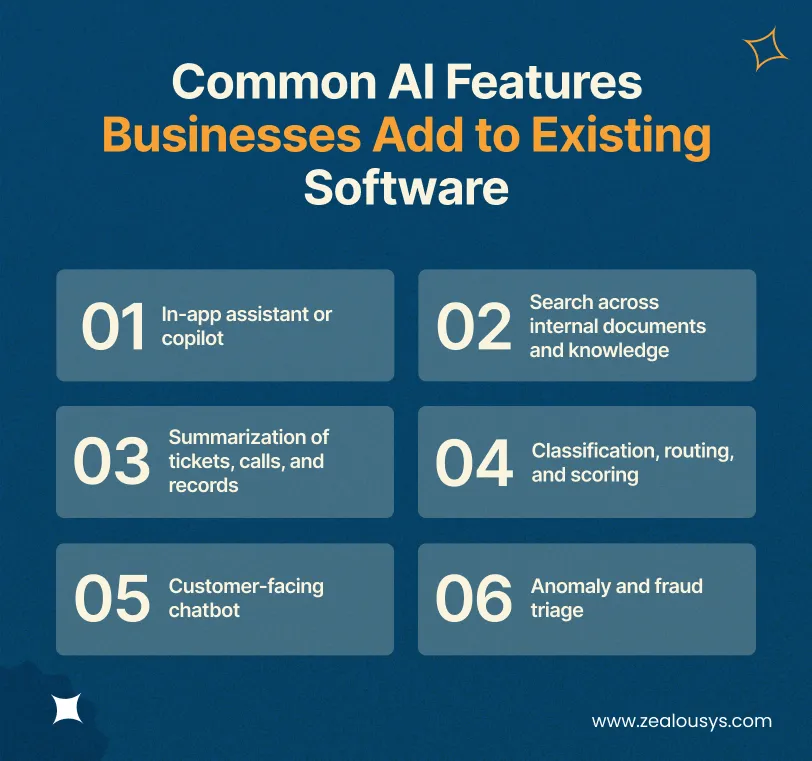
The features below consistently earn their build cost in existing products. Each is tagged with the integration pattern it maps to.
A conversational helper inside your product that answers questions about how to use it, finds records, or drafts content in context. Works best when your app has depth that new users struggle with.
Pattern: embedded SDK.
Natural-language search over policies, contracts, tickets or manuals, returning answers with source citations instead of a list of links. The highest-value feature for most B2B products sitting on years of accumulated documents.
Pattern: RAG.
Long support threads, call transcripts and case histories condensed into a few lines. Low risk, easy to measure, and a common first project because the output is immediately obvious to non-technical stakeholders.
Pattern: API wrapper.
Incoming items sorted automatically by type, urgency, or owner, with a score and a written justification attached. Replaces rules that have grown to hundreds of conditions and that nobody wants to touch.
Pattern: event-driven enrichment.
An assistant that answers real questions using your product data and policies, not a scripted decision tree. The difference between a useful one and an ignored one is almost entirely about grounding it in your own content.
Pattern: RAG plus API layer. Worth reading alongside chatbot development approaches.
AI reviews alerts as they are raised, gathers supporting context, and recommends an action with an explanation. Humans keep the final say on anything uncertain.
Pattern: AI microservice plus RAG.
One rule applies across all of them. Pick a single feature for the first release. Teams that start with three ship none of them.
Each of these reaches your application through one of five patterns.
These five AI integration architecture patterns cover almost everything that works in production. Most projects start with one and add a second later.
Your existing service layer calls a hosted LLM over HTTPS and returns the result. No new infrastructure, no new services, just a client class and a prompt.
A separate service, usually Python or Node, that holds all AI logic and talks to your main application over REST or a message queue. Your monolith gains one HTTP client, and nothing else changes.
This pattern pairs naturally with existing application integration work, since the hard part is usually connecting the sidecar to the systems that hold the data.
Retrieval-augmented generation indexes your existing content as embeddings in a vector database. At query time, the system retrieves the relevant passages and passes them to the model, which answers using your material and cites where the answer came from.
A multilingual travel assistant built this way is documented in this RAG chatbot case study.
Integration at the interface level. A widget, sidebar, or command bar in your front end that calls your own backend endpoint, which in turn calls the model.
The AI never sits in the user’s path. Records are pushed onto a queue or trigger a webhook; a worker processes them, and results are written back to your database. By the time a user opens the record, the AI output is already there.
Which of the five fits your case comes down to four variables.
Work through these four questions in order. They eliminate options faster than a feature comparison does.
Regulated or personal data determines which providers are acceptable, whether you need a regional endpoint, and how much of the decision stays with a human. Under GDPR, HIPAA, or SOC 2, this comes first.
A copilot has roughly two seconds before it feels broken. A nightly scoring job has hours. Inference latency varies with prompt size and provider load, not just your code.
AI features carry an ongoing inference cost that traditional features do not. A cheap build with expensive per-request costs can total more over two years than the reverse.
A pattern your engineers cannot debug at 2 am is the wrong pattern, whatever its merits. This is the most common reason a promising pilot never reaches production.
| Pattern | Effort | Typical Timeline | Typical Build Cost | Best For |
|---|---|---|---|---|
| API Wrapper Layer | Low | 2 to 4 weeks | $8,000 to $20,000 | Summarization, drafting, simple classification |
| AI Microservice | Moderate | 6 to 10 weeks | $25,000 to $60,000 | Complex logic, awkward core stack, separate release cycle |
| RAG Over Existing Data | High | 8 to 14 weeks | $40,000 to $90,000 | Document search, grounded assistants, policy answers |
| Embedded In-App Assistant | Moderate to High | 8 to 12 weeks | $30,000 to $70,000 | Copilot, in-product guidance |
| Event-Driven Enrichment | Low to Moderate | 5 to 9 weeks | $20,000 to $50,000 | Scoring, tagging, classification at volume |
All figures are in US dollars and reflect a production-ready feature including evaluation and monitoring, not a demo.
One question sits underneath all five patterns: hosted API, or your own model? For the large majority of applications, a hosted API is the right call. Custom or fine-tuned models are worth the extra work in three situations:
Outside those three, a custom model adds months of work and a permanent maintenance burden, for accuracy gains that better retrieval and prompt design usually deliver more cheaply. If this decision is genuinely open, an AI consulting review answers it faster and for less money than running a pilot to find out.
Whichever pattern you pick, five architecture decisions determine whether it survives contact with production.
LLM integration into existing architecture succeeds or fails on five decisions, and none of them are about which model you pick. These concerns cut across all five patterns, and skipping them is what turns a working pilot into an expensive rewrite eight months later.
Every AI call should go through one internal interface that your code owns. Behind it, swapping providers or routing sensitive requests elsewhere becomes a configuration change instead of a refactor.
Providers deprecate models and change pricing with modest notice. With a gateway, that is a Tuesday. Without one, it is a sprint.
Decide up front how long the user will wait, then design what happens when that limit is exceeded. Models time out. Rate limits trigger. Providers have incidents.
Write the fallback down before launch, not during one:
A feature that fails back to the old flow is fine. A feature that shows a spinner forever is not. Caching matters here too, since repeated and near-identical requests are common in production and every one of them is a fresh charge.
The instinct is to model cost as requests multiplied by price. The bigger driver is context size. A RAG feature retrieving twelve passages per query costs several times more than one retrieving three, at identical volume. Model this before launch using realistic prompt sizes, then set alerts on daily spend.
For regulated data, PII redaction belongs in your own infrastructure, applied before the request goes out. Combine that with zero-retention endpoints where providers offer them, and log what was sent and what came back.
Data residency needs a decision, not an assumption:
These questions arrive during procurement anyway. Answering them in the design phase costs a conversation. Answering them during a security review costs a release.
Assemble 100 to 200 real examples with known good answers and score every change against them. Without this, “the AI got worse” is an argument between opinions rather than a measurement.
Then monitor in production:
Acceptance rate is what tells you whether the feature works. Human-in-the-loop review keeps quality high, and in regulated settings it is an audit requirement.
With the architecture settled, the delivery sequence looks like this.
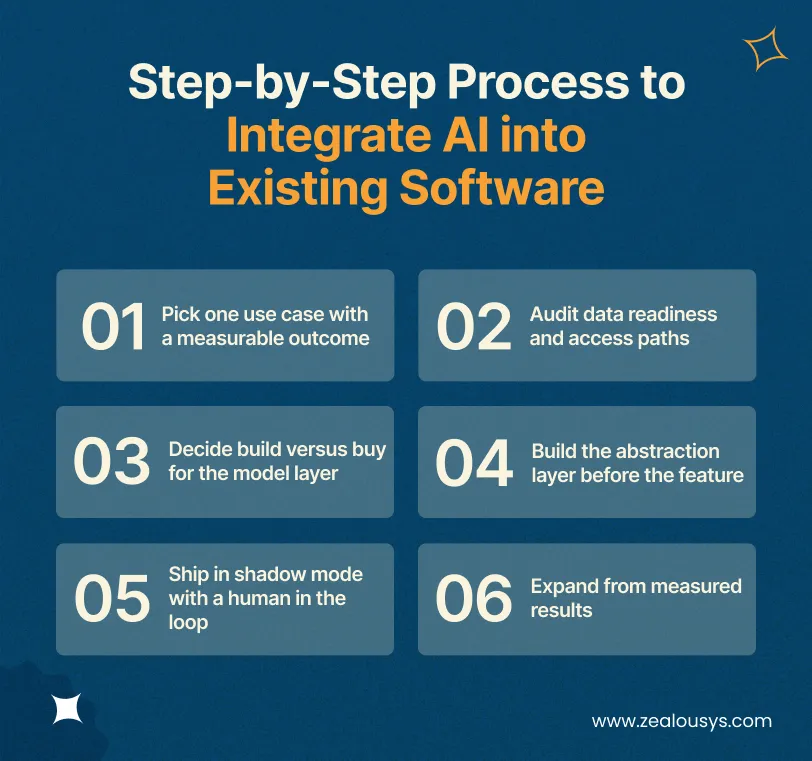
This is the sequence that works for AI integration in legacy systems, in the order the steps actually need to happen.
Choose a workflow where you can already count something: hours spent, tickets handled, time to resolution, error rates. If nobody can say what number should move, the project will have no defense when budgets tighten.
Find out where the data lives, who owns it, how current it is, and how you can read it without touching production. Projects that run late almost always run late here, not during model work.
Default to a hosted API, and move to fine-tuning or self-hosting only if domain language, volume economics, or regulation force it. Write down the reasoning, because this decision gets revisited every time someone reads a vendor announcement.
One internal interface for all model calls, with provider details behind it. It costs a day or two now and saves weeks later.
Run the AI against live traffic without acting on its output, and let your team compare its recommendations against their own. This tunes accuracy against real cases and builds trust with the people who will use the feature.
Turn on automation for the categories where accuracy targets are consistently met, and keep humans on the rest. Then scope the second feature, which will cost significantly less because the gateway, monitoring and evaluation harness already exist.
That sequence holds across stacks. Older backends do have specific quirks worth knowing about.
The question of how to add AI features to a legacy .NET or Java application comes up constantly, and the answer is more encouraging than most teams expect. None of these stacks needs replacing.
Modern AI vendor SDKs often target .NET 6 and above, which rules them out on .NET Framework 4.x. This is not a blocker. The APIs are plain REST, so HttpClient with JSON serialization works fine, and you avoid an SDK dependency you would have wanted to abstract away anyway.
Two practical notes worth knowing before you start:
TLS 1.2. Older Windows Server installations often need it enabled explicitly before outbound calls will succeed at all.
Thread pool deadlocks. In synchronous WebForms or older MVC code, blocking on an async call is a reliable way to lock things up. Route AI calls through a background job or a sidecar service instead.
Teams already planning ASP.NET Core work often find the AI service becomes the first component built on the newer runtime.
Java systems tend to integrate cleanly, since most already have a service layer to hook into. On Spring Boot, a dedicated service with a REST client and a circuit breaker covers most cases. On older JDK 8 estates where current SDKs will not run, a plain HTTP client does the job.
For higher volumes, put the model call behind a queue rather than in the request path. Existing Kafka or RabbitMQ infrastructure makes the event-driven pattern almost free for Java development teams to adopt.
The main risk in PHP applications is blocking the request cycle. A model call taking three to eight seconds inside a synchronous request will exhaust your workers under load.
Push inference into queued jobs, write results back to the database, and let the interface poll or use websockets for updates. For older CodeIgniter or custom PHP applications, a small sidecar service is usually less work than retrofitting async behavior into the existing codebase.
If your application can make an outbound HTTPS call, and your data can be read through an API, a replica or an export, the language is not the constraint. Where a genuine gap exists, middleware usually fills it more cheaply than modernizing the application would, as this middleware API gateway project shows.
Most attempts to retrofit AI into an existing app come apart for reasons that have nothing to do with the model. These are the mistakes that turn a six-week project into a six-month one.
Vendor SDK calls scattered through your service layer mean a provider change becomes a refactor across dozens of files. One gateway interface prevents this entirely, and it takes an afternoon.
Without scored examples, quality regressions are invisible until a customer reports one. Every prompt change becomes a gamble, and nobody can prove whether the last release helped or hurt.
Models return different responses to the same input, and occasionally return nonsense. Any code path that assumes a specific format will eventually break. Validate structure, constrain output where possible, and always define what happens when validation fails.
“Add AI to the dashboard” has no success criteria, so it cannot be defended, extended, or funded a second time. Pick something countable.
In RAG systems, this is a data breach waiting to happen. If a user cannot see a document in your application, retrieval must filter it out for that user too. Retrofitting permission-aware retrieval after launch is far harder than designing it in.
Avoiding these keeps a project inside the ranges discussed earlier.
Two numbers matter, and most estimates only include the first: what it costs to build, and what it costs to run. Build ranges by pattern are in the comparison table above. What follows is what moves them.
Three factors move the number more than anything else.
A proof of concept costs less, often $5,000 to $15,000. What that figure leaves out:
That gap is why a $10,000 pilot turns into a $50,000 rollout conversation. A proof of concept is a decision-making tool, not a discounted version of the real thing.
Inference is charged per token, so budget against context size rather than request count.
The second feature costs substantially less, because the gateway, evaluation harness, monitoring and deployment pipeline are all reusable.
How long AI integration takes depends far more on data access than on model selection. Add two to four weeks to any range above where regulated data, security review, or procurement sign-off is involved. Projects slip during data access and approval, rarely during model integration.
A mid-sized non-banking financial company was raising over 12,000 fraud alerts a month from a rule-based detection engine. More than 90% were legitimate transactions, and analysts spent 15 to 20 minutes on each one, pulling data from four separate systems.
The constraint was absolute: the existing fraud engine and core banking infrastructure had to stay exactly as they were.
What was built alongside it was an AI triage agent with a data enrichment layer over REST APIs, and an explainable decision engine using RAG over the client’s own fraud policies. Uncertain cases route to a human. Three patterns from this article working together, validated in shadow mode before rollout.
The results: manual reviews down 62%. Average resolution time from roughly 14 hours to about 3. Per-alert review time from 15 to 20 minutes to under 4.
Full details are in the AI fraud triage agent case study.
Most AI vendors are set up to build something new. Adding AI to a system already carrying revenue is a different discipline with different risks, which is why the choice is usually better framed as picking an AI software modernization company than picking an AI vendor.
The AI integration services page covers engagement models in more detail. Where you would rather keep ownership in-house, you can also hire AI integration developers who work as an extension of your existing team.
Yes. AI provider APIs are standard REST endpoints, so any application that can make an outbound HTTPS call can use them, including .NET Framework 4.x and JDK 8 systems. Where a modern SDK will not run, a plain HTTP client or a sidecar service handles it.
For most applications, a hosted API is enough. Custom models make sense only with unusual domain language, volumes high enough that per-request pricing dominates, or regulation requiring the model to run in your own environment.
A production-ready first feature typically costs $8,000 to $90,000 depending on the pattern, with most mid-market projects landing between $20,000 and $70,000, plus $200 to $2,500 a month in inference. Data readiness is the largest single variable.
A proof of concept takes 2 to 4 weeks. A production feature takes 3 to 14 weeks depending on the pattern, with RAG systems at the longer end. Add two to four weeks for regulated data or formal security review.
Only if you put the model call in the user’s request path without planning for it. Event-driven patterns keep inference out of the user experience. User-facing features need a defined latency budget with caching, timeouts, and a fallback.
It can be, with the right controls. Redact personal data before the request leaves your network, use zero-retention endpoints where offered, choose regional endpoints for residency obligations, and log everything for audit. HIPAA work also needs a business associate agreement.
Yes, and it is usually one of the faster integrations. A hosted LLM API called from your backend covers most cases. If the assistant needs to answer using your own product data or policies, you need RAG rather than the model alone.
The first question is not which model to use. It is which single workflow has a number that could visibly move, and whether the data behind it can be read without touching production. That applies whether you need custom AI integration for SaaS or one feature added to an internal system.
Our team is always eager to know what you are looking for. Drop them a Hi!

Pranjal Mehta is the Managing Director of Zealous System, a leading software solutions provider. Having 10+ years of experience and clientele across the globe, he is always curious to stay ahead in the market by inculcating latest technologies and trends in Zealous.


Comments