An AI browser agent is a software system that uses a large language model (LLM) to control a web browser and complete tasks autonomously, from filling forms and extracting data to navigating multi-step workflows.
Building one involves choosing an LLM, a browser controller like Playwright or Puppeteer, an agent framework, and wiring up memory and error handling. Costs range from a few thousand dollars for a basic prototype to well above $50,000 for production-grade systems, depending on scope and complexity.
Most automation tools follow instructions. AI browser agents figure out the instructions themselves.
Give a traditional RPA bot a task and it will click exactly where you told it to click, nothing more. Give an AI browser agent the same task and it can read the page, decide what to do next, handle unexpected changes, and recover from errors, all without you rewriting the script every time a button moves.
That shift matters to anyone building internal tools, data pipelines, or web-based workflows. This guide covers what they actually are, how to build one, what it realistically costs, and where the real difficulties show up.
An AI browser agent is a software program that uses a large language model to drive a web browser and complete tasks autonomously on a user’s behalf. It does not follow a fixed script. Instead, it observes the current state of the browser, reasons about what action to take next, and then acts. That loop runs until the task is done, or until the agent hits a condition it cannot work through.
The three layers that make this work are perception, planning, and action.
The key difference from older automation is that the LLM handles ambiguity. If a page loads differently than expected, the agent can adapt. A traditional script cannot.
AI browser agents are most valuable where the task involves a browser, a repeatable goal, and enough variation that a hard-coded script fails too often to be worth maintaining.
Agents that visit multiple sources, extract structured information, and compile it into a database or report. The advantage over traditional scraping is resilience. When a site changes its layout, the agent can usually still find what it needs. A traditional scraper breaks and stays broken until someone fixes the selectors.
Many business workflows involve moving data between systems that have no API connection. Supplier portals, government forms, and legacy web applications are common examples. An agent can log in, navigate to the right page, fill in the fields, and submit, handling the kinds of minor variations in page behavior that would require constant script maintenance otherwise.
Tracking competitor pricing, product availability, and content changes across multiple sites. Agents handle this more reliably than scheduled scrapers because they can navigate paywalls, handle pagination, and deal with JavaScript-heavy pages that resist simple HTTP-level scraping.
Visiting directories, company pages, or professional listings to extract contact information and qualify leads based on what the page says. This is one of the more commercially active use cases, though it comes with significant legal and ethical considerations around data collection that deserve careful attention before deployment.
Rather than writing explicit test scripts for every scenario, teams are using AI browser agents to explore a web application the way a real user would. The agent can identify broken flows, missing error messages, and unexpected UI states without a predefined test case for each one.
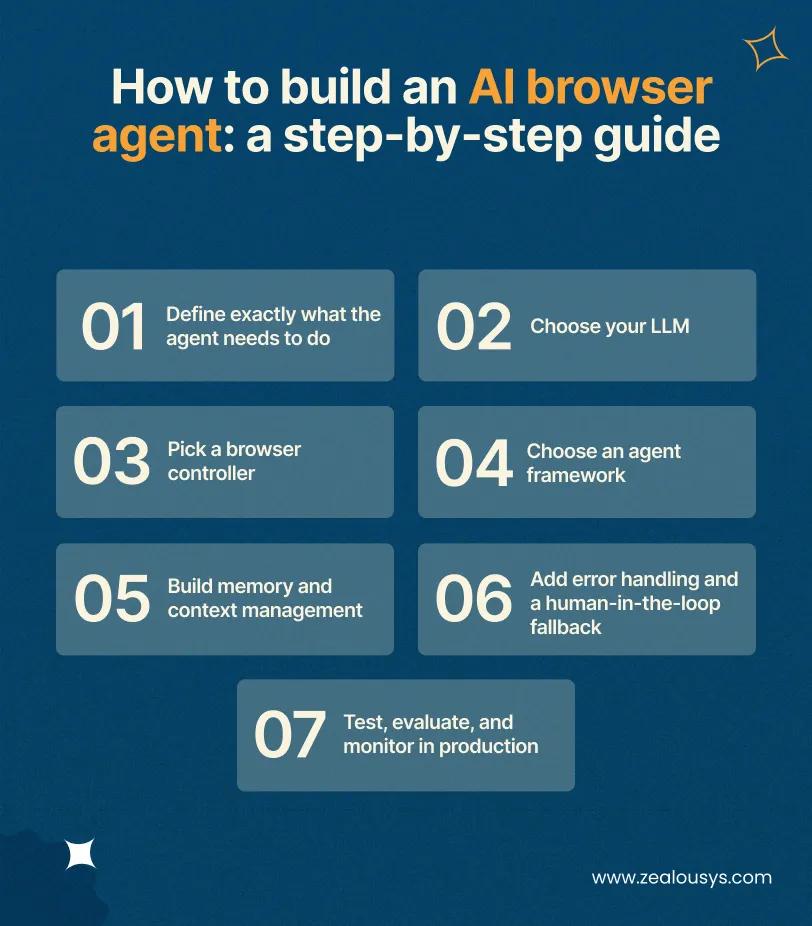
Building a browser agent shares a lot with building any LLM-powered application. The browser layer adds meaningful complexity, but the fundamentals are the same: clear task definition, the right model, a reliable action layer, and good failure handling. Here is how the process works in practice.
This step matters more than any technical decision that follows. A vague task definition produces a fragile agent. Write the task in plain language before touching code: what page does the agent start on, what is the end state, and what decisions does it need to make along the way.
An agent tasked to “collect leads from LinkedIn” will produce inconsistent results and is likely to violate terms of service. An agent tasked to “visit each URL in this list, extract the company name and any visible contact email, and log both to a CSV” is specific enough to build, test, and evaluate.
The LLM is the reasoning layer. Your choice affects quality, cost, and latency in ways that compound quickly at scale.
Smaller open-source models: Viable for simple, well-scoped tasks where you want to minimize API costs. Less reliable on complex navigation tasks that require nuanced reasoning about page state.
For most production AI browser agent projects, GPT-4o and Claude 3.5/3.7 are the two models teams reach for first.
The browser controller is the mechanical layer. It opens the browser, interacts with elements, reads the DOM, and takes screenshots when needed.
Frameworks handle the scaffolding: how context gets passed to the LLM, how actions are dispatched, and how memory is managed across steps. LangChain, LangGraph, CrewAI, and AutoGen are the most widely used general-purpose options. Browser Use is a library specifically designed for browser agents on top of Playwright, and it handles much of the browser-LLM integration out of the box.
For a simple, well-defined task, a custom loop is often cleaner and easier to debug than a framework. For complex multi-step agents, or anything involving multiple agents working in parallel, a framework pays for itself quickly.
LLMs have finite context windows. An agent navigating 20 pages will accumulate more state than most models can hold. Without a memory strategy, the agent either loses track of earlier steps or exceeds the context limit entirely.
Common approaches include keeping only the most recent page state in context, maintaining a scratchpad for intermediate results, writing extracted data to a database and referencing it by key rather than holding the full content in context, and using embeddings to retrieve relevant past observations when needed.
Browser agents encounter failures that conventional software rarely does: CAPTCHAs, login timeouts, pages that load differently on different days, and LLM decisions that are plausible-looking but wrong. Production agents need explicit handling for each class of failure.
At minimum: retry logic with a hard limit, detection for when the agent is circling the same steps without progress, and a mechanism to pause and route a task to a human reviewer when the agent’s confidence is low or when it hits a state it has not seen before. Human-in-the-loop is not a fallback for bad engineering. It is how you keep the system reliable while the edge cases get resolved over time.
Testing browser agents is harder than testing conventional code. The output is a sequence of actions rather than a deterministic return value, and the same task can succeed or fail depending on page state at the time of execution.
Build an evaluation set of tasks with known correct outcomes and run the agent against them on every significant change. In production, log every action the agent takes along with the page state it observed at that moment. When something goes wrong, that trace is how you diagnose the problem without reproducing it manually.
No single stack fits every project, but most production browser agents are built from the same set of components. Here is how the layers typically break down.
| Layer | Common Options | Notes |
|---|---|---|
| LLM | GPT-4o, Claude 3.5/3.7, Gemini 1.5 Pro | GPT-4o and Claude cover most production use cases |
| Browser Controller | Playwright, Puppeteer, Selenium | Playwright is the standard starting point |
| Agent Framework | LangChain, LangGraph, CrewAI, Browser Use | Optional for simple tasks; valuable for complex ones |
| Memory/Storage | PostgreSQL, Redis, Pinecone, In-Memory | Depends on task duration and retrieval needs |
| Infrastructure | Docker, AWS, GCP, Azure, Browserbase | Managed browser services reduce operational overhead |
| Monitoring | Langfuse, Custom Logging, Datadog | Action traces are essential for production debugging |
One infrastructure point worth calling out separately: running a headless browser in production means provisioning machines with enough memory and CPU to handle concurrent sessions. Managed browser services like Browserbase and Browserless handle this infrastructure layer and can be more cost-effective than managing your own fleet, particularly at lower session volumes.
Cost depends on task complexity, whether you are building in-house or working with an external team, and how much the agent runs in production. The figures below reflect realistic market rates as of 2026.
| Project Type | Estimated Cost | Typical Timeline |
|---|---|---|
| Simple prototype (single task, limited error handling) | $3,000 – $8,000 | 1-3 weeks |
| Mid-complexity agent (multi-step, basic memory, error recovery) | $15,000 – $35,000 | 4-8 weeks |
| Production-grade system (robust, monitored, multi-task support) | $40,000 – $80,000+ | 2-4 months |
| Ongoing maintenance and iteration | $2,000 – $6,000 / month | Ongoing |
These figures assume a small team of one to three developers. Agency rates typically sit at the higher end of each range. In-house teams with existing infrastructure will often land lower, particularly on the maintenance side.
API token costs are a recurring operational expense that scales directly with usage. The LLM call is made on every step of the agent loop, not once per task. An agent that takes 15 steps to complete a task makes 15 LLM calls. At scale, this adds up.
Model pricing changes frequently and should be verified against each provider’s current pricing page before making budget decisions. Build cost monitoring into your system from day one. Unexpected usage spikes are much easier to catch early than to reconcile after the fact.
Running headless browsers at scale requires dedicated compute. Expect anywhere from $200 to $1,500 per month for cloud infrastructure, depending on session volume and concurrency requirements. Managed browser services charge per session or per compute hour and can reduce both cost and operational complexity at lower volumes.
Browser agents are practical and genuinely capable now, not just promising. They also fail in ways that are hard to predict until you have run them against real websites at real scale.
Understanding where the failure modes are before you build saves a lot of debugging time later.
Most high-traffic websites run active bot detection. Browser fingerprinting, CAPTCHA challenges, rate limiting, and IP blocking will all affect agents that operate on public sites. Residential proxy networks and managed browser services that handle detection evasion help, but this is an ongoing challenge rather than a solved problem.
Websites change. Selectors that worked last week stop working when a site updates its front end. Agents that rely on specific CSS selectors or XPath expressions are brittle. Agents that use vision, passing a screenshot to a multimodal LLM rather than parsing the DOM, are more resilient to layout changes but slower and more expensive per step.
The model can misread a page and select an action that looks plausible but is wrong. This is not rare. On complex pages with ambiguous UI elements, even strong models make mistakes. Good logging makes these errors detectable. Human review of low-confidence steps prevents them from causing damage before they are caught.
Tasks that require navigating many pages accumulate state that eventually exceeds the model’s context window. Without explicit memory management, the agent starts making decisions based on incomplete context. This is a design problem, not an LLM problem, and it needs to be addressed at the architecture stage.
Automated access violates the terms of service of many websites. Data protection law applies to any personal data the agent collects. Both deserve legal review before deploying any agent that operates at scale on third-party sites or handles user data. This is not a compliance checkbox. Real legal and financial exposure is on the table.
The honest starting point is: most teams should look at existing platforms before committing to a custom build.
Off-the-shelf tools have improved significantly. Bardeen, Relay.app, and Lindy offer no-code or low-code browser automation with AI built in. For a well-defined, recurring task that falls within their supported scope, these tools can be running in hours rather than weeks. Per-task pricing can add up at volume, but for moderate usage, they are often the right call.
Browserbase and Browserless sit at a different layer from the tools above. They are infrastructure, not agent platforms. If you are building a custom agent and do not want to manage headless browser fleets yourself, they handle that layer for you.
Custom development makes sense when the task is complex enough that no existing platform handles it reliably, when you need tight integration with internal systems or proprietary data, when data sensitivity rules out third-party platforms entirely, or when the economics of per-task pricing break down at your usage volume.
A practical path is to start with a managed tool to validate that the task is worth automating, then move to a custom build once you know exactly what you need. Rebuilding something you validated is much cheaper than building something nobody ends up using.
An AI browser agent is a system that uses a large language model to control a web browser and complete tasks without step-by-step human instruction. It observes the current page, reasons about what to do next, and takes action through a browser controller like Playwright or Puppeteer.
Development costs range from roughly $3,000 to $8,000 for a basic prototype up to $40,000 to $80,000 or more for a production-grade system. Ongoing LLM API and infrastructure costs vary significantly with usage volume and model choice.
Define the task scope, choose an LLM, select a browser controller, set up an agent framework or custom loop, implement memory management, add error handling and human-in-the-loop fallbacks, then build an evaluation and monitoring layer. The step-by-step section of this post covers each in detail.
GPT-4o and Claude 3.5/3.7 are the most commonly used in production. GPT-4o handles visual page input well. Claude performs well on structured, multi-step tasks. The right choice depends on your task type, context requirements, and budget. Smaller open-source models are viable for simple, well-scoped tasks.
For tasks that involve genuine variation, AI agents are more reliable than traditional RPA. For high-volume, fully stable, rule-bound tasks where the UI never changes, RPA is still faster and cheaper. Most real-world automation falls somewhere between those two poles, which is why hybrid approaches are increasingly common.
At minimum: an LLM API, a browser controller, and infrastructure to run a headless browser. Most production builds also include an agent framework, a memory or storage layer, and a logging setup. The tech stack section of this post covers the options at each layer.
AI browser agents are practical technology right now, not a future promise. The tooling has matured, the LLMs are capable enough for most real-world tasks, and the patterns for building reliably in production are well understood.
The biggest risk is not technical. It is scope creep in the planning stage. Start with one specific, high-value task. Get it working cleanly. Then expand from there.
If you are at that stage and need experienced input on architecture or stack decisions, Zealous System builds these kinds of systems. Reach out when the problem is specific enough to discuss in detail.
Our team is always eager to know what you are looking for. Drop them a Hi!

Ruchir Shah is Technology Head at Zealous System with hands-on expertise in AI/ML, Microsoft Azure, .NET, Node.js, Python, React, and Angular. He leads enterprise software development, champions digital transformation, and mentors developers building the future of intelligent apps.


Comments