Integrating generative AI into an existing product does not require rebuilding it. Most SaaS teams add AI capabilities through LLM APIs (GPT-4o, Claude, Gemini) or Retrieval-Augmented Generation (RAG), layered on top of their current architecture. The right approach depends on your use case, data quality, and compliance requirements.
Costs are driven primarily by token usage and infrastructure, and they vary widely based on model choice and scale. Getting the integration right is less about picking the most powerful model and more about solving the right problem with the right pattern.
Adding AI to a product sounds straightforward until you actually try to do it. Then the questions stack up fast. Which model? Which architecture? Do you need a vector database? What happens to your data? How do you avoid shipping something that confidently gives wrong answers?
For most product teams, the difficulty is not access to AI. APIs are widely available, documentation is solid, and the tooling has matured. The real challenge is making smart decisions before the first line of code gets written. Picking the wrong integration pattern early costs weeks. Ignoring data quality until halfway through costs even more.
This guide focuses on the decisions that actually matter: how to choose the right GenAI integration pattern for your product, which LLM fits your use case, what your engineering team needs to set up before going to production, and what causes most integrations to quietly fail before they deliver any value.
Before jumping into the how, it’s worth understanding why so many GenAI integration projects stall, ship late, or quietly get killed after a pilot.
Teams get excited about a model, build a demo around it, and then go looking for a problem it solves. That rarely ends well. A chatbot that no user asked for is not a feature. It’s technical debt with a UI.
LLMs are only as useful as the context they’re given. If your product data is scattered across siloed databases, poorly structured, or locked in PDFs with inconsistent formatting, the AI will produce inconsistent outputs. Garbage in, garbage out still applies here, just at a much higher token cost.
“Make it smarter” is not a success metric. Without clear benchmarks like response accuracy, latency thresholds, user adoption rate, and error rate, you cannot tell whether the AI is working or just sounding like it is.
Users need to trust AI outputs, especially in healthcare, legal, finance, or logistics. Products that ship AI without guardrails, citations, or human-in-the-loop fallbacks often see adoption drop after the first wave of wrong answers.
GenAI integration is not a feature you ship and forget. Models get updated. Prompt behavior shifts. Token costs change. It needs ongoing maintenance, just like any other critical system.
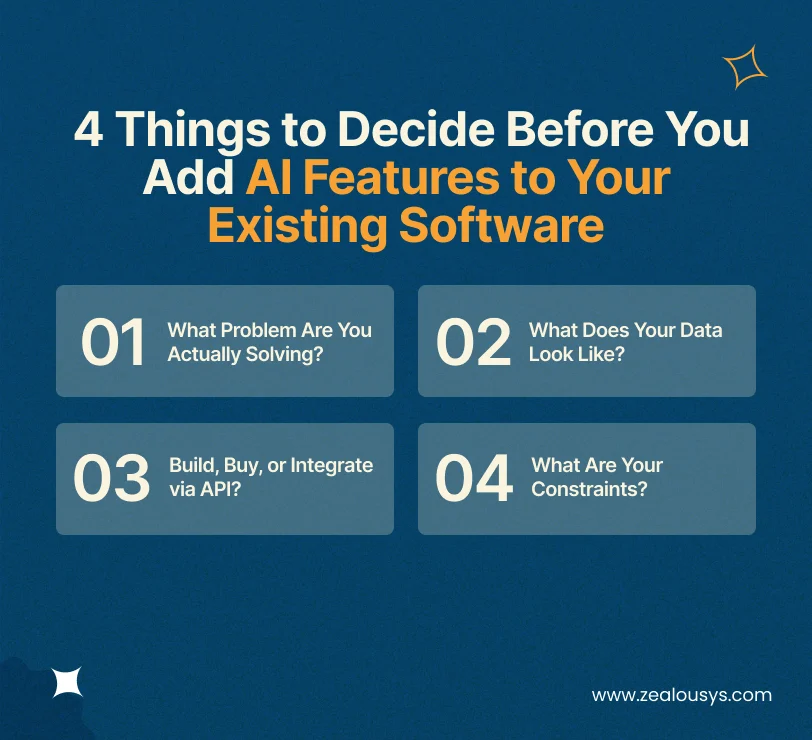
Rushing into implementation without making these decisions first is one of the most common and most costly mistakes teams make.
Start with user behavior, not AI capabilities. Where are users getting stuck? What takes too long? What do your support tickets keep asking for? The best GenAI features solve problems that users already have, not problems that AI makes it interesting to solve.
A logistics SaaS might benefit from AI-generated shipment summaries. An LMS might need intelligent content recommendations. A healthcare platform might need AI-assisted clinical note drafting. The point of entry matters.
This is the question most teams defer to for too long. GenAI integration depends heavily on the quality, structure, and accessibility of your data. Before you pick a model or pattern, audit what you have. Are your documents clean? Is your database schema consistent? Do you have enough domain-specific content to make RAG or fine-tuning worthwhile?
If the answer is “our data is a mess,” fix that first. An AI layer on top of disorganized data produces confident-sounding wrong answers, which is worse than no AI at all.
You have three broad paths:
For most SaaS products, LLM API integration is the fastest and most practical starting point.
Define your boundaries upfront. Key constraints to consider:
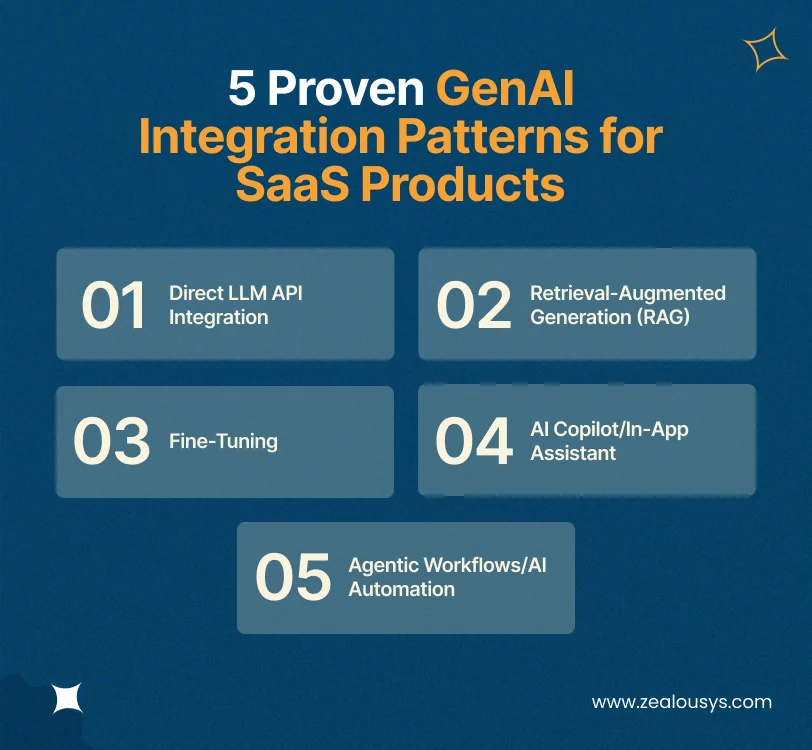
There’s no single right way to add AI to a product. The pattern you choose depends on your use case, data type, and how much control you need over model behavior. Here are the five patterns that actually work in production.
The simplest pattern. You call an LLM API (OpenAI’s GPT-4o, Anthropic’s Claude, or Google’s Gemini) with a prompt and get a response back. No vector database. No retrieval layer. Just prompt engineering and output handling.
Best for: Content generation, text summarization, simple chatbots, code assistance, translation.
Watch out for: Hallucinations on factual questions, context window limits, and token costs at scale. This pattern works well when the task doesn’t require the model to know anything specific about your product or users.
RAG is currently the most widely adopted pattern for enterprise SaaS. Instead of relying solely on the LLM’s training data, you retrieve relevant chunks of your own content from a vector database like Pinecone or Weaviate and pass them into the prompt as context. The model answers based on what you feed it, not just what it was trained on.
Best for: Document Q&A, knowledge bases, support automation, search, compliance-heavy products.
Why teams love it: You don’t need to retrain or fine-tune anything. You control the data. Answers are grounded in your content, which reduces hallucinations significantly.
Challenges: Requires embedding pipelines, chunking strategy, and retrieval quality tuning. A poorly designed RAG setup retrieves irrelevant chunks and produces worse answers than no RAG at all.
Fine-tuning means taking a base LLM and training it further on your own domain-specific data. The result is a model that “thinks” more like your domain.
Best for: Highly specialized use cases (legal document analysis, clinical note drafting, financial modeling) where the model needs to understand terminology and patterns unique to your field.
RAG vs fine-tuning: which to use? A useful rule of thumb: use RAG when you need the model to know your data. Use fine-tuning when you need the model to know your domain. Many mature products use both.
Reality check: Fine-tuning is expensive, requires labeled training data, and needs ongoing maintenance when the model provider releases updates. It’s not the right first step for most teams.
This pattern surfaces AI capabilities directly inside your existing product UI, as a sidebar assistant, an inline suggestion engine, or a command palette. Users don’t leave their workflow. The AI assists within it.
Best for: Productivity SaaS, developer tools, CRMs, project management platforms, design tools.
Key design consideration: The copilot should feel like a knowledgeable colleague, not an interruption. Keep it contextual, keep it fast, and give users control over when it activates.
The most advanced pattern. Instead of a model responding to a single prompt, you give it a set of tools and let it execute multi-step tasks. Using frameworks like LangChain, LlamaIndex, or the Model Context Protocol (MCP), you can build agents that read data, take actions, call APIs, and make decisions, with or without human approval at each step.
Best for: Automated reporting, data pipelines, multi-step customer service workflows, back-office automation.
Human-in-the-loop: For high-stakes decisions, design your agent to pause and request human confirmation. Not every action should be fully automated on day one.
| Use Case | Recommended Pattern | LLM Options | Key Tool |
|---|---|---|---|
| Document Q&A | RAG | GPT-4o, Claude | Pinecone, Weaviate |
| Support Chatbot | RAG + Direct API | Claude, Gemini | LangChain |
| Content Generation | Direct LLM API | GPT-4o, Claude | OpenAI SDK |
| In-App Assistant | AI Copilot | GPT-4o, Claude | LlamaIndex, MCP |
| Specialized Domain | Fine-Tuning | Open-source LLMs | HuggingFace |
| Automated Workflows | Agentic | GPT-4o, Claude | LangChain, MCP |
The LLM you choose is not a forever decision, but it’s an important one. Each model has different strengths, pricing structures, and context window limits. Here’s a practical breakdown for product teams.
GPT-4o is fast, multimodal (handles text, images, and audio), and has an enormous ecosystem around it. The API is well-documented, and the developer community is massive. If you’re building a product where speed and versatility matter and you want the broadest support from libraries like LangChain, GPT-4o is a strong default.
Limitation: Vendor lock-in risk is real. Pricing changes have happened before, and they’ll likely happen again. That said, for teams looking to integrate ChatGPT into existing software quickly, GPT-4o remains the most documented and community-supported starting point.
Claude models, particularly Claude 3.5 Sonnet and Claude 3 Opus, are widely regarded as strong performers on tasks requiring nuanced reasoning, long document processing, and instruction-following accuracy. Claude has a 200K token context window, which is a genuine advantage for products dealing with long-form documents.
If you’re building for healthcare, legal, or finance, where outputs need to be accurate and tone-appropriate, Claude is worth evaluating seriously. The Claude API is straightforward to integrate and is available on AWS Bedrock, which helps with enterprise compliance requirements.
Gemini 1.5 Pro’s standout feature is its 1 million token context window. For use cases that require feeding in massive amounts of context (entire codebases, lengthy reports, long conversation histories), this is a meaningful differentiator. Gemini is also tightly integrated with Google Cloud, which benefits teams already running infrastructure there.
Open-source models give you full control over your data and infrastructure. Nothing leaves your servers. For products in regulated industries, or teams with strong MLOps capacity, running a self-hosted LLM can be both cost-effective at scale and significantly more private.
The trade-off is operational overhead. You manage the infrastructure, the updates, and the performance tuning. For most early-stage product teams, this is a distraction. For mature teams with compliance requirements, it can be the right call.
Practical recommendation: Start with a managed API (OpenAI or Claude). Both follow a model as a service approach, meaning you pay per use with no infrastructure to manage. Abstract your LLM calls behind a service layer in your codebase so you can swap providers later without rewriting your entire integration.
This is where engineering gets involved in earnest. Before your first API call goes to production, your team should have addressed each of these areas.
Good prompt design is the difference between an AI feature that works and one that doesn’t. A few core principles:
If you’re building a RAG integration, you’ll need to:
You can’t fix what you can’t measure. Set up:
Tools like LangSmith, Helicone, or custom logging to your existing observability stack all work here.
Generative AI integration cost is one of the most common questions product leaders ask, and one of the hardest to answer without context. The range is wide, and it moves based on your integration pattern, model choice, and scale. Here is a rough starting point for each scenario:
Building the initial integration (prompt engineering, API setup, vector database configuration, testing) typically takes 4–12 weeks for a small to mid-size engineering team. This varies based on the complexity of the use case and how much of your existing data needs to be prepared for RAG.
Every call to an LLM API costs money, priced per input and output token.
A rough rule of thumb: for a product with moderate usage (10,000–50,000 AI interactions per month), API costs can range from a few hundred dollars to a few thousand dollars monthly depending on model choice and average prompt size. GPT-4o and Claude 3 Opus are significantly more expensive per token than lighter models like Claude 3 Haiku or GPT-3.5-Turbo.
Designing for token efficiency (shorter prompts, smart caching, choosing the right model tier for each task) can cut your monthly token spend by a meaningful margin without changing what the feature does for users.
RAG pipelines require vector database hosting (Pinecone starts at a few hundred dollars/month at scale), embedding generation, and potentially additional compute for self-hosted components. If you’re running open-source models, GPU instance costs can be high.
Prompt drift, model updates, and data pipeline maintenance are not free. Budget for ongoing engineering time, usually 10–20% of the initial build effort per month.
The most expensive mistake: Over-engineering the first version. Start simple. A well-designed direct API integration with smart prompt engineering can get your first AI feature live and working without a large upfront investment. Add RAG, fine-tuning, or agentic layers only when you’ve validated the need.
Even well-resourced teams with good intentions run into these pitfalls.
An AI summary button that nobody clicks is not a product improvement. If the AI feature does not fit naturally into how users work, it will not get used, regardless of how impressive the model is.
An AI response that takes 8 seconds feels broken to most users. If your use case requires real-time interaction, you need to either use a faster model, stream the response, or redesign the feature around async delivery.
LLM APIs go down. Rate limits get hit. Responses can be malformed. Your product needs to handle these cases without crashing or showing users raw error messages. Build fallbacks from the start.
Token costs are invisible until suddenly they’re not. A single unexpected traffic spike or a runaway loop in an agentic workflow can generate massive API bills. Monitor token usage from day one.
Synthetic test cases rarely capture the messiness of real user inputs. Before you launch, run real prompts from real users through your integration. The results will surprise you.
The models you use today will not be the best models available in 12 months. Design your integration to be model-agnostic. Abstract the LLM provider so you can upgrade or switch without a full rebuild.
Yes. In most cases, you don’t need to rebuild anything. LLM API integration works as a layer on top of your existing product. You add an AI service, connect it to your data, and surface outputs through your existing UI. The heavy lifting happens in prompt design, data preparation, and output handling, not in rewriting your core application.
At a basic level, you add the OpenAI SDK to your backend service, store your API key securely as an environment variable, design your prompt template, and make HTTP calls to the completions or chat completions endpoint. Wrap this in a dedicated service class so your business logic doesn’t depend directly on OpenAI. That way, swapping to Claude or Gemini later is a configuration change, not a rebuild.
Use RAG when your AI needs to answer questions based on your specific data: documents, knowledge bases, product catalogs. Use fine-tuning when you need the model to behave differently at a fundamental level: to write in a specific style, use domain-specific terminology, or follow patterns that aren’t in the base model’s training. For most SaaS products, RAG comes first. Fine-tuning is a second-stage optimization.
Startups typically have two options: build in-house using LLM APIs and open-source tooling, or work with a software development partner that specializes in GenAI integration. The right choice depends on your team’s technical capacity, your timeline, and how central AI is to your product’s core value proposition. If AI is a secondary feature, a specialist partner may get you to market faster. If AI is your core differentiator, building in-house with deep ownership is usually the better long-term path.
It can be, with the right architecture. Key considerations include: using models available on HIPAA-compliant infrastructure (AWS Bedrock, Azure OpenAI), not logging PHI in your prompt history, implementing strict output validation, and designing human-in-the-loop checkpoints for clinical decisions. Regulatory compliance is achievable, but it requires deliberate architecture, not just an API key.
A basic LLM API integration can go from concept to staging in 2–4 weeks. A production-ready RAG system with proper data pipelines, guardrails, and observability typically takes 6–12 weeks. Agentic or fine-tuned systems can take several months, depending on complexity and data readiness.
Integrating generative AI into an existing product is not a moonshot project. The hard part is not the technology. It’s the decisions you make before writing a single line of integration code: what problem you’re solving, whether your data is ready, and what good actually looks like for your users.
The teams that do it well don’t start with the most powerful model or the most complex architecture. They start with a specific problem worth solving, a dataset worth building on, and a clear definition of what success looks like. Then they ship something small, learn from real users, and layer on complexity only when it’s earned.
The access barrier to AI is genuinely low right now. What separates products that ship something useful from the ones that accumulate demo debt is not which model they picked. It’s whether they started with a real problem and stayed honest about what the AI could and couldn’t do.
At Zealous System, we work with SaaS companies, digital product teams, and enterprise development leads to design and build GenAI integrations that fit inside real products, not just demos. If your team is at the planning stage and needs a technical partner who has done this across SaaS, healthcare, logistics, and enterprise products, it is worth having that conversation.
Our team is always eager to know what you are looking for. Drop them a Hi!

Ruchir Shah is Technology Head at Zealous System with hands-on expertise in AI/ML, Microsoft Azure, .NET, Node.js, Python, React, and Angular. He leads enterprise software development, champions digital transformation, and mentors developers building the future of intelligent apps.


Comments