
Quick answer: Custom project portfolio management (PPM) software typically costs $10,000–$25,000 for a core system, $25,000–$50,000 for a mid-range platform with resource management and financial tracking, and $50,000–$150,000+ for enterprise-grade solutions with AI-driven prioritization and deep integrations. Development takes 3 to 9 months depending on scope. This guide covers when building beats buying, the features that matter, realistic costs, and the step-by-step development process.
Here’s the situation that sends most companies looking for PPM software: leadership is running fifteen projects at once and nobody can answer three basic questions. Which projects actually support our strategy? Where are our people over-allocated? And if we can only fund ten of the fifteen, which five do we kill?
The answers live scattered across spreadsheets, email threads, and individual project managers’ heads. Decisions get made on whoever argues loudest rather than on data. According to the Project Management Institute’s Pulse of the Profession research, organizations waste roughly 11 percent of every dollar invested in projects due to poor project performance, and the root cause is usually not bad execution on individual projects, but the absence of portfolio-level visibility and prioritization.
Project portfolio management software exists to fix exactly that. And for a growing number of organizations, the real question isn’t whether to adopt PPM software, but whether to license an off-the-shelf tool or build one that matches how they actually work. This guide walks through that decision, then covers the features, costs, and development process for building custom PPM software.
Project portfolio management software gives organizations a single view across all their projects, not to manage the tasks inside each project, but to manage the collection: which projects to start, continue, or stop, how to allocate limited people and budget across them, and whether the portfolio as a whole is delivering against strategic goals.
That distinction matters. Project management software (Jira, Trello, MS Project) optimizes execution inside one project. PPM software sits a level above, answering questions like: What’s our total resource capacity versus demand next quarter? Which projects are at risk of overrunning budget? What happens to the roadmap if we pause Project X?
Typical users are PMO leaders, department heads, and executives, people whose job is deciding between projects, not just delivering them.
Off-the-shelf PPM tools like Planview, Smartsheet, Monday.com, and Wrike are the right answer for many organizations, especially smaller teams with standard workflows. Be honest about that before spending development budget. But custom development wins in specific, predictable situations:
| Situation | Why Off-the-Shelf Struggles | Why Custom Wins |
|---|---|---|
| Industry-specific workflows (mining, construction, healthcare) | Generic tools can’t model certifications, compliance rules, or field operations. | Software built around your actual operating model. |
| Large user counts | Per-seat licensing at $20–$60/user/month compounds fast; 300 users can exceed $100k/year forever. | One-time build cost, no per-seat fees, you own the asset. |
| Deep integration needs | Off-the-shelf connectors cover common tools only; legacy ERP and custom systems are left out. | Purpose-built integrations with every system you run. |
| Sensitive data or strict compliance | Your data lives in the vendor’s cloud, on their terms. | Full control over hosting, security, and data residency. |
| Unique prioritization logic | Scoring models are configurable only within vendor limits. | Your exact strategic criteria, encoded in the system. |
The break-even math is straightforward: if your five-year licensing spend approaches or exceeds a custom build cost, and the off-the-shelf tool still forces workarounds, building is the stronger investment.
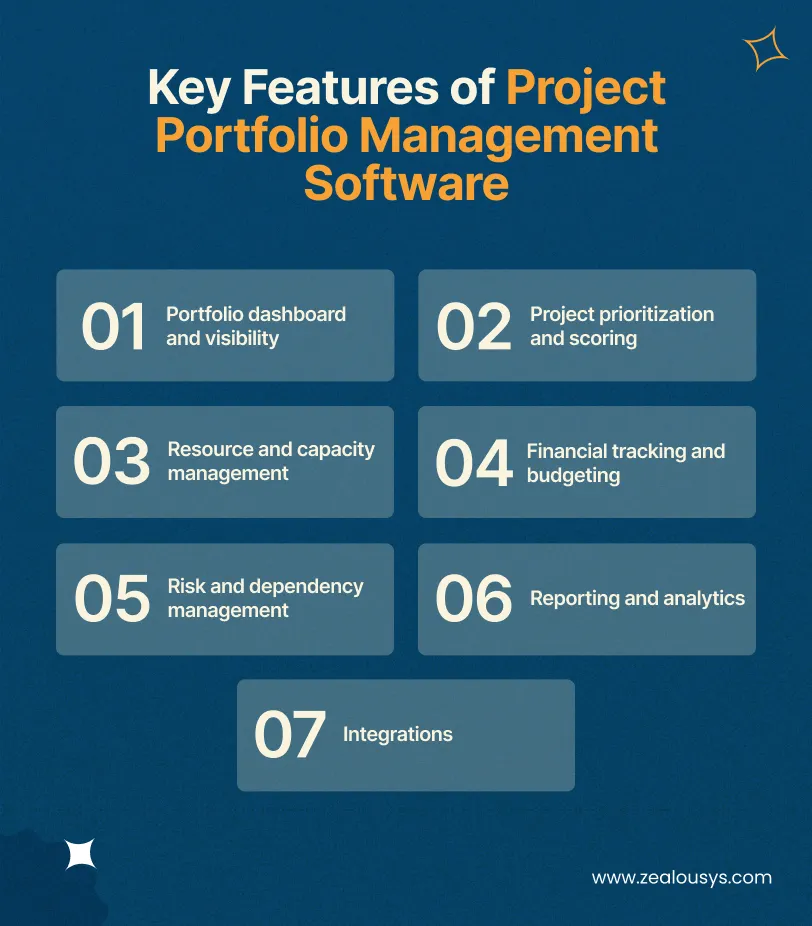
A real-time view of every project’s status, health, budget consumption, and strategic alignment, with role-based views so executives see the summary while PMO leads drill into detail.
Scoring models that rank proposed and active projects against weighted criteria: strategic fit, expected ROI, risk, resource demand. This is the feature that turns “loudest voice wins” into a defensible decision process.
Who is available, who is over-allocated, and what capacity looks like next quarter. For industries with certified or licensed workers, this includes qualification tracking, since assigning an uncertified worker isn’t just inefficient but a compliance breach.
Budget versus actuals at both project and portfolio level, with forecasting to flag overruns before they happen rather than in the post-mortem.
Cross-project dependencies and shared risks that individual project plans never capture: two projects competing for the same specialist, a delay in one blocking three others.
Dynamic, self-service reports rather than static exports, so decision-makers pull answers without waiting on the PMO to compile monthly slides.
Connections to the systems where work actually happens: ERP for financials, HR systems for resource data, Jira or similar for execution-level status, and communication tools for notifications.
| Scope | Estimated Cost | Timeline | What You Get |
|---|---|---|---|
| Core PPM system | $10,000 – $25,000 | 3–4 months | Portfolio dashboard, project tracking, basic resource views, standard reports. |
| Mid-range platform | $25,000 – $50,000 | 4–7 months | Everything above plus prioritization scoring, capacity planning, financial tracking, and 2–3 integrations. |
| Enterprise-grade | $50,000 – $150,000+ | 7–12 months | AI-assisted forecasting and prioritization, deep ERP/HR integrations, advanced compliance features, and multi-entity support. |
The variables that move you within these ranges are the same ones that drive any custom software project: integration complexity (legacy systems cost more than modern APIs), user roles and permission depth, compliance requirements, and whether you need mobile access for field teams. Budget an additional 15–20 percent of build cost annually for maintenance, updates, and gradual feature expansion.
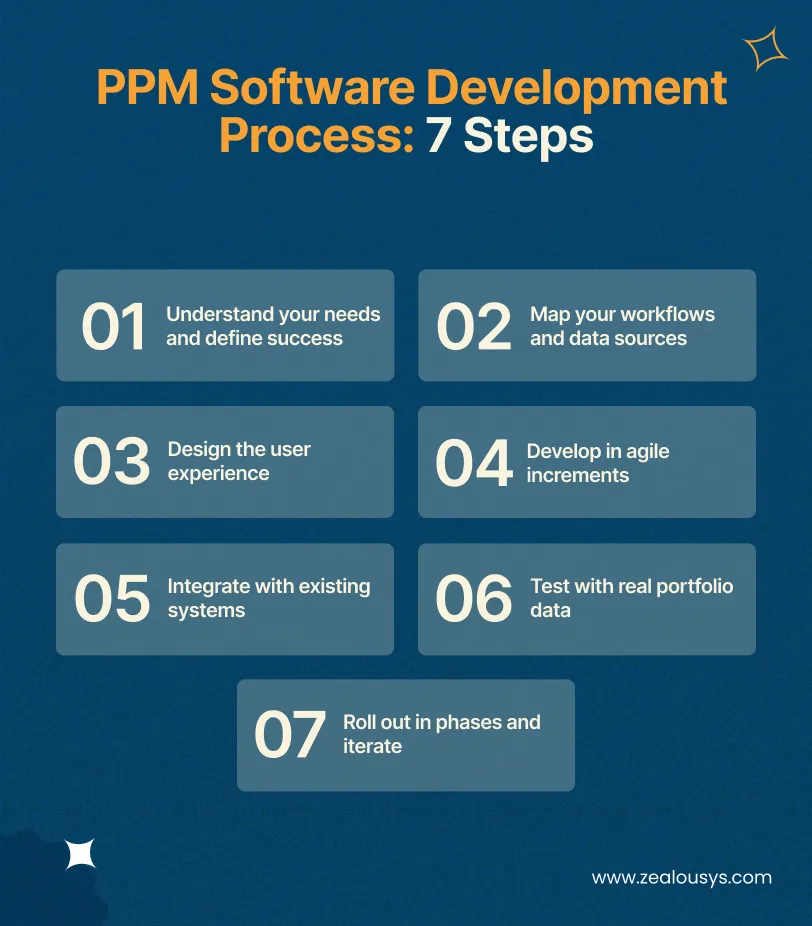
Document the decisions the software must support (project selection, resource allocation, budget control), who makes them, and what data those decisions need. The most expensive PPM failures come from building a tracking tool when the organization needed a decision tool.
Where does project, resource, and financial data currently live? Which systems must integrate? A discovery phase here, typically 2–4 weeks, prevents the mid-project surprises that blow budgets.
Wireframes and prototypes for each user role. PPM software succeeds or fails on adoption: if executives can’t get their answer in two clicks, they’ll go back to asking for spreadsheets, and the system dies quietly.
Build the core (portfolio dashboard, project data model) first, then layer prioritization, resources, and financials in sprints, with stakeholder review at each stage rather than a single big reveal.
Connect ERP, HR, and execution tools. This step deserves its own line because it’s where timelines slip: legacy systems without documented APIs can require custom middleware, so scope it during discovery, not during development.
Functional testing plus something teams skip at their peril: load the system with your actual messy project data and let real PMO users run their real monthly process on it before launch.
Start with one department or portfolio, gather feedback, fix friction, then expand. Pair the rollout with training, because PPM software changes how decisions get made, and that’s an organizational change, not just a software deployment.
Theory is easy; here’s what this looks like in practice. An Australia-based client came to Zealous needing to manage projects and workforce across the mining and healthcare industries, where the portfolio problem had a compliance dimension: employee certificates, licenses, and project assignments lived in traditional files and folders, and critical announcements relied on meetings and emails that reached some workers and missed others.
We built them a custom project and workforce management platform that replaced those manual processes end to end.
What we built:
| Challenge | Platform Solution |
|---|---|
| Workers deployed on lapsed credentials | Qualification-based assignment with certificate and license expiration tracking. |
| No visibility across roles | Role-based dashboards showing each user level exactly what they need. |
| No accountability for changes | Activity log recording every change and entry on the platform. |
| Announcements missing workers | Broadcast announcements with read receipts, so supervisors know who’s seen what. |
| Reporting via manual compilation | Dynamic, self-service reports generated from live operational data. |
The measurable results:
Read those three numbers as a set: they trace the exact value chain PPM software promises. Better allocation decisions, fewer resource collisions, and leadership time spent acting on data rather than compiling it. And notice how the industry shaped the feature set: certificate-aware resource allocation and audit trails aren’t in any off-the-shelf PPM tool’s standard configuration, yet they were non-negotiable for this client. That’s the build-vs-buy decision in miniature.
Zealous System has been building custom software since 2008, including workforce management platforms and industry-specific solutions for sectors like mining, where project portfolios come with compliance, field operations, and legacy system constraints that generic tools can’t handle. Our process starts with your decision-making needs, not a feature checklist, and our delivery model combines dedicated development teams with transparent, milestone-based pricing.
Project portfolio management software pays for itself when it changes decisions: which projects get funded, where people go, and what gets stopped before it wastes another quarter of budget. Off-the-shelf tools are the right starting point for standard workflows and smaller teams. But when your industry, software integrations, user count, or compliance requirements force constant workarounds, a custom build stops being a luxury and starts being the cheaper option over any five-year horizon.
If you’re weighing that decision, we’ll give you an honest read: share your project landscape and current tools, and we’ll tell you whether custom development actually makes sense for your situation, and what it would realistically cost.
Typically $10,000–$25,000 for a core system, $25,000–$50,000 for a mid-range platform with resource and financial management, and $50,000–$150,000+ for enterprise software solutions. Ongoing maintenance adds 15–20 percent of the build cost annually.
A core system takes 3–4 months; a full-featured platform typically takes 4–9 months including discovery, integrations, testing with real data, and phased rollout.
Project management software runs the work inside one project (tasks, timelines, boards). PPM software manages the collection of projects: prioritization, resource allocation across projects, portfolio-level budgets, and strategic alignment.
Build when you have industry-specific workflows (compliance, certifications, field operations), large user counts where per-seat licensing compounds, deep legacy integrations, or prioritization logic vendors can’t model. Buy when your workflows are standard and your team is small.
Yes, and it should. Integration with ERP (financials), HR (resource data), and execution tools (Jira and similar) is what makes portfolio-level data trustworthy. Scope integrations during discovery, since legacy systems without modern APIs affect both cost and timeline.
Increasingly, yes. AI-assisted forecasting flags projects trending toward overrun, prioritization models score incoming proposals against historical outcomes, and capacity prediction anticipates resource crunches. These belong in the enterprise tier and should be built on top of a solid data foundation, not before it.
Our team is always eager to know what you are looking for. Drop them a Hi!

Pranjal Mehta is the Managing Director of Zealous System, a leading software solutions provider. Having 10+ years of experience and clientele across the globe, he is always curious to stay ahead in the market by inculcating latest technologies and trends in Zealous.


Comments