Quick Overview
AI workflow automation is the use of machine learning models and language models inside a business process to handle the steps that fixed rules cannot: reading unstructured documents, classifying ambiguous cases, and deciding what happens next. Traditional automation executes instructions. AI-powered workflow automation makes judgment calls inside the workflow, then writes the result back to your systems of record.
The distinction matters more than it sounds. According to McKinsey’s State of AI 2025 survey, 88% of organizations regularly use AI in at least one business function, up from 78% a year earlier. Yet only 39% report any EBIT impact at the enterprise level, and most put it below 5%. The gap is not caused by weak models. Everyone has access to the same models.
McKinsey tested 31 organizational variables to find what separates the roughly 6% of companies seeing real financial impact. Redesigning workflows had one of the strongest links to results of anything measured, and high performers were nearly three times more likely to have done it.
AI workflow automation combines a workflow orchestration engine with AI models that handle the decision points a rules engine cannot express. Three things happen at once: something triggers the process, a model interprets input that has no fixed shape, and the outcome gets written into systems your business already runs on. Some vendors call this intelligent workflow automation. The label varies; the architecture does not. Remove any one of the three and you have something less useful. A model with no write-back is a suggestion engine. Orchestration with no intelligence is plain scripting.
Most production systems separate into seven layers, and the separation matters because each one fails differently:
1. Trigger Layer: Event-driven architecture picks up the signal that starts the process: a webhook, a file landing in a folder, a database change, an inbound email.
2. Ingestion Layer: Raw input gets normalized. Intelligent document processing (IDP) pulls structured fields out of PDFs, scans, and images. NLP handles free text.
3. AI Decision Layer: Machine learning models classify, score, and extract. Language models reason over context no classifier was trained on.
4. Orchestration Layer: State, retries, branching, and timeouts. Teams underestimate this layer, and it is the one that breaks in production.
5. Integration Layer: API integration into your ERP, CRM, and data warehouse. Older systems mean database connectors or file drops rather than clean REST endpoints.
6. Human-in-the-Loop Layer: Confidence thresholds decide what a person reviews. Below the threshold, work routes to a queue with the model’s reasoning attached.
7. Monitoring Layer: Logging, model versioning, and drift detection. Without it, you learn a workflow has degraded when a customer complains.
RPA and AI workflow automation get discussed as competitors. They are better understood as tools for different halves of the same process. RPA is excellent at the parts that never change. AI handles the parts that always do.
| RPA | AI Workflow Automation | |
|---|---|---|
| Input It Handles | Structured, fixed-format | Unstructured and semi-structured |
| How Logic Is Defined | Explicitly scripted by a developer | Learned from examples, bounded by policy |
| Unexpected Input | Halts or produces a wrong result silently | Scores confidence, routes to a human |
| Maintenance Trigger | Any change to a screen or file format | Model drift, new input patterns |
| Auditability | Deterministic and easy to trace | Probabilistic, needs logging and versioning |
| Best Fit | High-volume, stable, repetitive steps | Variable inputs, judgment steps, exceptions |
Give RPA credit where it earns it. When a process is genuinely stable, deterministic behavior is a feature rather than a limitation. If an auditor asks why a transaction was processed a certain way, “line 47 of the script says so” beats a confidence score. For regulated, unchanging steps, RPA stays cheaper and safer.
The moment inputs stop being uniform, scripted automation costs more than it saves. A supplier changes their invoice template and the bot breaks. AI process automation handles that variance natively, because it was built for input it has not seen before.
Production workflows usually run hybrid. RPA moves data between systems that lack APIs, business process management (BPM) tools hold the long-running state, and the AI layer decides what the data means. Vendors sell the combination as hyperautomation, though the label matters less than whether each layer was chosen deliberately. Gartner has a name for what happens when that choice is not deliberate: “agent washing,” where vendors rebrand existing RPA and chatbot products as AI without the underlying capability.
For a fuller comparison of rule-based systems against goal-directed ones, see our guide on agentic AI vs traditional automation.
The clearest explanation is one process followed the whole way through. Invoice processing works well, because almost every mid-market company runs it and almost every one of them runs it badly.
An invoice lands as an email attachment, an EDI message, or a portal upload. The workflow starts on arrival, not on a nightly batch.
Intelligent document processing returns header fields and line items. A scan photographed on a phone follows the same path as a clean digital PDF.
The system matches the vendor against master data and pulls the purchase order and goods receipt from the ERP.
A three-way match runs across PO, receipt, and invoice. Fixed rules break down here. Partial deliveries, unit-of-measure mismatches, and pricing that shifted between order and delivery all produce mismatches that are legitimate. The model classifies each variance and scores its confidence.
Inside tolerance and above the confidence threshold, the invoice posts with no human involvement, what finance teams call straight-through processing. Outside either boundary, it routes to an AP reviewer with the discrepancy flagged and a proposed resolution attached.
The posting lands in the ERP and the payment schedule updates. Without this step, the automation produced a recommendation rather than an outcome.
When the reviewer overrides the model, that correction is captured. Over months, the share of invoices needing review falls.
Exception handling decides whether a project succeeds, and it is what demos skip. A workflow that handles 80% of cases cleanly and dumps the rest into an unmarked queue has moved the bottleneck rather than removed it. Good systems attach context to every exception: what the model saw, what it inferred, where confidence dropped.
If you are working through how AI decisions should connect to your existing systems, our AI software development services cover this layer.
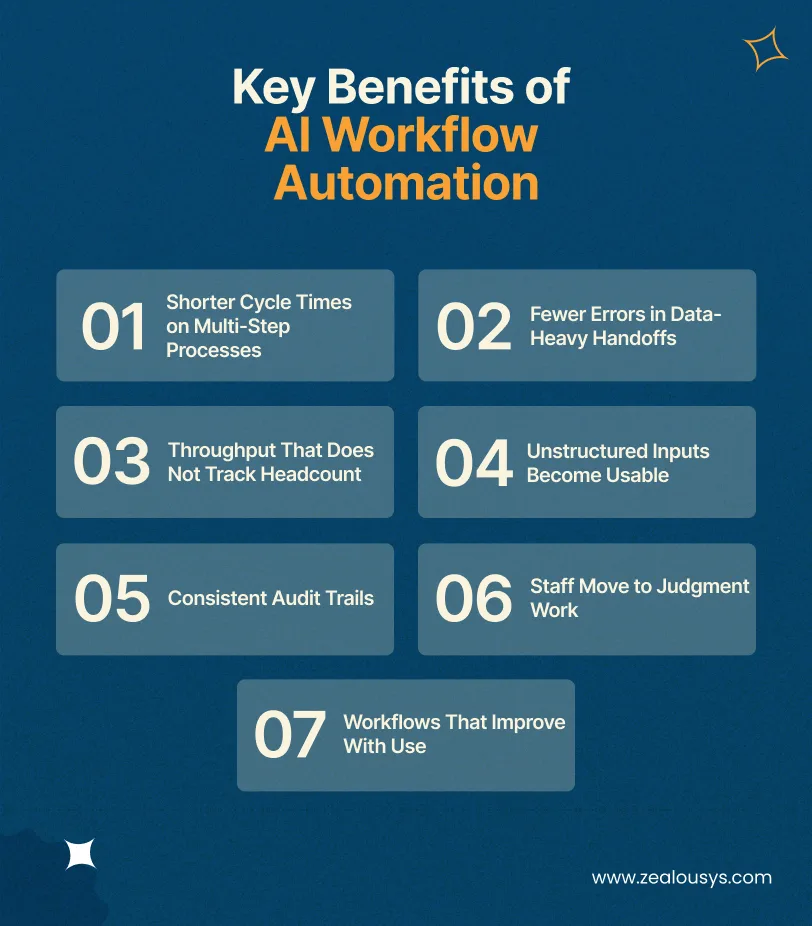
AI workflow automation benefits are easy to overstate. The ones worth discussing are those you can put a number against.
Most delay in a business process is waiting, not working. An invoice sits in a queue for two days and gets handled in four minutes. Removing the handoffs compresses elapsed time far more than making any single step faster.
Every manual re-key between systems introduces error. Automating the transfer removes an entire class of mistakes, along with the downstream reconciliation work each one creates.
This is the benefit that matters during a hiring freeze. Volume can double without the ops team doubling. McKinsey’s respondents most commonly reported cost benefits from AI in software engineering, manufacturing, and IT.
Email, PDFs, scanned forms, call transcripts, and images all become inputs a process can act on. This alone puts workflows in reach that rule-based tools could never touch, which is why intelligent document processing has become the entry point for so many teams.
Manual processes leave gaps. An automated workflow logs every decision, input, and override by default, which turns compliance reporting from an exercise in reconstruction into a query.
The realistic outcome is reallocation rather than reduction. Your AP clerk stops keying line items and starts investigating the 8% of invoices that are genuinely wrong.
Rule-based automation performs on day 400 exactly as it did on day one. A system that captures corrections gets measurably better, provided someone built the feedback loop deliberately.
AI workflow automation use cases vary by industry, mostly according to how much unstructured input a sector handles and how expensive its errors are.
Prior authorization, clinical documentation, and claims are document-heavy and deadline-driven. Automating intake and coding cuts administrative load without touching clinical judgment. We covered where to start in our breakdown of healthcare automation opportunities hospitals are missing.
Exception handling dominates logistics. A delayed shipment sets off a cascade: notify the customer, reroute, update the ETA, adjust the downstream schedule. AI workflows handle the routine cascade and escalate only the unusual, an approach we detail in our guide to building AI-powered logistics software.
Claims intake, damage assessment, and underwriting combine unstructured input with regulated decision-making, which makes human-in-the-loop design mandatory rather than optional. Our work on AI agent architecture for insurance covers the compliance constraints.
Beyond invoice processing, AI workflows handle supplier evaluation, contract review, and spend classification. The use of AI in procurement shows returns quickly because the baseline is so manual.
Returns processing, catalog enrichment, and support routing are high-volume and highly variable. On the planning side, AI demand forecasting feeds automated replenishment rather than sitting in a dashboard nobody opens.
Onboarding is a coordination problem: accounts, equipment, payroll, compliance training, and scheduling, each in a different system. Unglamorous, and one of the highest-return first projects available, because the handoffs are visible to everyone.
This is the decision most teams reach after their first automation project, usually about eighteen months in. It is also where enterprise workflow automation separates from departmental tooling.
Often. Say your workflow connects two modern SaaS products with good APIs, runs at modest volume, and involves logic a business user can express in a condition builder. Zapier or Power Automate will do that job for a fraction of what custom development costs. Anyone who tells you otherwise is selling something.
Your ERP is fifteen years old and exposes a database, not an API. No-code connectors do not reach it. Legacy system integration closes that gap, and this application integration work is usually the real constraint rather than the AI itself.
The rules that make your pricing or routing work are specific to your company and often undocumented. A condition builder with AND/OR branches cannot hold them.
If regulated data cannot leave your infrastructure, a hosted tool that processes it in another jurisdiction is not an option regardless of its features.
Consumption pricing is cheap at 1,000 runs a month and brutal at 500,000. Teams discover this after building on the platform, when moving is expensive.
You cannot swap models, adjust prompts, or fine-tune on your own data. When the vendor changes their model, your workflow behaves differently and you find out from your users.
Work through this honestly. Three or more suggests the tool has stopped paying for itself:
That sixth signal is the one teams underestimate. On a recent workflow automation build for a US freight brokerage, the approval rules existed purely as tribal knowledge. Nobody could say who approved what, under which conditions, across four to six sign-offs per shipment. A condition builder does not solve that, because there is nothing yet to enter into it. Getting the logic out of people’s heads took longer than the engineering that followed.
Four factors move the number more than anything else: how many systems you integrate and how modern they are, how clean your data already is, your volume and latency requirements, and the scope of your compliance obligations. For detailed pricing bands across proof of concept, MVP, and production, see our full breakdown of the cost of agentic AI workflows.
If you want the broader framing beyond automation specifically, our analysis of the build vs. buy software decision covers total cost of ownership across both paths.
How to implement AI workflow automation comes down to sequencing more than tooling. These are the practices that separate projects that scale from projects that stall.
Document what actually happens, including the workarounds nobody admits to. Teams that pick a platform first end up shaping the process around the tool’s limits.
Multiply how often a process runs by how much its inputs vary by what a mistake costs. The winner is rarely the process people complain about loudest.
Decide before you build what the model is not allowed to decide alone. McKinsey found that high performers are more likely than others to have defined processes for determining when model outputs need human validation. Retrofitting this after launch is far harder than designing it in.
If your customer records disagree across three systems, no model resolves that. Most projects that stall do so here.
Adoption fails when automation asks for a new login. If your operations team lives in email and Slack, approvals should happen there rather than in a separate application. The workflow changes. The daily habit does not.
Take a single process end to end with real measurement attached. Broad rollouts produce activity that is impossible to evaluate. Running the old and new processes in parallel for a few weeks before cutting over is worth the duplicated effort, particularly where a failure would stop revenue.
Log every decision with its inputs, confidence, and version. When behavior changes six months in, you will need to know whether the model drifted or the input did.
Who owns the workflow, who can change it, who reviews exceptions, and what the rollback path looks like. These questions get answered either now or during an incident.
The AP clerk knows which invoices are always wrong and why. That knowledge is not written anywhere, and excluding them removes both the information and their willingness to make the system work.
Gartner predicts that over 40% of agentic AI projects will be canceled by the end of 2027, citing escalating costs, unclear business value, and inadequate risk controls. Every cause on that list is a management failure rather than a technical one.
Systems that disagree about the same customer make automated decisions unreliable. Reconcile before you automate.
Automation projects sponsored by a committee stall quietly. One person needs the decision rights.
Some decisions should stay human because the cost of being wrong is asymmetric. McKinsey found 51% of organizations using AI have experienced at least one negative consequence, with inaccuracy the most commonly reported. Choose deliberately which calls the system is allowed to make.
Each point-to-point connection built under deadline pressure becomes something to maintain. Ten of them become a second system nobody documented.
Data preparation and integration usually take longer than model work. Budget for that honestly, or you will be defending a delay you should have predicted.
The direction is toward workflows that pursue goals rather than follow paths. Gartner expects 15% of day-to-day work decisions to be made autonomously through agentic AI by 2028, up from effectively none in 2024, and 33% of enterprise software applications to include agentic capability by the same year.
Multi-agent orchestration and standards like model context protocol make these systems easier to compose. For how goal-directed systems differ from the workflow automation described here, read our guide to agentic AI workflows.
We are an AI workflow automation company building custom AI workflow automation solutions for teams that have outgrown their no-code setup, or that need automation reaching systems those tools cannot.
Our AI workflow automation consulting starts with a process assessment: mapping the workflow, identifying where AI adds value against where rules are sufficient, and saying so plainly when an off-the-shelf tool would serve you better. From there we scope a pilot on one workflow with measurement attached, then scale what works.
Our work spans LLM orchestration, intelligent document processing, and integration with ERP, CRM, and legacy systems across healthcare, logistics, insurance, and manufacturing. For the engineering detail, our writeup of how we built a multilingual RAG chatbot for a travel client covers the architecture decisions and what we would do differently.
If you are weighing whether a process is worth automating, we are happy to look at it with you.
RPA follows explicit scripts and handles structured, predictable inputs. AI workflow automation interprets unstructured input and makes decisions the script does not cover. RPA breaks on unexpected input; AI-driven workflows score their confidence and route uncertain cases to a human. Most production systems use both.
Look for high volume, meaningful input variability, and a measurable cost when something goes wrong. Invoice processing, claims intake, document review, onboarding, and support triage qualify. Low-volume processes, or those needing human judgment on every case, do not.
A focused pilot on one workflow runs six to twelve weeks, with production rollout following. The variable is rarely the AI. It is data readiness and integration complexity, particularly where legacy systems are involved.
Not to start. You need someone who understands the process deeply and someone who owns the decision. Most teams either hire AI automation developers or bring in a delivery partner for the engineering. What cannot be outsourced is the business knowledge about how the workflow actually runs.
Through architecture: deploying models in your own environment, keeping regulated data inside your infrastructure, and logging every decision for audit. Compliance requirements should shape the design from the start, since they often determine whether a hosted tool is viable at all.
Yes, though the method varies. Modern platforms expose APIs. Older on-premise systems may need database-level integration, middleware, or file-based exchange. This is usually the largest single factor in timeline and cost, which is why it belongs in scoping rather than discovery.
When you hit one of five walls: systems your tool cannot reach, logic too specific for a condition builder, compliance rules that exclude hosted processing, per-task pricing that breaks at your volume, or the need to control your own model layer. Below those thresholds, an off-the-shelf platform is the better economic choice.
Our team is always eager to know what you are looking for. Drop them a Hi!

Ruchir Shah is Technology Head at Zealous System with hands-on expertise in AI/ML, Microsoft Azure, .NET, Node.js, Python, React, and Angular. He leads enterprise software development, champions digital transformation, and mentors developers building the future of intelligent apps.


Comments