
Ask a growing law firm how many systems it uses to run the business, and the answer is rarely one. Billing sits in one tool, accounting in another, HR in a spreadsheet, and partners wait until month-end for a profitability report that is already out of date. An ERP system for law firms exists to close that gap.
An ERP pulls finance, billing, trust accounting, HR, resource planning and reporting into one connected platform. This guide covers the features that matter, where ERP helps most, how it compares with practice management software, what it costs and how to choose the right route for your firm.
Enterprise resource planning (ERP) software runs a firm’s core business operations from a single, shared database. In a law firm, that means the general ledger, client invoices, trust accounts, payroll, staffing and management reports all draw from the same records. Nothing gets re-keyed from one tool to the next.
Generic ERP platforms were designed around products, inventory and supply chains, so ERP for legal firms has to work differently. Law firm ERP software is organized around clients, matters and timekeepers, because that is how a firm earns, bills and measures revenue.
ERP is also different from legal practice management software, which focuses on day-to-day matter work. Many firms end up needing both, connected through integrations. The comparison section later in this guide shows which one fits your situation.
The right mix of modules depends on your size and practice areas. These are the ones that carry the most weight in legal operations.
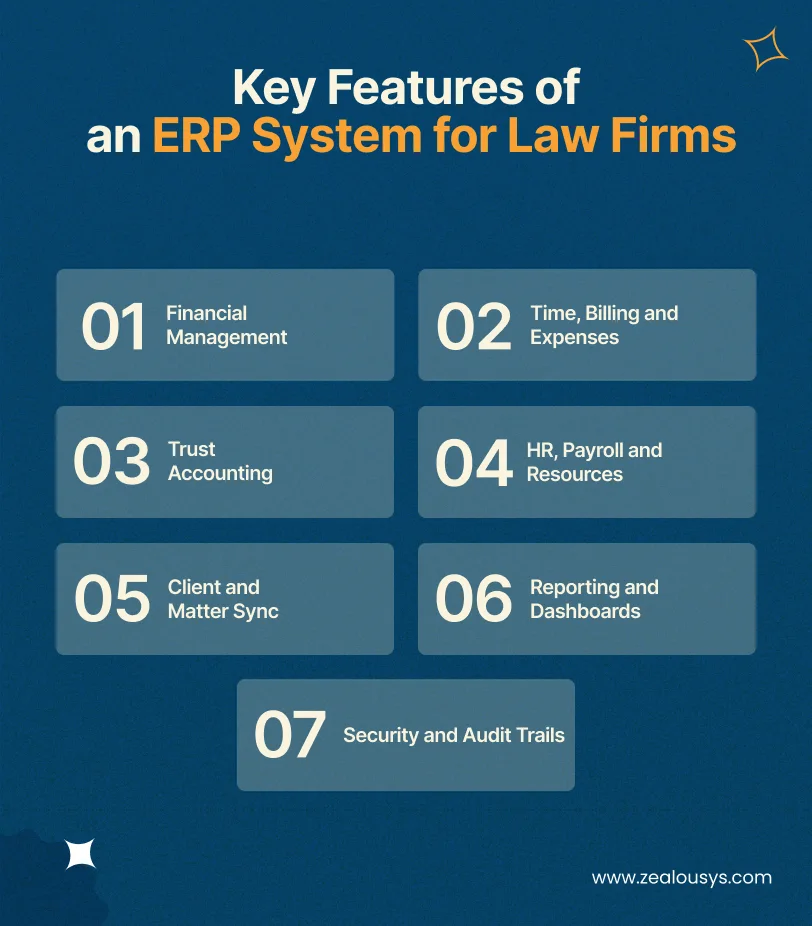
General ledger, accounts payable and receivable, budgeting and bank reconciliation live in one place. Firms with offices in several countries also need multi-entity and multi-currency support, so partners can see firm-wide and office-level results without finance merging spreadsheets.
Time and expense tracking feeds straight into invoices, whether the matter is hourly, fixed-fee, contingency or a blended arrangement. Many corporate clients require invoices in formats defined by the LEDES standards, so built-in e-billing output saves your billing team hours of reformatting and resubmission.
Client money is where mistakes carry regulatory consequences. According to the American Bar Association, IOLTA participation is mandatory in 45 states, DC and Puerto Rico for lawyers holding client funds. In England and Wales, the SRA Accounts Rules require client account reconciliations at least every five weeks.
Good legal ERP software keeps separate client ledgers, blocks payments that would overdraw an individual client balance and automates three-way reconciliation. Audit preparation then comes down to running a report and reviewing the exceptions.
Employee records, leave, payroll and staffing sit alongside the financial data they affect. Utilization rates by lawyer, team and office show who is overloaded and who has capacity, so resource allocation happens before deadlines slip.
ERP should not duplicate your matter management or document tools. It should share client and matter records with them, so billing, budgets and reports always match what fee earners see. If documents are a separate pain point, a dedicated legal document management software setup usually works better alongside the ERP than inside it.
Realization rates, work in progress, lockup, matter profitability and practice-area performance appear in live dashboards. Partners can drill from a firm-wide figure down to a single matter without asking finance for a custom export.
Role-based permissions, encryption, retention policies and full audit logs protect confidential client data. Firms serving clients in the EU or UK also need data residency options and processes that support GDPR compliant software.
Here is what an ERP system for law firms changes in day-to-day operations.
How much of this you see depends on data quality, user adoption and how well the system fits your workflows. Software alone does not fix a broken process.
An ERP system for law firms makes the clearest difference in the situations below, which are usually where firms feel the strain first.
| Situation | What Goes Wrong | What Changes With ERP |
|---|---|---|
| Multi-office management | Each office reports financials differently | Consolidated reporting with shared approval workflows |
| Billing and collections | Time, expenses and invoices don’t align | Connected billing with receivables tracking by client and partner |
| Resource planning | Partners can’t see team capacity across matters | Live workload and utilization views |
| Financial planning | Profitability is hard to compare by practice area | Practice-level dashboards and budget tracking |
| HR and administration | Staff and expense data entered twice | Integrated employee and finance records |
| Compliance oversight | Inconsistent access and approval controls | Permission rules, approval chains and audit logs |
Matter-specific work such as deadlines, court calendars and document drafting usually stays in dedicated legal software connected to the ERP.
This is where many buying decisions go wrong. Firms often shop for an ERP when their real problem is matter management, or keep adding practice management add-ons when the gap is firm-wide finance and staffing.
| Criteria | ERP System | Legal Practice Management Software |
|---|---|---|
| Primary focus | Firm-wide business operations | Matters and daily legal workflows |
| Financial management | Full accounting and business reporting | Mostly legal billing and matter finances |
| HR and resources | Built in | Limited or via integrations |
| Case and matter workflows | Needs integration or customization | Core capability |
| Best fit | Complex operations, several offices | Firms focused on matters, deadlines and documents |
Use this as a quick decision guide:
Still unsure? Ask your finance and operations leads which of these problems costs them the most time each month. Their answers usually point clearly to one column.
AI-powered ERP for law firms earns its place where there is plenty of structured financial data and lots of repetitive judgment calls. Legal research and drafting tools are a separate category, covered in separate guides on AI legal assistant development and AI agents in legal document management.
AI can review calendar entries, emails and document activity, then suggest time entries a lawyer simply approves. Unbilled time that would otherwise go unrecorded gets captured.
Models flag invoices that break client billing guidelines, show unusual write-downs or contain vague narratives before they go out. Fewer invoices get rejected by clients’ e-billing systems.
Historical payment patterns help predict which receivables will arrive late. Finance teams can chase the right clients earlier.
Partners can ask, “Which practice area had the lowest realization last quarter?” and get an answer without building a report.
Vendor invoices and receipts are read, coded to the correct matter and routed for approval automatically.
Financial actions still need human sign-off. Designing human-in-the-loop AI agents keeps people in control of approvals, and a private LLM for enterprise applications keeps client data inside your environment. Firms adding these features to an existing ERP usually do so through AI integration services rather than a full rebuild.
Feature lists look similar across vendors, so the best ERP software for law firms is usually the one that handles your firm’s day-to-day workflows with the fewest workarounds. These six checks show how to choose ERP software for a law firm without relying on a polished demo.

List every tool your firm uses for finance, billing, HR and reporting, and note where data gets re-entered. Those handoff points are where an ERP delivers the most value.
Separate what you need on day one from what can wait. Trust accounting and billing are rarely optional, while advanced forecasting can come in a later phase.
Confirm the system supports the trust accounting rules, data residency and retention requirements in every jurisdiction you operate in.
Ask vendors to run your actual billing cycle, trust reconciliation and partner report in a demo. Generic demos hide the gaps.
Licensing is only part of the bill. Add implementation, data migration, integrations, training and annual support over at least five years.
Find out who handles updates, regulatory changes and new integrations once the system is live, and how quickly they respond.
Most law firm ERP implementation projects that struggle do so for predictable reasons.
Years of client ledgers, invoices and employee records rarely move cleanly. Clean and validate data before moving it, and use structured data migration services for trust account history, where accuracy is non-negotiable.
The ERP must exchange data reliably with practice management, document and e-billing tools. Test every data flow before launch, ideally with support from experienced application integration services.
Define roles, ethical walls and approval paths before rollout, not after the first access complaint.
Fee earners resist anything that slows them down. Keep their screens simple and train each role on the tasks they actually perform.
Roll out in phases, starting with finance and billing, and run parallel checks on critical processes before switching off old systems.
A custom ERP system for a law firm typically costs between $30,000 and $350,000. The law firm ERP cost you plan for depends mostly on how many modules you need, what the system has to connect to and how much old data comes across.
| Project Size | Typical Cost | What You Get |
|---|---|---|
| Small build | $30,000 to $80,000 | One or two modules, such as billing and finance, linked to the tools you already use |
| Mid-size firm ERP | $80,000 to $150,000 | Finance, billing, trust accounting, HR and reporting in one system |
| Large or multi-office firm ERP | $150,000 to $350,000+ | Several offices or entities, AI features and large data migrations |
What pushes the price up or down:
Off-the-shelf platforms trade upfront build cost for recurring per-user licenses plus implementation fees, so compare costs over five years rather than year one. A detailed look at the cost to build software covers these factors further. An estimate built on your firm’s own modules and integrations will always be more accurate than a general range.
Custom ERP software for law firms suits some practices, not all. Most firms end up choosing between three routes.
| Route | Works Well When | Downside |
|---|---|---|
| Off-the-shelf ERP | Your processes match standard modules | You may need to change workflows or buy add-ons |
| Integrated software stack | Your existing legal tools already work well | More integrations to maintain |
| Custom ERP development | Your workflows or reporting needs aren’t served by existing tools | More planning upfront, and you own the upkeep |
Our build vs buy software guide covers this decision in more depth. Custom development usually makes sense when:
At Zealous System, our ERP projects keep pointing to the same lesson: data and adoption cause more trouble than code. For a US fresh produce company, we replaced two disconnected platforms with a single web-based ERP for the produce industry. The real work was migrating scattered legacy data, automating P&L and reconciliation reports, adding audit trails and role-based access, and running hands-on workshops so staff actually adopted it. Law firms moving off older finance and billing systems run into the same hurdles.
Legal operations are familiar ground as well. For an Australian legal services firm, we built an AI-based chatbot for law firms. It handles client queries and alerts the admin team when a client needs an expert. Our business intelligence solution for cloud accounting systems brought data from multiple accounting platforms into one planning and reporting environment.
If you are weighing custom ERP for law firms, our guide on how to build an ERP system walks through the process from discovery to rollout. Our ERP software development team is also happy to talk through whether it fits your firm.
Usually not. Firms with fewer than 20 lawyers and a single office are often well served by practice management software with built-in billing and trust accounting. ERP software for large law firms earns its cost when multiple offices, entities or complex staffing make firm-wide finance and reporting hard to manage.
It depends on how much you build and how much data moves across. A phased rollout often brings finance, billing and trust accounting live within three to six months. HR, advanced reporting and AI features usually follow in later phases, and large multi-office migrations take longer.
In most cases, yes. Integration depends on whether your current tools offer APIs, the data formats they use and any vendor restrictions. A technical review of your existing stack early on shows what can connect directly and what needs middleware.
Yes, and many firms do. The practice management tool keeps handling matters, deadlines and documents, while the ERP manages finance, HR and firm-wide reporting. The key is a reliable integration so client and matter data stay consistent across both.
An ERP system for law firms gives leadership what disconnected tools never will: one reliable view of finances, people and performance. The right choice depends on where your gaps sit. Practice management software, an off-the-shelf ERP, an integrated stack and a custom build each solve different problems.
Start by mapping your systems, testing vendors against your own workflows and comparing costs over several years. If your firm needs a platform built around how it really operates, the Zealous System team can talk through what you need and which route makes the most sense.
Our team is always eager to know what you are looking for. Drop them a Hi!

Pranjal Mehta is the Managing Director of Zealous System, a leading software solutions provider. Having 10+ years of experience and clientele across the globe, he is always curious to stay ahead in the market by inculcating latest technologies and trends in Zealous.


Comments