An AI agent should require human approval when an action is high-impact, hard to reverse, wide in reach, sensitive, or dependent on judgment that no tested rule can capture. Everything else, such as retrieving data, drafting content, or updating low-risk records, can usually run on its own with logging and monitoring. That one rule is the foundation of well-designed human-in-the-loop AI agents.
Applying that rule is where most teams get stuck. Once an agent can make tool calls, write to your CRM, send emails, or move money, the stakes change. Every new capability raises the same question in design reviews: does a person need to sign off on this?
Too few approvals and the agent does something costly that nobody can undo. Too many and you get a queue of requests people click through without reading. Many companies already sit at one extreme or the other. In McKinsey’s State of AI survey, 27% of respondents using gen AI said employees review all of its output before use. A similar share said 20% or less gets checked.
Human-in-the-loop AI agents work best when oversight is assigned action by action rather than to the agent as a whole. So the real design question is which actions need a human, and how much human oversight each one deserves. This guide gives you the criteria, a decision matrix, and the design patterns to answer it.
“Human in the loop” covers several forms of AI agent human oversight, and picking the wrong one causes most of the friction teams run into.
| Control | When the Human Acts | What the Agent Does | Example |
|---|---|---|---|
| Human Approval | Before the action executes | Prepares the action, then waits | Authorizing a $10,000 vendor payment |
| Human Review | After the agent produces output, before it reaches anyone | Drafts; a person checks and sends | Reviewing a reply to an upset customer |
| Escalation | Only when the agent hits an exception | Hands the case to a person with full context | An insurance claim that matches no known pattern |
| Human Override | At any time | Keeps running until a person stops or reverses it | Halting a bulk update mid-run |
Approval is the most expensive control because it blocks execution, so reserve it for cases where a mistake costs more than the wait. Override should exist for everything. It’s your emergency brake.
Run each action through these five questions. You’re scoring the action, not the agent. The same agent might summarize a contract freely and still need sign-off before emailing it to a client.
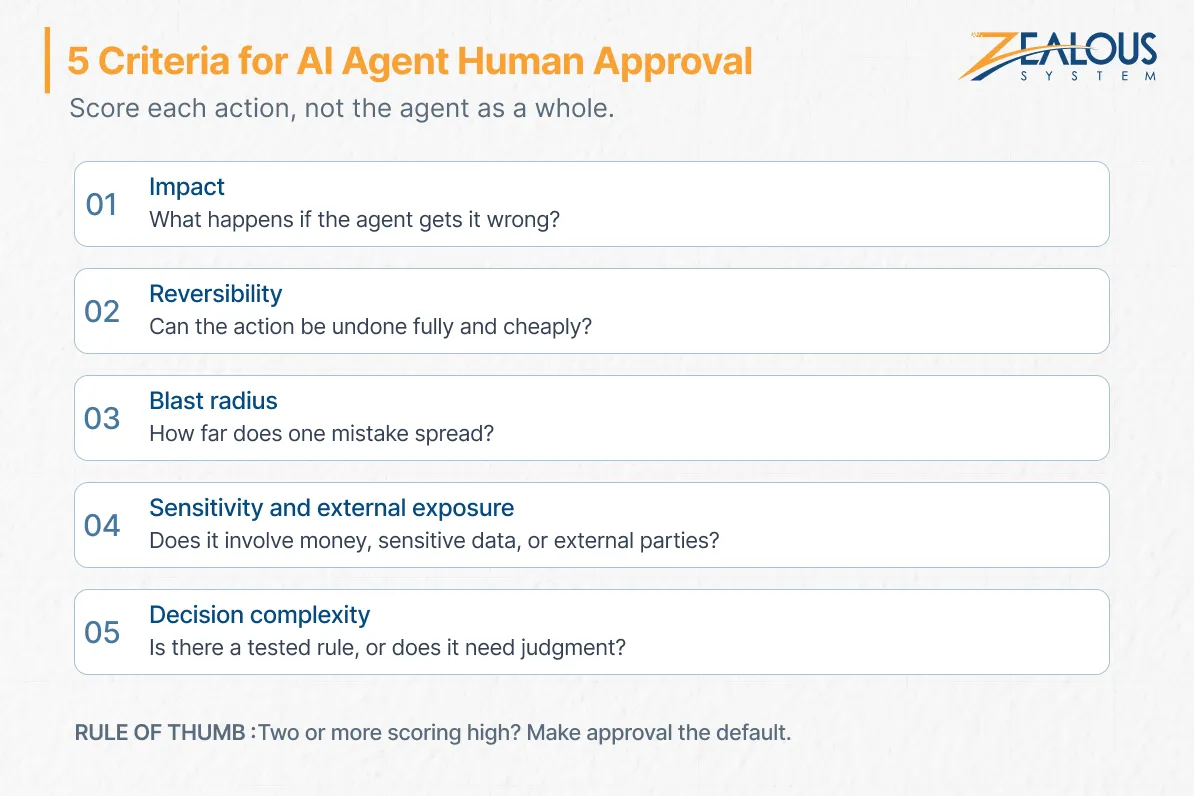
What happens if the agent gets this wrong? A misfiled support ticket costs a few minutes. A wrong credit limit, a mispriced quote, or an incorrect payroll entry costs money, trust, or both. Plan for the worst realistic outcome, not the average one.
Can you undo the action fully and cheaply? A CRM field can be restored from its change history. A sent email, an executed payment, or a deleted record without a backup cannot. The harder the undo, the stronger the case for approval before execution instead of review after it.
How far does a single mistake spread? Updating one record is contained. A bulk update across 40,000 customer accounts, a change to a shared pricing table, or a production configuration change can hit thousands of people before anyone notices. Agents act fast, so their errors scale fast too.
Does the action involve financial transactions, sensitive data, credentials, or external communications with customers, vendors, or regulators? Anything that leaves your company can’t be quietly fixed afterward.
Regulation raises the stakes here. Article 14 of the EU AI Act requires high-risk AI systems to be designed so people can effectively oversee them. That includes the ability to override an output or stop the system. It also says oversight should match the system’s risks, level of autonomy, and context of use, which is the same principle this guide applies.
For stand-alone high-risk uses such as credit scoring and employment decisions, those obligations now apply from December 2, 2027. The Digital Omnibus moved the date back from August 2026. If you’re working within a wider AI governance framework, this criterion is usually where legal and compliance teams want the most input.
Can the agent follow a clear, tested rule, or does the decision depend on context and judgment? “Refund orders under $50 if the item never shipped” is a rule. “Decide whether this long-standing customer deserves an exception” is judgment. Agents handle the first kind well. The second is where a person still adds something the model can’t.
Model confidence is missing from this list on purpose. A model can be confidently wrong, and a low-confidence answer on a harmless task carries little risk. Confidence thresholds work better as a runtime escalation trigger, covered in the design section.
Rule of thumb: the more consequential, irreversible, wide-reaching, sensitive, or judgment-heavy an action is, the stronger the case for human approval. When two or more criteria score high, make approval the default.
Here’s how AI agent human approval decisions play out across common actions in finance, customer service, IT, and operations. In every column, “High” means riskier.
| Agent Action | Impact | Hard to Reverse? | Blast Radius | Sensitivity | Needs Judgment? | Oversight Mode |
|---|---|---|---|---|---|---|
| Retrieve Internal Information | Low | Low | Low | Low | Low | Autonomous |
| Draft a Customer Email | Low | Low | Low | Medium | Low | Autonomous; a human sends it |
| Update a Single CRM Record | Low | Low | Low | Low | Low | Autonomous, with logging |
| Send a Sensitive Customer Communication | High | High | Medium | High | Medium | Review before sending |
| Process an Unusual Insurance Claim | High | Medium | Low | High | High | Escalation |
| Issue a Refund Above a Set Limit | High | High | Medium | High | Medium | Approval |
| Bulk Update Customer Records | High | Medium | High | Medium | Low | Approval |
| Change Production Configuration | High | Medium | High | Medium | Medium | Approval, with rollback |
| Grant Privileged System Access | Critical | Medium | High | Critical | Medium | Approval, plus an audit trail |
| Delete Business-Critical Records | Critical | High | High | High | Low | Approval, plus a second approver |
A few patterns are worth calling out:
Treat this table as a starting point. Your thresholds depend on your risk appetite, your regulators, and the agent’s track record.
Most of what a well-scoped agent does should need no sign-off at all. Human-in-the-loop doesn’t mean a human at every step.
Autonomous actions that usually run safely include:
Errors here are cheap, visible, and easy to correct. Keep logging and monitoring on so you can spot drift early. If a workflow is fully rule-based, it may not need an agent at all. Our comparison of agentic AI vs traditional automation explains where each one fits.
Every AI agent approval gate buys safety at a price. Ignore the price, and you get oversight that looks good on paper and fails in practice.
When reviewers see dozens of requests a day and nearly all of them are fine, they stop reading. Approval becomes a reflex. The EU AI Act even names this risk, automation bias, which it describes as the tendency to over-rely on a system’s output. A gate that gets clicked through gives you the cost of oversight without the protection.
Approvers have meetings, time zones, and weekends. A task the agent finishes in seconds can stall for a day in someone’s inbox. In customer-facing work, that delay can hurt more than the risk you were guarding against.
If people supervise every small action, the agent becomes a slow form with extra steps. Count approval overhead in your business case; our breakdown of the cost of agentic AI workflows covers where those costs come from.
An approve button doesn’t make an agent safe by itself. It needs guardrails around it. A gate is decorative when the reviewer can’t see what will change. It’s equally hollow when the agent’s permissions exceed its task, or another tool can reach the same outcome without approval.
Aim for the least human involvement that keeps risk acceptable, and set that target before launch, when it’s cheapest to design in.
When you build human-in-the-loop AI agents, good approval design brings the human in at the one moment that matters and does everything else before they arrive. This is especially important when deploying an AI voice agent to handle customer interactions, where routine queries can be managed autonomously while complex or sensitive issues are escalated to a human representative. In practice, the flow looks like this:
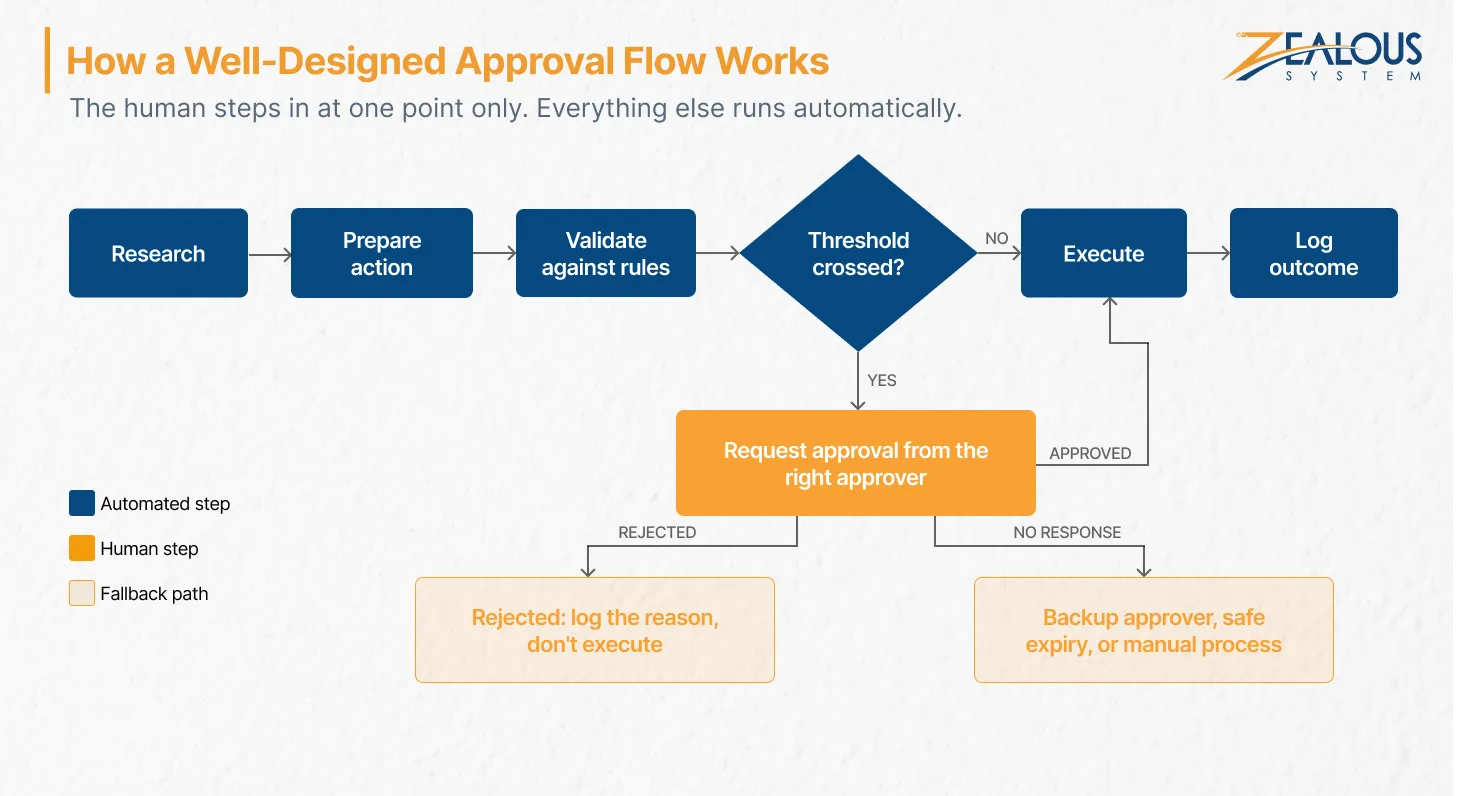
An agent that stops and waits while a person checks everything by hand burns the reviewer’s time. These patterns avoid that.
Start the agent in shadow mode or with narrow permissions, then widen its autonomy one category at a time as it proves accurate. Let the data decide when it earns more freedom. Track approval and override rates as you go. If reviewers approve nearly everything in a category, that threshold is ready to loosen.
This is the backbone of risk-based approval. Define triggers in configuration: dollar limits, record counts, data classes, external recipients. Deterministic thresholds are easy to audit and easy to adjust as the agent proves itself.
The agent builds the email, payment batch, or configuration change, and a person commits it. You keep most of the time savings while the risky step stays human.
When confidence drops, or a case looks unlike anything the agent has handled, route it to a person instead of letting it guess. Treat AI agent escalation as part of exception handling, and pass the full case context along so the person doesn’t start from scratch.
Finance controllers approve payments; platform engineers approve infrastructure changes. One generic queue for everything guarantees fatigue.
Show the reviewer exactly what will change, why the agent proposes it, which data it relied on, and what happens on rejection. Context is what turns a click into a decision.
Decide in advance what happens when nobody responds: escalate to a backup approver, expire safely, or fall back to a manual process.
Log every action, approval, rejection, and override with reasons. Keep a working stop control and, where possible, a rollback path.
Permission design matters as much as the approval flow itself. Our guide to AI agent legacy system integration explains how to scope what an agent can touch in older systems.
At Zealous System, approval design starts in discovery, well before launch. We map every agent action through one chain: action → risk → autonomy level → approval requirement → permissions → audit trail. That map shapes the workflows, integrations, security controls, approval interfaces, and monitoring we build.
Our AI fraud triage agent for a UK-based NBFC shows how this works in production. The client’s rule-based system generated more than 12,000 fraud alerts a month, and analysts spent 15 to 20 minutes gathering data for each one. We built an agent that enriches every alert and recommends closing it, sending it for review, or escalating it as high risk, with a plain-language explanation attached.
Analysts keep the final decision on uncertain and high-risk cases, and the client set zero tolerance for auto-closing genuine fraud. The agent ran in shadow mode first, then gained autonomy one low-risk alert category at a time. Manual alert reviews fell by 62%, and average resolution time dropped from about 14 hours to roughly 3, with every automated decision logged for audit.
Whether you need AI consulting services to define the risk map or an AI agent development company to build the full system, the same framework applies. Settle the agent’s approval boundaries first, then build around them.
Require approval when an action is high-impact, hard to reverse, wide in reach, sensitive, or judgment-heavy. Low-risk, reversible, rule-based actions can usually run autonomously with logging.
Human-in-the-loop AI is a design approach where people take part in an AI system’s decisions at defined points, by approving actions, reviewing outputs, or handling escalated exceptions. For human-in-the-loop AI agents, it means deciding which specific actions need a person and which can run on their own.
Actions that are both high-impact and hard to reverse: large payments, deletion of business-critical data, privileged access grants, production system changes, and regulated decisions about credit, insurance, or employment. Many teams require two approvers for the most critical of these.
Yes, for well-bounded tasks like retrieval, summarization, classification, drafting, and low-risk record updates. Keep logging, alerts, and a working override in place.
It can, when human approval for AI agents is applied broadly. Targeted approvals with clear thresholds, draft-then-commit workflows, and good reviewer context limit the delay to the few actions where the wait is worth it.
Our team is always eager to know what you are looking for. Drop them a Hi!

Pranjal Mehta is the Managing Director of Zealous System, a leading software solutions provider. Having 10+ years of experience and clientele across the globe, he is always curious to stay ahead in the market by inculcating latest technologies and trends in Zealous.


Comments