Healthcare CRM software is a purpose-built platform that helps hospitals, clinics, and health systems manage patient relationships, coordinate care, and handle communications, all while staying compliant with data privacy regulations like HIPAA.
Unlike a standard business CRM, it’s built around clinical workflows, patient data, and deep integration with systems like EHRs and billing platforms. If you’re evaluating whether to build one, buy one, or customize an existing solution, this guide covers everything you need to make that decision with clarity.
Managing patient relationships has always been at the heart of good healthcare. But for a long time, the tools available for doing that were either too generic or too fragmented. Hospitals used spreadsheets, outdated phone systems, and disconnected patient portals. Clinics juggled multiple software tools that didn’t talk to each other. The result? Missed follow-ups, poor patient experience, and significant revenue leakage.
Healthcare CRM software changes that. It brings patient communication, appointment scheduling, care coordination, and data management into a single, connected system. And as the healthcare industry continues to digitize, the demand for such platforms is growing fast.
Whether you’re evaluating vendors, planning a build, or trying to make sense of what your organization actually needs, this guide gives you the full picture: features, architecture, compliance, cost, and the build-vs-buy decision.
A healthcare CRM system is a relationship management platform built specifically for the healthcare industry. Patient data gets centralized, interactions across touchpoints get tracked, routine communications run on automation, and the whole thing integrates with electronic health records, billing tools, and clinical systems.
Unlike a general CRM designed for sales pipelines, it handles care journeys, medical histories, consent forms, referrals, and PHI with the security that HIPAA demands.
These three are often confused. Here’s a clear breakdown:
The EHR knows what happened clinically. The practice management system handles the money. The CRM handles the relationship.
Organizations that invest in healthcare CRM software consistently see improvements across operations, patient satisfaction, and revenue. The impact shows up in five specific areas.
Patients today have more choices than ever. If patients don’t hear from your practice after a visit, they may not come back. Automated follow-ups, appointment reminders, care gap alerts, and post-discharge check-ins help patients feel supported. Over time, that consistency builds loyalty that’s hard to replicate any other way.
Manual scheduling is slow and error-prone. A CRM with integrated scheduling can automate reminders, handle cancellations, fill open slots, and reduce no-show rates. For a busy clinic, even a small improvement in fill rate translates directly into revenue. Beyond that, staff spend less time on phone tag and more time on actual patient care.
When multiple providers are involved in a patient’s care, communication gaps can be dangerous. A healthcare CRM gives care teams a shared view of patient interactions, open tasks, and care plans. Everyone stays aligned, and nothing falls through the cracks.
Patients who feel engaged are more likely to pay their bills, show up for appointments, and stay within your network. Beyond engagement, a CRM can also flag patients due for preventive care, reducing costly late-stage interventions. In other words, the relationship layer has a direct line to the revenue line.
A healthcare CRM surfaces intelligence that EHRs alone can’t provide: which outreach campaigns worked, where patients are dropping off, and which care gaps need attention. That visibility helps leadership make faster, better decisions.
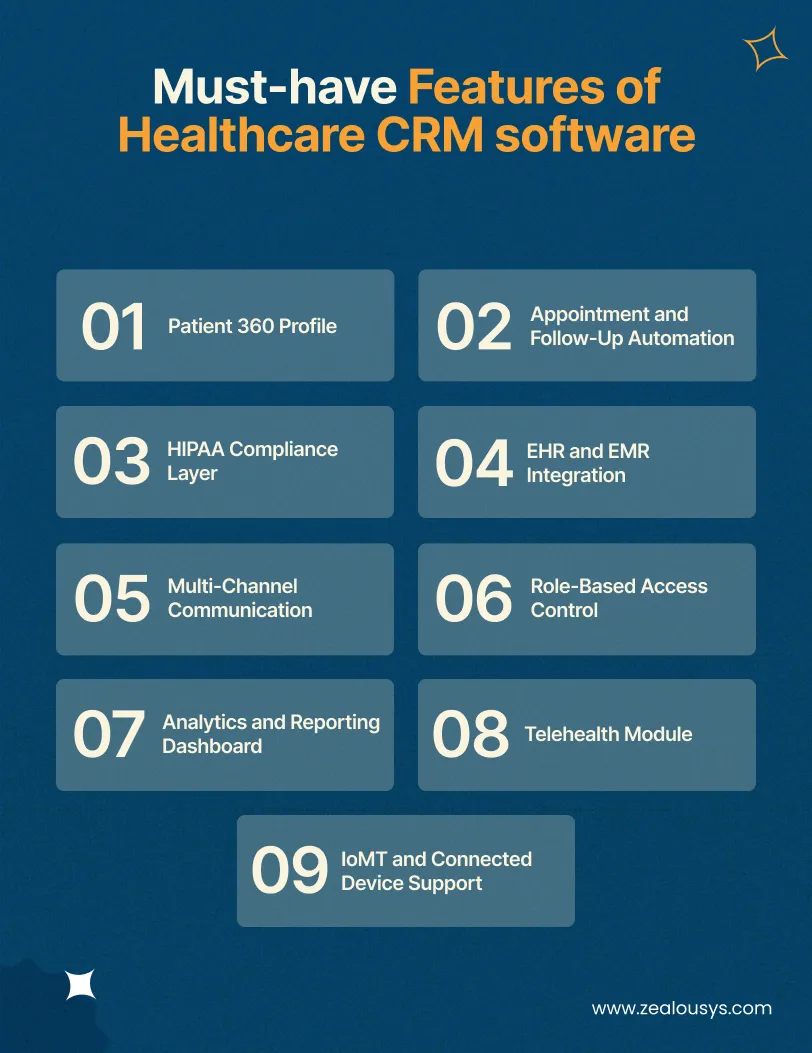
Not all features are created equal. Some are table stakes. Others add real differentiation. Here’s what a well-built healthcare CRM needs to do well.
Every patient should have a single, unified profile that pulls together their contact information, appointment history, communication preferences, insurance details, care team members, and interaction log. This is the foundation. Without it, everything else is disconnected.
The CRM should handle automated reminders via SMS, email, or voice. It should also trigger follow-up tasks after appointments, procedures, or lab results. The goal is to keep patients engaged without requiring your staff to manually initiate every interaction.
This isn’t a feature you add later. HIPAA compliance needs to be architected in from day one. End-to-end encryption, access controls, audit trails, and data handling policies that meet federal requirements are non-negotiable from the start, not retrofits.
A healthcare CRM that doesn’t connect with your EHR creates more work, not less. Bidirectional integration means patient data flows between systems without manual re-entry. FHIR-based APIs are the modern standard for achieving this.
Patients communicate differently. Some prefer text. Others want email or a phone call. Your CRM should support all channels and track interactions across each one. Unified communication history is critical for care continuity.
Not everyone in your organization should see everything. A nurse coordinator needs different access than a billing administrator. Role-based access ensures that users only see the data relevant to their function, which also reduces compliance risk.
A good analytics layer turns raw CRM data into usable insight. Patient satisfaction trends, campaign performance, appointment analytics, care gap reports, and staff productivity metrics should all be visible and exportable.
Post-pandemic, telehealth is a permanent part of the care delivery mix. A telehealth-ready CRM can schedule and track virtual visits, send video links, and maintain records of remote encounters alongside in-person ones.
Wearables, remote monitoring devices, and connected medical equipment generate real-time patient data. A modern healthcare CRM should receive that data, surface relevant alerts, and link device readings to patient profiles.
Architecture decisions made early determine how well your CRM will scale, integrate, and hold up under compliance scrutiny. Here’s how to think about each layer.
For internal-facing dashboards, React or Angular are widely used because of their component reusability and rich ecosystem. For patient-facing interfaces like portals, mobile apps, and scheduling tools, React Native or Flutter enables cross-platform development without duplicating codebases. WCAG 2.1 compliance should be a design requirement, not an afterthought.
Node.js, Python (Django or FastAPI), and Java (Spring Boot) are all solid choices. For medium-to-large organizations, a microservices architecture makes it easier to scale individual components, isolate failures, and maintain the system over time without wholesale rewrites.
Healthcare data is complex and sensitive. You’ll typically need a combination of:
All databases holding PHI must be encrypted at rest with a clear data retention and deletion policy.
The API layer connects your CRM to EHRs, billing systems, labs, pharmacies, and device platforms. For healthcare-specific data exchange, HL7 v2.x and FHIR R4 are the dominant standards. FHIR is the direction the industry is moving: it defines a standard format for health data exchange and is increasingly a hard requirement for U.S. health systems.
Many legacy hospital management systems still use HL7 v2.x, so your integration layer may need to handle both simultaneously. Tools like Mirth Connect, Azure Health Data Services, and AWS HealthLake help manage that complexity.
AWS, Azure, and GCP all offer HIPAA-eligible services. Azure is particularly popular in healthcare due to its enterprise ecosystem and health-specific services. Key considerations include multi-region deployment for redundancy, auto-scaling for peak loads, VPC network segmentation to isolate PHI environments, and cloud-native logging. On-premise deployments still exist for health systems with strict data residency requirements, but cloud-first is the default for most new builds.
Security in a healthcare CRM is a set of layered controls:
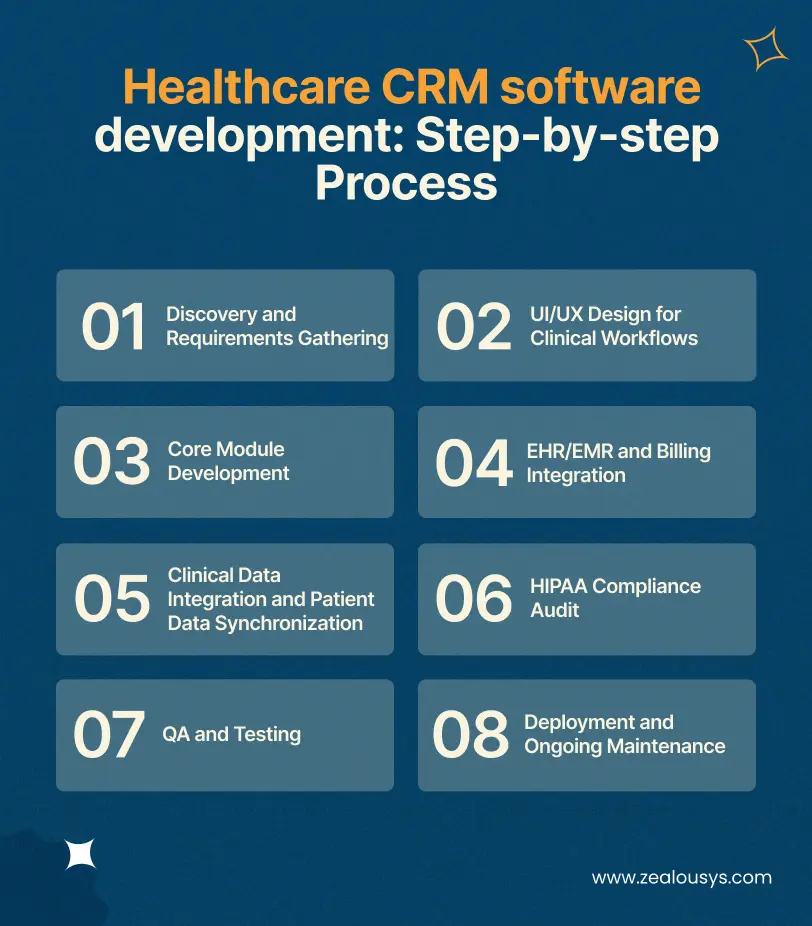
Building a healthcare CRM is not a single sprint. It’s a phased process that requires input from clinical, technical, and compliance stakeholders at every stage.
This is where most projects succeed or fail. You need to understand what the system needs to do, who will use it, and what it needs to connect with. That means interviewing clinical staff and administrators, mapping existing workflows, documenting integration requirements, and defining compliance needs. Rushing this phase is a common and costly mistake.
A confusing healthcare interface doesn’t just frustrate users. It can lead to errors. Design work should begin with clinical workflow mapping, and wireframes should be tested with actual end users before any code is written. Patient-facing interfaces need particular attention to clarity, plain language, and accessibility.
Development proceeds in modules: patient profile system first, then scheduling, communication, and analytics. Use a proper branching strategy and build automated unit, integration, and end-to-end tests for every module from the start.
This is typically the most technically challenging phase. EHR vendors vary enormously in API openness and documentation. Epic, Cerner (now Oracle Health), and Athenahealth all have different integration models. Plan for FHIR-based integrations where available, and always test thoroughly in a sandbox before connecting to production clinical data.
Beyond EHR integration, you may need data from labs, imaging systems, pharmacies, and connected devices. Bidirectional sync is often necessary: the CRM should write back to the EHR for certain events, not just read from it.
Before any live patient data touches the system, conduct a formal compliance review covering the technical architecture, data handling policies, and BAA verification for all third-party vendors. Build regular security reviews into your operational cadence from this point forward.
Healthcare software requires exhaustive QA across functional, integration, performance, security, and user acceptance testing. Bugs found after go-live in a healthcare setting are far more expensive to fix than bugs caught during QA.
Start with a pilot group, gather feedback, and iron out issues before full rollout. Plan for regular updates, compliance monitoring, staff training, and performance management. Healthcare software isn’t a build-it-and-forget-it product. Maintenance is a permanent commitment.
HIPAA compliance is the most non-negotiable aspect of healthcare software development. Getting it wrong isn’t just a technical failure. It’s a legal liability with significant financial penalties.
Protected Health Information (PHI) is any data that can be used to identify a patient in connection with their health status, care, or payment. This includes names, dates of birth, addresses, phone numbers, Social Security numbers, medical record numbers, and biometric identifiers. It also includes health data stored in your CRM: diagnoses, appointment records, communication logs, and insurance details.
Any system that stores, processes, or transmits PHI must comply with the HIPAA Privacy Rule and Security Rule.
The HIPAA Security Rule requires specific technical safeguards for electronic PHI (ePHI):
If any third-party vendor, cloud provider, or tool handles PHI on your behalf, they must sign a Business Associate Agreement (BAA). This is a legal contract that defines the vendor’s responsibilities for protecting that data. AWS, Azure, and GCP all offer BAAs for their HIPAA-eligible services. Any tool you integrate, including email platforms, analytics tools, and SMS gateways, needs one too.
Data flowing from IoMT devices to your CRM is PHI. The entire data pipeline, from device to gateway to cloud to CRM, must be secured and compliant. This includes encryption at every hop, device authentication, and access controls on the data once it arrives.
Cost varies significantly based on feature scope, integration complexity, and the team you’re working with. A few key factors drive most of the variance.
These are directional ranges, not quotes. Actual costs depend heavily on scope and team.
| Scope | Estimated Development Cost |
|---|---|
| MVP (core patient management, basic scheduling, one EHR integration) | $15,000 – $25,000 |
| Mid-tier (full feature set, 2-3 integrations, telehealth, analytics) | $25,000 – $50,000 |
| Enterprise (advanced analytics, IoMT, multi-system integration) | $50,000+ |
These figures assume a competent full-stack development team working over 6-18 months, depending on scope.
Development cost is only part of the picture. Factor in:
Building and deploying healthcare CRM software comes with a specific set of challenges. Knowing them in advance lets you plan around them rather than react to them.
Many hospitals run EHR systems that are 10-20 years old, with poorly documented APIs and vendors slow to support integrations. As a result, this is one of the most common friction points in the entire development process. Use an integration engine like Mirth Connect or Azure Health Data Services to translate between formats, and always build buffer time into the EHR integration timeline.
True interoperability is still a work in progress even with FHIR. Different systems implement the standard differently, and semantic interoperability, making sure “hypertension” in System A means the same thing in System B, is harder than it sounds. You can use established terminology standards (SNOMED CT, ICD-10, LOINC) throughout your data model and test with real partner data, not just synthetic records.
Migrating historical patient data from a legacy system means dealing with data quality issues, inconsistent formats, and incomplete records. Conduct a data audit first, build a dedicated ETL pipeline, and run parallel systems during the transition before cutting over.
The best-built CRM fails if staff don’t use it. Healthcare professionals are busy, and workflows that feel slow or awkward get worked around. Involve end users in the design process early, invest in change management alongside the technical build, and identify clinical champions who can advocate peer-to-peer for the new system.
HIPAA is the floor, not the ceiling. Build compliance as a continuous process. Design your system to be configurable enough to absorb new requirements without full rebuilds.
IoMT integration introduces device authentication challenges, data format diversity, and edge-case handling when devices go offline or send erroneous readings. Use an IoT middleware layer to normalize incoming data and build alerting logic with clinician input to avoid alarm fatigue.
This is one of the most practical decisions a healthcare organization or health-tech company will face. Neither path is universally better. The right choice depends on your specific situation.
Commercial healthcare CRM platforms like Salesforce Health Cloud, Microsoft Cloud for Healthcare, and Veeva CRM exist precisely because many organizations have similar needs. They offer:
If your requirements are relatively standard, say a mid-sized clinic wanting to improve appointment reminders, patient communication, and basic analytics, a commercial platform is worth serious consideration.
Custom development makes sense when:
Custom development gives you full control. You own the architecture, the data, and the roadmap. You’re not waiting for a vendor to prioritize a feature you need. But it requires more upfront investment, a capable development team, and a long-term commitment to maintenance.
Many organizations start with a commercial platform and customize it heavily. This works when the base platform is extensible enough to absorb customization, but it can create technical debt if those changes outgrow what it was built to support.
| Situation | Recommendation |
|---|---|
| Standard use case, limited technical resources | Off-the-shelf |
| Moderate customization needs, existing vendor relationship | Customized off-the-shelf |
| Specialized workflows, health-tech product, scalability goals | Custom development |
| Tight budget, short timeline, standard integrations | Off-the-shelf |
| Complex multi-system integration, proprietary data model | Custom development |
Healthcare CRM software serves a wide range of organizations. The use cases below show how different types of healthcare businesses put it to work.
Large hospitals use CRM platforms for patient acquisition, discharge follow-up, and care gap management. A cardiology department, for example, might identify patients overdue for follow-up after a cardiac event, automatically reach out, and track re-engagement. At scale, that kind of proactive outreach has a measurable impact on readmission rates.
Specialty practices in orthopedics, oncology, fertility, and behavioral health have longer patient journeys with multiple touchpoints. For an oncology clinic, a CRM might track treatment phases, automate milestone-based follow-ups, and coordinate across the multidisciplinary team.
Telehealth providers live entirely in the digital channel. Their CRM needs to handle scheduling, video visit coordination, post-visit follow-up, and multi-state compliance, often within a single unified interface.
Home healthcare agencies use the CRM as their operational backbone: scheduling home visits, tracking caregiver assignments, managing family communications, and reporting outcomes to payers. IoMT integration is particularly valuable here, where remote monitoring devices provide health data between visits.
Organizations running remote monitoring programs use CRM software as the interface between device data and care teams. A patient with congestive heart failure wears a continuous monitoring device. The data flows into the CRM, the system flags a concerning pattern, and a care coordinator calls the patient before they end up in the emergency room. This is real-time patient monitoring delivering genuine clinical value, and it’s one of the most consequential applications of connected medical devices in modern care.
An EHR is the clinical system of record. It captures diagnoses, medications, lab results, and treatment plans. A healthcare CRM manages the relationship and communication layer: appointment scheduling, patient outreach, engagement tracking, and care coordination. They’re complementary, not competing, and should integrate with each other.
It can be, if it’s built correctly. HIPAA compliance isn’t automatic. It requires specific technical safeguards (encryption, access control, audit logging), administrative policies, and Business Associate Agreements with all vendors who handle PHI. A custom-built CRM gives you full control over compliance architecture, but it also means full responsibility.
A well-scoped MVP typically takes 6-9 months. A full-featured platform with complex integrations, advanced analytics, and IoMT support can take 12-18 months or more. The timeline is heavily influenced by EHR integration complexity and how mature your requirements are at kickoff.
Rough estimates range from $15,000 to $50,000+, depending on scope. See the cost section above for a full breakdown by tier.
FHIR (Fast Healthcare Interoperability Resources) is a modern standard for exchanging health data between systems. It uses RESTful APIs and standardized formats, making integrations with EHRs, labs, and clinical systems far cleaner than older HL7 v2.x approaches.
Yes, but it requires deliberate architecture work. IoMT devices generate continuous data streams in various formats. Your CRM needs an integration layer that can receive, normalize, and process that data, then connect it to the right patient profile. Data from connected medical devices is PHI and must be handled accordingly.
If your use case is standard, a commercial platform will get you there faster and cheaper. If you have complex workflows, specialized integrations, or you’re building a product to sell, custom development gives you the control you need. Many organizations land somewhere in between.
Healthcare CRM software is not a plug-and-play solution. It takes real planning, the right architecture, serious attention to compliance, and a clear-eyed view of how your clinical workflows actually operate. Organizations that get this right end up with a system that genuinely improves patient engagement, reduces care gaps, and gives teams the visibility they need to act quickly and confidently.
The technology side is only part of the equation. Whether you build custom or go with an existing platform, the outcome depends on how well the solution fits your specific workflows, your integration landscape, and your long-term goals. Working with an experienced healthcare software development company makes a meaningful difference at every stage, from scoping and architecture to HIPAA compliance and post-launch support.
At Zealous System, we work with healthcare organizations and health-tech teams to think through exactly these decisions. If you have questions about where to start, feel free to reach out for an open conversation.
Our team is always eager to know what you are looking for. Drop them a Hi!

Ruchir Shah is Technology Head at Zealous System with hands-on expertise in AI/ML, Microsoft Azure, .NET, Node.js, Python, React, and Angular. He leads enterprise software development, champions digital transformation, and mentors developers building the future of intelligent apps.


Comments