You launched your site on WordPress because it was fast to set up and easy to manage. It handled your early content needs without forcing you to write everything from scratch. For many startup founders and SaaS teams, that choice worked perfectly at the beginning.
Growth shifts everything. Traffic climbs. Workflows turn complex. Suddenly, the same platform that felt lightweight now requires constant tweaks and extra plugins just to keep up. You start wondering whether WordPress still fits your business or if it has quietly become the bottleneck.
The question surfaces for CTOs, product managers, and e-commerce owners every day: when should you upgrade WordPress to Laravel? The answer depends on where your platform stands right now and where you plan to take it next.
This guide walks you through the exact signs that it is time to consider the switch. You will find a clear comparison between the two approaches, the real considerations during migration, and practical steps that make the move smoother. What comes next should help you make that call with clarity, not just guesswork.
WordPress earned its place as the go-to choice for many early-stage projects. It lets you launch quickly with ready-made themes and plugins. You handle content updates yourself without needing a developer on speed dial. The large community means fixes and features stay within reach.
That early success hides the cracks that appear as your business grows. Here is where WordPress starts to hold you back:
These issues push many teams to ask the same question. Is it time to upgrade WordPress to Laravel? The CMS still suits simple content sites. But for scalable web applications with intricate business logic, the limitations become too costly to ignore.
You know your business better than anyone. When certain frustrations keep showing up week after week, they are not random glitches. They signal that WordPress has reached its limits for your specific needs. Spotting these signs early helps you avoid months of wasted effort and mounting costs.
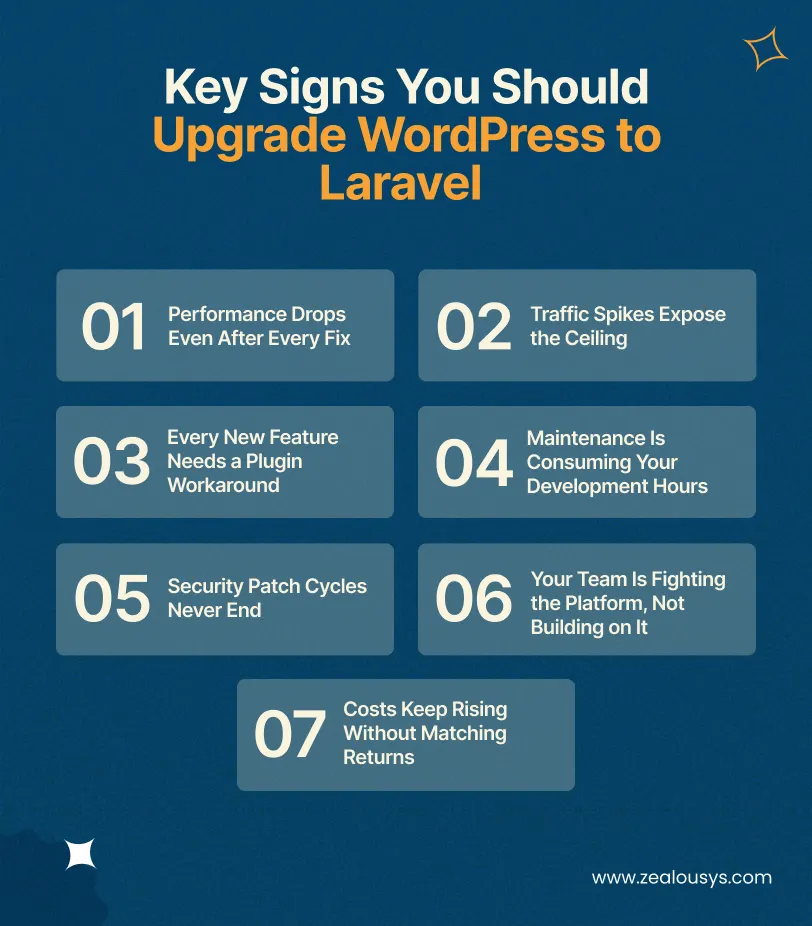
Here are the clearest indicators that it may be time to upgrade WordPress to Laravel.
Your site slows down noticeably even after caching plugins, CDN tweaks, and database cleanups. Visitors wait longer for pages to load, and your team notices the admin dashboard dragging during peak hours.
Traffic spikes cause downtime or force expensive server upgrades that still do not solve the root problem. WordPress scalability issues become obvious when basic caching tricks no longer deliver consistent performance.
Custom features require endless plugin workarounds or heavy custom code that breaks with every core update. Real estate portals needing advanced search filters or fintech platforms handling secure transactions hit these walls quickly.
Application maintenance eats up more developer hours than actual feature building. You spend time patching plugins and fixing conflicts instead of moving your product forward.
Security worries start creeping in because even one outdated plugin can put your customers’ data at risk. And before you know it, keeping everything updated feels like a full-time job instead of something that just runs in the background.
Your development team complains that adding new business logic feels like fighting the platform instead of working with it. Simple requests turn into complicated hacks that no one wants to maintain later.
Your hosting costs, premium plugins, and those last-minute fixes keep getting more expensive but your revenue and capabilities aren’t really growing at the same pace.
These signs rarely appear overnight. They build gradually until the pain outweighs the comfort of staying on a familiar system. When you recognize several of them in your own setup, the conversation naturally shifts toward custom web development solutions that can actually support where your business is headed next.
Laravel stands out as a full-featured PHP framework built specifically for modern web applications. It gives you the structure and tools that WordPress simply cannot match once your needs move beyond basic content management. For teams dealing with complex workflows or rapid growth, it shifts the focus from fighting the platform to building exactly what your business requires.
Laravel handles high traffic and complex operations without the constant tweaks that WordPress demands. Its efficient routing, caching layers, and queue systems let you process heavy workloads smoothly.
You avoid the database bottlenecks and plugin overload that slow down growing SaaS platforms or marketplaces. This makes Laravel the practical choice for scalable web applications that need to expand without breaking.
The framework follows a clear MVC pattern and offers powerful tools like Eloquent ORM and built-in authentication. You build custom features directly instead of layering plugins that conflict or slow your site.
This architecture benefit removes the guesswork and maintenance headaches common in WordPress setups. For startups and SMEs with unique business logic, it turns custom web development solutions into something reliable that your team can actually build on as requirements grow.
Laravel includes protections against common vulnerabilities right from the start, such as CSRF guards and secure password handling. Updates happen at the framework level rather than chasing dozens of third-party plugins.
Your team spends less time on emergency fixes and more time on actual product improvements. This reliability matters especially for fintech or real estate platforms where data protection is non-negotiable.
Modern PHP practices in Laravel speed up building advanced functionality like real-time updates or intricate user permissions. Developers work with clean, testable code instead of hacking around CMS limitations.
The result is shorter timelines for new features and lower long-term costs compared to constant WordPress customizations. This is why many teams choose to upgrade WordPress to Laravel when they outgrow the CMS model.
Choosing between the two platforms becomes clearer when you look at how they handle real-world demands. WordPress gives you speed and simplicity for basic sites, but it shows strain as features multiply. Laravel offers a structured framework designed for applications that must grow without constant compromises.
This side-by-side view highlights exactly where each approach fits your needs and why many teams eventually consider upgrading WordPress to Laravel.
| Aspect | WordPress | Laravel |
|---|---|---|
| Ease of Initial Setup | Fast launch with themes and plugins | Requires development setup but offers a clean foundation |
| Scalability | Limited by plugins and database load | Built for high traffic and complex operations |
| Performance for Large Sites | Slows under heavy load without constant server-level tuning | Efficient routing and caching deliver consistent speed |
| Customization Flexibility | Relies on plugins or custom code hacks | Full control through MVC architecture and custom logic |
| Security | Depends on frequent plugin updates | Built-in protections reduce common vulnerabilities |
| Maintenance Effort | High due to plugin conflicts and updates | Lower long-term effort with framework-level updates |
| Best For | Content sites and simple e-commerce | SaaS platforms, marketplaces, and complex workflows |
The table shows why custom Laravel development vs WordPress becomes a serious discussion once your business moves past basic content delivery. WordPress works well early on, yet its limitations for growing businesses push teams toward the framework when performance and flexibility matter most. This comparison helps you decide whether to stay or move forward with confidence.
Shifting your platform from WordPress to Laravel marks an important milestone. It gives you the custom to control your growing business needs, but it also requires thoughtful planning to keep everything running smoothly. You want to protect your existing data, control costs, and avoid unnecessary downtime.
Here are four key considerations to keep in mind before you upgrade WordPress to Laravel:
Every post, page, media file, and user record needs to move without loss or duplication. Miss one mapping step, and you are chasing corrupted data after launch. A clear process between the old WordPress database and your new Laravel structure prevents that from happening.
The cost to move from WordPress to custom Laravel development varies more than most teams expect. The final number depends on your site’s size, the features you want to rebuild, and how much legacy logic needs untangling. Factor in development time, testing phases, and ongoing integrations early. Set expectations that match your actual resources, not an optimistic estimate.
Laravel works best when your developers genuinely understand modern PHP frameworks. Check that honestly. If your current team has been deep in WordPress for years, it is worth considering whether to hire Laravel developers specifically for the transition rather than stretching a WordPress-focused team beyond their comfort zone.
Search rankings and visitor flow should stay stable throughout the process. One missed redirect can quietly undo months of SEO work. Proper URL mapping, thorough testing, and a phased rollout make sure users experience only the improvements.
These considerations turn the migration into a controlled project instead of a risky leap. They help you focus on what matters most for your specific workflows and long-term scalability.
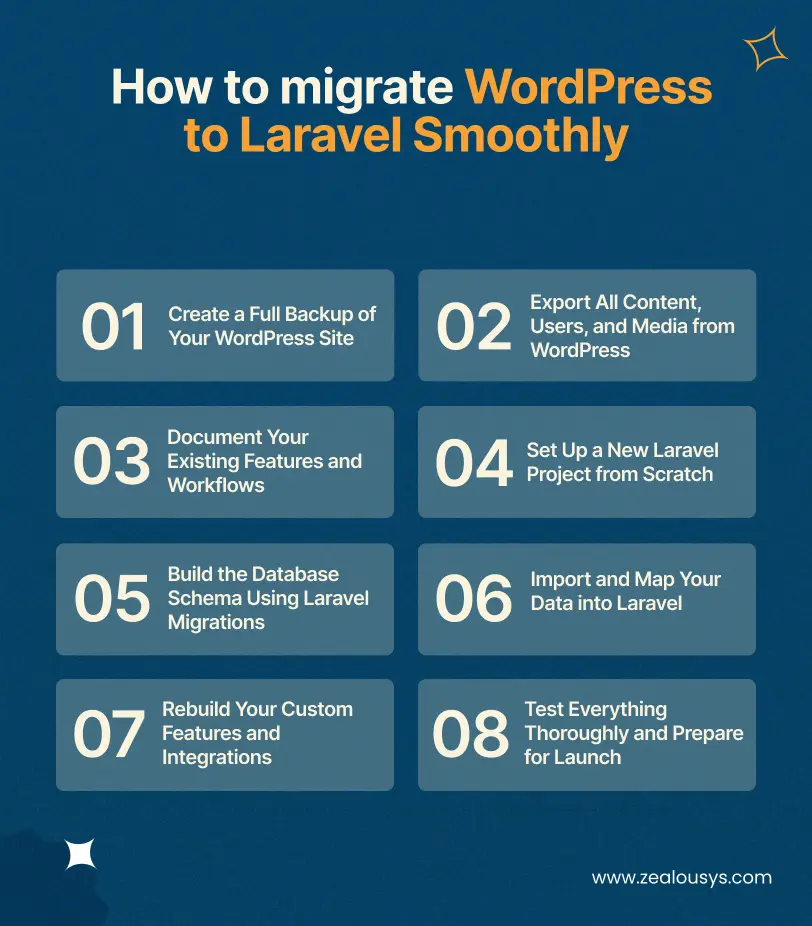
Moving your site from WordPress to Laravel does not need to feel like a massive disruption. With the right sequence of actions, you protect your data and keep your team focused on what matters most. These eight clear steps guide you through the process so the transition stays controlled and your business keeps moving forward.
The first step is to capture everything exactly as it stands right now. Use a reliable backup plugin to save your database, all media files, themes, and plugins into a single secure archive. Store copies both locally and in the cloud so you always have a safe restore point if anything unexpected happens during the move.
Next, pull out your actual data in a structured format. Run the built-in WordPress export tool for posts, pages, and comments, then use a database export for users and custom tables. Download every media file separately and organize them by folder so nothing gets lost when you bring them into Laravel later.
In this step, sit down with your team and list every custom function your site currently performs. Note how user permissions work, what search filters you rely on, and any third-party integrations that handle payments or inventory. This clear record becomes your blueprint for rebuilding the same capabilities in Laravel without missing a single requirement.
Now it is time to start fresh on the Laravel side. Install a clean Laravel application on your development server, configure the environment file, and connect it to a new database. Run the initial migrations so the framework is ready to accept your data and logic.
The next action focuses on recreating your data structure properly. Create Laravel migration files that match the tables and relationships you documented earlier. Use Eloquent models to define how content, users, and custom entities will connect in the new system.
Here, you bring your exported WordPress content into the Laravel environment. Write simple scripts or use Laravel’s seeder classes to transfer posts, users, and media while mapping old fields to the new models. Run validation checks after each batch to confirm that every record arrived correctly and no information was altered.
The last step before testing is to develop the functionality your business actually needs. Code the advanced search, user roles, or real-time updates directly in Laravel using its clean architecture instead of plugins. Connect any external services again so everything works exactly as it did before, only faster and more reliably.
Finally, run complete tests on the new Laravel site. Check every page, form, and workflow under both normal and high-traffic conditions. Once you confirm performance and functionality match or exceed the old version, schedule a low-impact cutover with proper redirects so visitors experience zero downtime.
These steps give you a practical path to upgrade WordPress to Laravel without unnecessary risks. Each one builds on the last, so you stay in control from backup to live launch.
These three cases reflect the kinds of migrations we have worked through with clients across different industries. The details have been kept general to protect confidentiality, but the challenges and outcomes are drawn from real projects.
A SaaS company that started with WordPress for its marketing site and early product prototype eventually needed proper multi-tenancy, where each client’s data is isolated, their admin experience is customized, and their usage is metered for billing purposes.
WordPress had no clean way to model this. The migration to Laravel allowed them to design a proper tenant isolation architecture, integrate with a payment processor for subscription billing, and build a client-facing dashboard that matched their actual product requirements.
A real estate marketplace built on WordPress with a property listing plugin outgrew the plugin’s capabilities as their listing volume grew and their search requirements became more complex. Filtering by multiple attributes, geolocation-based search, and agent dashboards with performance metrics.
Each new requirement required another plugin or a custom workaround. Moving to Laravel meant building a proper property data model, a custom search layer, and a role-based system for agents, agencies, and administrators. Performance improved significantly because the queries were designed for the actual data structure.
A B2B e-commerce business had pricing logic that WooCommerce simply could not handle. Customer-specific pricing tiers, volume discounts, contract-based pricing, and multi-currency support.
The WooCommerce extension ecosystem had partial solutions for each requirement, but they did not work well together. A custom Laravel application with a purpose-built pricing engine handled all of it cleanly, and the development team could actually reason about how the pricing logic worked.
WordPress is not a bad tool. It is simply the wrong tool for certain jobs once your product has outgrown the CMS. If your business has reached the point where custom requirements outpace what plugins can handle, sticking with it creates compounding technical debt. That debt slows your product development and raises risks you do not need.
The choice to upgrade WordPress to Laravel comes down to one practical question. Can your current platform support the next stage of your growth? The signs tend to stand out once you look closely: plugin limitations, performance ceilings, and workflows that no longer fit the CMS model. Your team ends up spending more time managing the platform than building the features your customers want.
Migration takes real effort. It calls for careful planning, the right resources, and the right people. Some teams choose to hire Laravel developers for the build while keeping their existing WordPress developers focused on maintaining the current site during the transition period. That parallel approach reduces risk and keeps both sides moving without bottlenecks. When you do it right, you lift the ceiling on your product and hand your team the tools to move forward without constant workarounds.
At Zealous System, we have worked with SaaS founders, CTOs, and product teams navigating exactly this decision. If you are evaluating whether migration makes sense for your platform, a thorough technical audit is the right starting point before any other decision is made.
For most SaaS applications, yes. WordPress is a content management system and does not provide the application architecture that SaaS products typically need. Multi-tenancy, subscription billing, role-based access control, and complex API integrations are all significantly easier to build correctly in Laravel.
It depends heavily on the complexity of your current setup. A relatively simple content site with limited custom functionality might take 6-10 weeks. A complex platform with custom integrations, large data volumes, and active users could take 4-6 months or longer. Proper planning and a realistic timeline are more important than speed.
Cost varies widely based on scope, developer rates, and complexity. The upfront development investment is higher than maintaining WordPress, but the long-term maintenance costs of a well-built Laravel application are typically lower. Avoid any estimate that does not start with a proper audit of your current setup.
Yes. Your content can be migrated through export scripts and database migration tools. The content itself transfers; the structure it lives in changes. A well-planned migration preserves your content, user data, and media files.
In most cases, yes. Because WordPress and Laravel have fundamentally different architectures, a direct port is rarely possible or advisable. The migration is an opportunity to rebuild with proper design, not just replicate what was already there.
When your development team spends more time working around WordPress than building on it. When your performance requirements exceed what WordPress can reliably deliver. When your business logic is too complex for a CMS to handle cleanly. These are not arbitrary thresholds. They are signs that your platform architecture is no longer aligned with your product needs.
That depends on your timeline and the complexity of your current setup. If you need to move quickly or your platform has significant custom logic, it is usually faster to hire Laravel developers who already know the framework well. Your existing WordPress developers remain valuable during the transition for maintaining the current site and helping document existing functionality. For smaller migrations with more time available, upskilling your current team is a viable path, though it adds to the overall timeline.
Our team is always eager to know what you are looking for. Drop them a Hi!

Raj Kewlani is a Project Manager and Mobile & Open Source Development Lead at Zealous System, specializing in agile-driven digital solutions. He focuses on delivering high-quality mobile apps and open-source projects that align with business goals.


Comments