Custom construction project management software is a purpose-built digital platform designed around the specific workflows, compliance requirements, and operational needs of a construction business. It’s built around how you work, not the other way around.
For Australian builders, that means software that handles SWMS and WHS Act compliance, integrates with Xero, manages RFIs and variations across multiple active sites, and aligns with the Security of Payment Act across NSW, VIC, and QLD. All in one place.
The cost to build custom construction software in Australia typically ranges from AUD $20,000 to $150,000+, depending on scope, features, and whether you need mobile, web, or both. This guide breaks down exactly what goes into that figure and what you get for it.
If you’re running a mid-to-large construction firm across New South Wales, Victoria, or Queensland, you’ve probably already looked at custom construction project management software and wondered whether the investment makes sense for your business. Maybe the licensing costs have grown beyond what the ROI justifies. Maybe the platform does too much in some areas and not enough in others. Or maybe your subcontractors keep ignoring the portal because it’s just too complicated.
Off-the-shelf platforms weren’t built for Australian compliance. They weren’t built for your subcontractor relationships, your variation approval process, or the way your site supervisors actually work. They were built for a global average, and you’re not average.
This blog is for builders, developers, project managers, and operations leads who are seriously evaluating whether custom construction project management software makes more business sense than another subscription to something that almost fits. We’ll cover what custom software actually is, what it needs to include, how much it costs to build, and how to approach the development process without wasting six months and a significant budget.
Custom construction project management software is a platform built specifically for your business: your workflows, your team structure, your compliance obligations, and your reporting needs. This is what custom software development for construction companies actually means in practice, not a product that gets configured, but one that gets designed from scratch around how your business runs.
It’s not a white-labelled product with your logo on it. It’s not Procore with some fields renamed. It’s software that starts with how you actually run projects and builds the technology around that.
At a basic level, it handles what any project management tool handles: scheduling, task assignment, document control, and budget tracking. But a custom build for the Australian construction market goes further. It incorporates SWMS management, WHS Act compliance documentation, Security of Payment Act workflows, Xero or MYOB integration, and RFI and variation tracking that actually reflects how Australian contracts work.
The core difference between custom and off-the-shelf comes down to fit. A bespoke system reflects your processes from day one. Off-the-shelf tools require you to change your processes to match theirs, and in a compliance-heavy industry like construction, that trade-off has real consequences.
The Australian construction industry has a compliance landscape that most global software vendors don’t account for by default.
Under the Work Health and Safety Act 2011 (harmonised across most states), principal contractors and builders must manage Safe Work Method Statements for high-risk construction work. A platform that doesn’t natively support SWMS creation, approval, and site-level version control isn’t a platform you can actually rely on for compliance. This isn’t a feature gap you can work around with a shared drive.
NSW operates under the Building and Construction Industry Security of Payment Act 1999. Victoria has its own version. So does Queensland. Each has different timeframes for payment claims, schedules, and adjudication processes. If your software doesn’t reflect these state-specific rules, your payment team is still doing that work manually somewhere else, and the risk of a missed timeframe sits with them.
Managing three concurrent projects in Greater Sydney, two in regional Victoria, and a commercial build in Brisbane isn’t just a scheduling challenge. It’s a data visibility challenge. Who has sight of variations being raised across all five sites at once? Which subcontractor compliance documents are expiring this week? Off-the-shelf tools handle this with dashboards that aggregate data you’ve already entered correctly. Custom software can be built so that the right data surfaces to the right person without anyone chasing it.
Most small-to-mid Australian construction firms run their accounts through Xero. When your project management platform and your accounting software don’t talk to each other, someone is manually reconciling job costs, invoices, and variations every week. Custom software with a proper Xero integration via the Xero API eliminates that entirely.
The way Australian head contractors manage their subcontractor panels, including inductions, insurances, licences, compliance documents, and payment claims, doesn’t map neatly onto tools built for the US or UK market. Custom subcontractor management software built for Australian builders can reflect the actual structure of those relationships from the ground up.
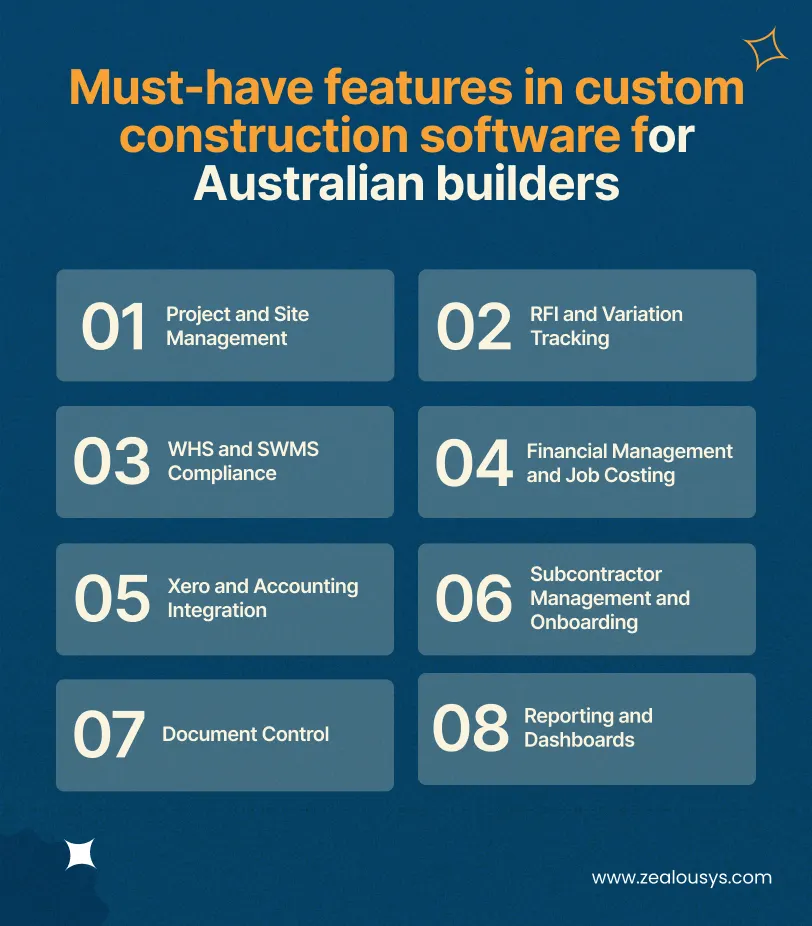
When scoping a custom build, feature decisions should come from the work, not from a feature checklist you found online. That said, there are core capabilities that consistently appear in well-built platforms, whether you’re looking at residential builder software for Australian operations or a multi-site commercial management system.
This section goes into deliberate depth. Features are where the build vs buy decision gets practical, and each capability below represents a real workflow decision that affects what gets built, how long it takes, and what it costs. Skimming this section is fine; coming back to it when you’re scoping is better.
The foundation of any construction management platform is the ability to track what’s happening across every active project. For multi-site construction management, this means a central dashboard with live status per project, Gantt-style scheduling with dependencies, task assignment down to trade level, and daily site diary functionality that site supervisors can fill in from a mobile device.
The mobile component matters more than most buyers initially think. If your site super has to go back to the office to log an issue, they won’t log it. A good mobile construction management app lets them photograph, annotate, assign, and close out issues in the field, with or without mobile signal, syncing when connectivity is restored.
RFI management and variation tracking are areas where generic project management tools consistently fall short. In Australian construction, a variation isn’t just a change order. It’s a formal document that may affect contract value, programme, and payment claims. Custom software can build the exact variation approval workflow your contracts require, including multi-tier approvals, time-stamped audit trails, and automatic notification to relevant parties.
The same applies to RFIs. When an RFI sits unanswered, it can stop work on site. A custom system can be built to escalate overdue RFIs, track response timeframes against contractual obligations, and give your PM a live view of what’s outstanding at any given moment.
Construction compliance software for Australian builders needs to handle more than document storage. It needs to manage the entire lifecycle of a Safe Work Method Statement: creation by the subcontractor or supervisor, review and approval by the principal contractor, site-level acknowledgement by workers, and version control when conditions change.
Beyond SWMS, a well-built system covers induction records, incident reporting, toolbox talk logs, and expiry tracking for subcontractor licences and insurance certificates. When a labour hire worker’s white card can’t be verified on site, the right system surfaces that before they set foot on the project.
Construction financial management software built for builders’ needs to go beyond a basic budget tracker. The features that matter most include: contract value tracking, budget-vs-actual by cost code, committed costs (subcontractor purchase orders), progress claim management, and real-time job costing that accounts for variations already approved.
For developers overseeing head contractors, a custom platform can be built to give principal developers visibility into their head contractor’s financials without giving them access to things they shouldn’t see. That level of permission control is something off-the-shelf tools rarely support cleanly.
A proper Xero accounting integration for builders means two-way data flow. Invoices from subcontractors that are approved in the construction platform should appear in Xero for payment. Job cost entries in the construction system should map to the correct Xero tracking categories. Variation approvals should update committed costs without manual re-entry.
This requires a well-designed API integration, not a basic export. When you’re building custom, you can design exactly how this data exchange works, which makes it far more reliable than the generic integrations that off-the-shelf tools offer.
Managing subcontractors across multiple sites means tracking who’s approved to work on each project, what documentation they’ve submitted, when licences expire, and whether their insurance is current. Custom subcontractor onboarding software can digitise the entire panel management process, from initial application and insurance upload through to site-specific inductions and payment claim submissions.
For head contractors, a custom platform can also manage the subcontractor portion of Security of Payment obligations, generating the right claim documentation and tracking payment timeframes by state.
Construction generates documents at a rate that surprises people outside the industry. Drawings, specifications, RFIs, submittals, variations, contracts, insurance certificates, SWMS, site diaries, inspection reports, progress photos: all of it needs to be version-controlled, accessible to the right people, and retained for the periods required by law.
Custom construction document management software gives you full control over the folder structure, permission levels, naming conventions, and retention policies that fit your business, not a one-size-fits-all system that half your team uses incorrectly.
For C-suite and ops leads, the value of a custom platform is often in the reporting layer. Construction reporting dashboards that show budget health, programme status, variation exposure, subcontractor performance, and compliance status across every active project, in real time, without someone manually assembling a spreadsheet, give leadership the visibility they need to make faster decisions.
Custom reporting can be built around exactly the metrics your business tracks, not the metrics the software vendor decided to include.
This is the question that most construction firms are actually trying to answer. Let’s be direct about it.
Off-the-shelf construction software is the right choice if:
Platforms like Procore, Buildxact, Simpro, and Buildertrend are solid products. For the right sized business with the right needs, they work well. The problem is that as firms grow, take on more complex projects, or operate across multiple states with specific compliance obligations, those platforms start showing their edges. That’s exactly why so many Australian firms are now actively searching for a Procore alternative in Australia, one that fits how they actually operate rather than how a global platform assumes they do.
The build vs buy construction software decision isn’t about size alone. A mid-sized builder managing $30M in annual revenue might find a custom platform pays for itself within two years through efficiency gains and reduced compliance risk. A larger firm spending $150,000+ annually on Procore licences may find the switch to custom a stronger long-term position.
One more thing to consider: off-the-shelf tools are improving, but they’re building features for the widest possible market. Every construction SaaS product in Australia is solving for the average firm. Custom software is built for you, and only you.
This is the section most people are here for, so let’s give it a straight answer.
The honest reality is that there’s no single number. Custom software cost in Australia is determined by scope, features, technology choices, the team size required, and the development partner you choose. That said, here are realistic market ranges based on how most construction software projects are scoped.
Entry-Level Custom Platform (AUD $20,000 – $50,000)
This typically covers a focused set of features: project scheduling, task management, basic document storage, and a simple mobile companion app. It suits a smaller firm wanting to move off spreadsheets with something that’s theirs, but it won’t cover deep compliance workflows or complex integrations.
This is the most common range for Australian builders looking to replace or supplement an off-the-shelf tool. A mid-range build typically includes: multi-site dashboards, RFI and variation management, WHS and SWMS compliance workflows, Xero integration, subcontractor management, document control, and a full-featured mobile app. It covers the core operational needs of a firm managing $20M–$100M in annual project value.
At this level, you’re building something that functions as construction ERP software for your Australian operations with the depth of an industry-leading tool, built specifically for your business. This includes complex financial management, multi-company environments, advanced reporting and analytics, API integrations with multiple third-party systems, and often a phased build that delivers value in stages while the full platform matures.
Several factors push the cost of custom construction app development higher:
The initial build is one cost. Most custom platforms are deployed as cloud-based construction management software, hosted on AWS, Azure, or Google Cloud, with ongoing costs covering hosting (typically AUD $500–$3,000/month depending on infrastructure), maintenance and bug fixes, and feature development as your needs evolve. A good development partner will give you a clear picture of total cost of ownership, not just the build quote.
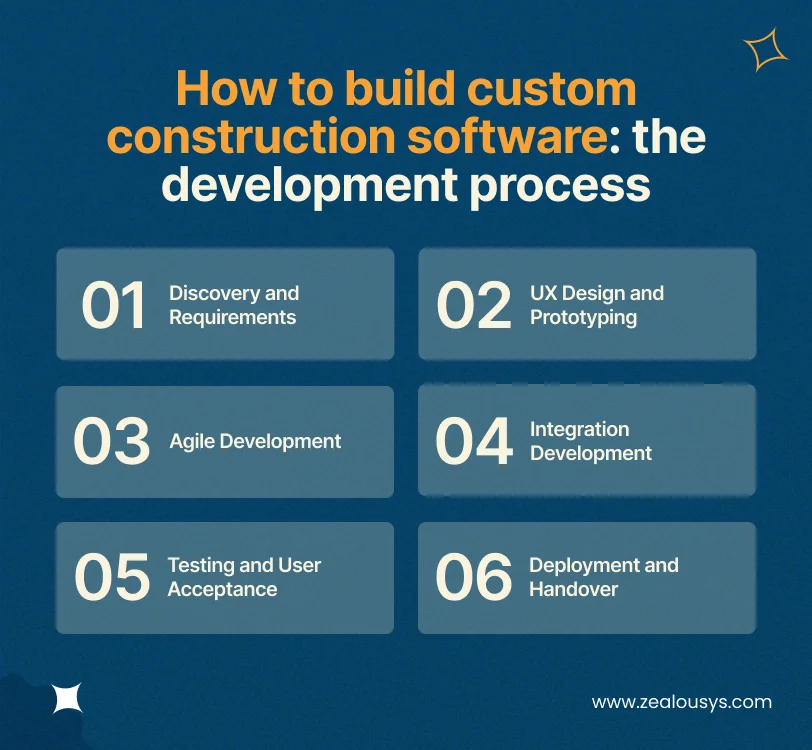
Building custom software for construction isn’t like buying a product. It’s a collaborative process, and understanding how it works helps you get the outcome you’re paying for.
This is where the foundation gets laid. A good development partner spends time understanding your actual workflows: not just what you think you need, but how your PMs currently raise a variation, how your site supervisors log a WHS incident, and how your finance team reconciles job costs at month-end.
Discovery typically produces a requirements document, user stories for each role type, and a preliminary technical architecture. For a mid-range platform, discovery alone might take three to six weeks. Skipping or rushing this phase is the most common reason construction software projects go over budget.
Before a line of code is written, the user experience should be designed and validated. Wireframes and interactive prototypes let your team click through the software logic, catch misunderstandings early, and confirm that the system will make sense to a site supervisor on a mobile device in the middle of a noisy construction site.
This phase also includes designing the construction reporting dashboards, the mobile app interface, and the document control structure.
Most experienced development teams build construction software using agile methodology, working in two-week sprints that deliver working software incrementally. This means you’re not waiting six months to see anything. You’re reviewing working features every two weeks and providing feedback that shapes the next sprint.
Agile construction software development also reduces risk. If a feature isn’t working the way you expected in practice, you catch it early rather than at launch.
Integrations with Xero, email systems, state licensing databases, or existing tools your business uses are typically built during the later development phases once the core platform is stable. Construction API integration work requires careful testing, particularly for financial data, and should never be rushed.
Testing a construction platform needs to involve the people who will actually use it. Site supervisors using the mobile app in a realistic environment. Finance staff running a month-end reconciliation in the test environment. PMs raising and approving a variation end to end. This is user acceptance testing (UAT), and it’s where real-world gaps surface before they become real-world problems.
A phased rollout, starting with one project or one site type before going organisation-wide, reduces the risk of disrupting live operations. Good development partners include training, documentation, and a support period post-launch as part of the engagement.
We worked with a residential developer overseeing multiple head contractors across NSW who needed a single view of progress across all active projects, without waiting for weekly reports from each head contractor. We built a custom platform that gave the developer real-time progress visibility, variation exposure by project, and a consolidated financial dashboard, while keeping head contractor data appropriately siloed. Weekly reporting calls were cut from three hours to forty minutes because the information was already there.
We worked with a commercial builder managing SWMS documentation across fifteen concurrent sites using a combination of PDFs, email chains, and a shared drive. Audits were stressful because proving current SWMS acknowledgement for every worker on every site meant pulling records from multiple places. We built a custom WHS compliance platform that managed the full SWMS lifecycle, tracked worker acknowledgements by site by day, and generated audit-ready reports on demand. The compliance manager described it as the difference between having a filing system and actually knowing what’s in it.
We worked with a Victorian head contractor managing a panel of forty-plus subcontractors who needed a way to handle Security of Payment Act claim schedules without their finance team manually tracking timeframes in spreadsheets. We built a custom platform with state-specific payment claim workflows, automated notification of claim receipt and schedule due dates, and integration with Xero for payment processing. Payment disputes dropped significantly in the first year of use, largely because the claims process was now transparent to both parties.
We worked with a construction project management firm employed directly by developers to oversee head contractors. Their problem was that every tool on the market was built for the contractor, not the PM. We gave their team a structured RFI workflow with contractual timeframe tracking, a variation register with financial impact analysis, and a progress reporting module that generated the developer reporting format automatically. The team went from spending half of Friday afternoon on reports to having them ready by Thursday morning.
We built a construction site inspection software solution for a government body that needed to replace a paper-based inspection process with a digital platform handling multi-inspector workflows, structured checklist formats, photo capture, and compliance reporting. The result gave inspectors a mobile-first tool for conducting evaluations in the field, with data flowing back to a central reporting dashboard in real time. You can see the full construction site inspection app in our portfolio.
Choosing a development partner for custom construction software is as important as getting the specification right. The wrong partner can produce something that technically works but doesn’t actually fit your business.
Here’s what to look for when evaluating a construction software development company:
A developer who hasn’t built anything in the construction or field services space will spend your budget learning what a variation is. Look for demonstrated experience with complex workflow software, multi-user platforms, and mobile-first applications. Construction-specific experience is a bonus; operational software complexity experience is the minimum.
Any partner who quotes you a number before spending meaningful time understanding your business is quoting you based on assumptions. The right partner treats discovery as a formal, paid phase, because getting the specification right is what makes everything else work.
You should never have to chase your development partner for a status update. Look for agile teams that give you fortnightly demos of working software, maintain a clear backlog, and communicate blockers early rather than quietly.
Software is never finished on launch day. Construction businesses grow, compliance rules change, and your team will have ideas six months in that they couldn’t have had before they used the system. A good partner has a structured post-launch support and iteration model.
Ask to speak with clients who commissioned similar platforms, not a portfolio of apps that vaguely resemble what you need. Specifically ask whether the final delivery matched the original specification, how scope changes were handled, and how the team communicated during difficult phases.
Zealous System builds ERP software and digital products for businesses that need platforms built around complex, real-world workflows. If your construction business needs a mobile app or a web application that connects field operations with financial and compliance systems, that’s exactly the kind of work we scope and build.
For a mid-range platform, expect twelve to twenty weeks from the end of discovery to initial launch. Enterprise-scale platforms can take six to twelve months, particularly when phased delivery is involved. Discovery and UX design typically add four to eight weeks before development begins. Rushing this timeline is the leading cause of construction software projects that miss the mark.
Yes. If you’re in a transition period or need to maintain a Procore connection for specific projects or clients, a custom platform can be built with a Procore API integration. This is common for firms moving away from Procore gradually rather than switching overnight.
It can, and for Australian builders operating across NSW, VIC, and QLD, it should. Custom platforms can be built with state-specific payment claim workflows, automatic notification of claims and scheduled timeframes, and audit trail documentation that meets adjudication requirements. This is one area where off-the-shelf tools frequently fall short.
When you commission custom software from a reputable development partner, you own the intellectual property. You own the code, the database, and the platform. This is fundamentally different from an off-the-shelf subscription, where you’re licensing someone else’s product and have no ownership of the underlying technology.
This is a normal part of custom software ownership. Most development partners offer ongoing support and feature development agreements, where new features are scoped, prioritised, and added to the product roadmap. Because you own the codebase, you’re also free to engage a different development partner for future work, though continuity with the original team is usually faster and lower risk.
Security is about how software is built, not whether it’s custom or off-the-shelf. A well-built custom platform with proper authentication, role-based access control, encrypted storage, and secure API design is very secure. The advantage of custom software is that you can specify and verify the security architecture directly, rather than relying on a vendor’s published security posture.
Yes, and for most businesses, this is the recommended approach. Starting with the highest-value use cases, typically scheduling, RFI management, and document control, and adding financial management, compliance workflows, and subcontractor portals in later phases allows you to validate the platform against real usage before committing to the full build scope.
Custom construction project management software isn’t the right answer for every Australian builder. But for firms that have outgrown off-the-shelf tools, paying for features they don’t use while working around gaps that cost them time and compliance risk, it’s worth taking seriously.
The case for custom software comes down to fit. Australian construction has specific compliance requirements, specific accounting integrations, and specific multi-site management challenges that generic platforms weren’t built around. Bespoke construction software for Australian builders isn’t a premium option, it’s a practical one when the alternative keeps costing you workarounds, compliance risk, and subscription fees for features you don’t use.
If you’re at the stage of evaluating a build, the most valuable first step is a proper discovery conversation, one that maps your actual workflows before any technology decisions are made.
Zealous System builds custom software for construction businesses and field-operations-heavy industries. If you’re thinking about what a platform built around your processes could look like, get in touch with our team to start that conversation.
Read Also:
Our team is always eager to know what you are looking for. Drop them a Hi!

Meet the Zealous Team – your dedicated source for cutting-edge insights on the latest technologies, digital transformation, and industry trends. With a passion for innovation and a commitment to delivering unparalleled expertise.


Comments