An AI agent that can read your ERP is useful. One that can write to it, using the same all-powerful service account your nightly batch jobs run on, is a production incident looking for a trigger. That risk sits at the center of every AI agent legacy system integration.
For most mid-market and enterprise teams, the debate has already moved past whether agents can help. The open question is how to let one near a 20-year-old system without putting the records the business runs on at risk.
The concern is well founded. IBM’s 2025 Cost of a Data Breach Report found that 97% of organizations reporting an AI-related security incident lacked proper AI access controls. That gap is an architecture problem, which means it has architectural answers. Below, you’ll find five ways to connect agents to legacy software, how to choose between them, the guardrails your CISO will ask about, and a rollout sequence that keeps production safe.
Yes, provided the agent never touches the legacy system directly. Put a controlled integration layer between the two, start with read-only access, require human approval before any write, and log every action. Choose the integration method based on what your system already exposes: an API, a database, files, or only a screen.
What the agent can reach, what it can change, and who signs off matter far more than which LLM you pick.
Older platforms were built for trained staff working at human speed. AI agents for legacy software behave very differently:
AI can still work safely with core systems. The connection simply needs the same planning as any other change to production.
Every safe setup follows the same basic shape:
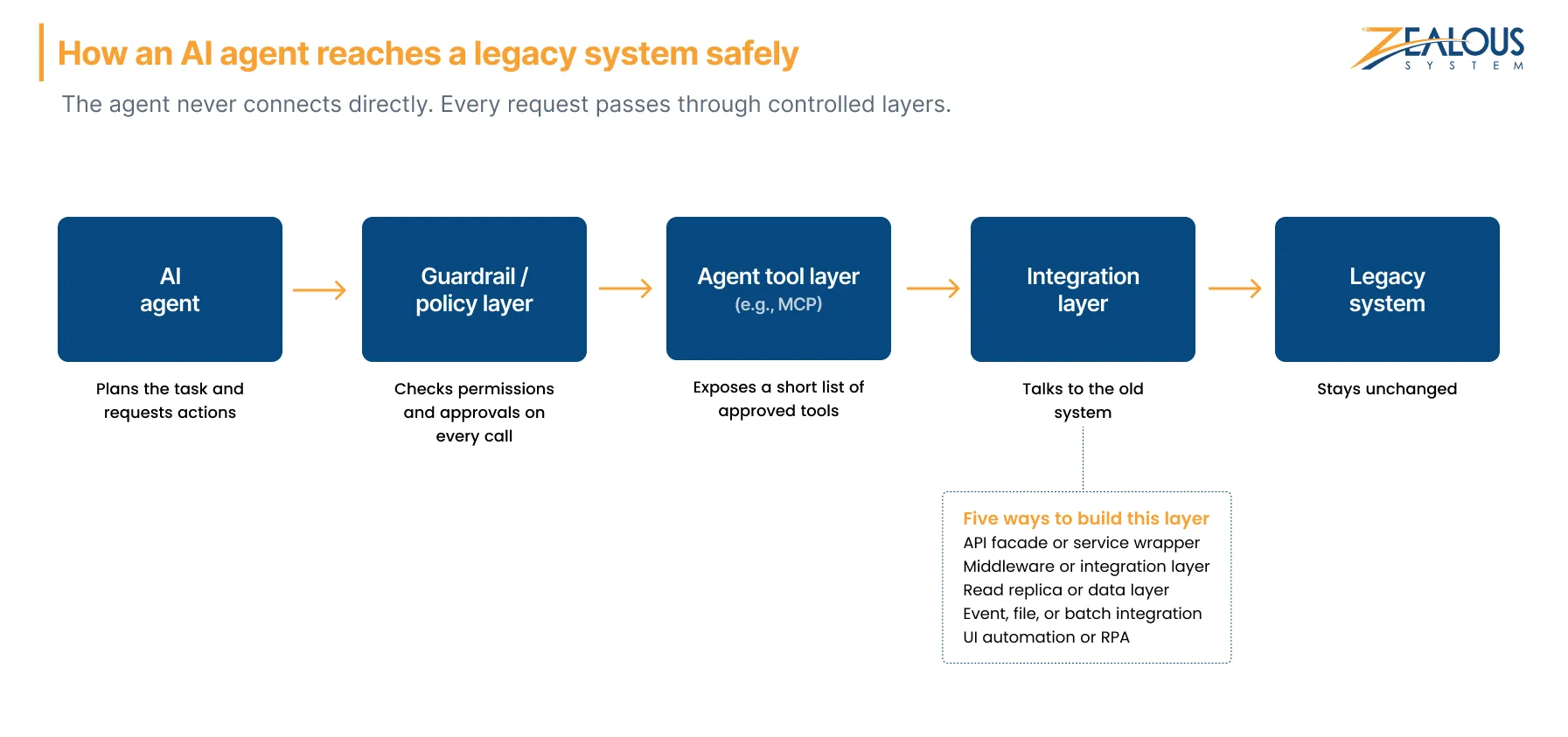
The agent never holds a database password or admin credentials. Through LLM tool calling, it requests actions from a short list of approved tools; the policy layer checks each call, and the integration layer talks to the old system. The five patterns below are the practical ways to integrate AI agents with legacy systems, and each one builds that integration layer differently.
A thin, modern service, often called an API wrapper, sits in front of the legacy system and exposes a few narrow operations, such as “get order status” or “create draft invoice.” Behind the scenes, it calls logic the system already has: SOAP services, stored procedures, or SAP BAPIs.
This is the strongest default for read-and-write use cases and the usual route when teams need to connect AI to legacy ERP platforms. Existing validation still runs, and you decide exactly which operations exist. Avoid generic “run query” endpoints, which quietly hand the agent the keys to everything.
If you already run an ESB or iPaaS platform such as MuleSoft, BizTalk, or Boomi, the agent can connect through it and inherit existing connectors, data mapping, and monitoring.
This suits workflows that span several systems, like checking warehouse stock before updating an ERP order. Solid application integration practices matter here, because old integration flows often carry assumptions nobody wrote down. Our middleware API gateway development work for a UK travel business follows the same principle: several services sit behind one controlled layer.
The agent reads from a replica, reporting database, or curated views kept current through change data capture (CDC). Production is never touched.
For question-answering, reporting, search, and triage agents, this is often the safest starting point. The catch: the agent can see but not act, and replica data may lag production by seconds or minutes.
Mainframes and AS/400 systems often exchange data through scheduled files, EDI, or message queues. An agent can consume those outputs or prepare validated files for an inbound folder the system already processes.
The legacy core stays untouched, and its import validation still applies. You give up real-time action, though, so tasks that need answers in seconds need another route.
When a system offers no API, database access, or file interface, the agent can operate the user interface through RPA bots or computer-use agents. For some green-screen and closed vendor systems, it’s the only option.
Treat it as a last resort: it demos well but breaks when screens change, and it’s hard to limit what the agent clicks. If you’re weighing RPA vs AI agents for a legacy system, compare agentic AI vs traditional automation on cost and upkeep before committing. Newer AI browser agents cope better with small layout changes, but they still need tight scoping.
The Model Context Protocol (MCP) is an open standard for how AI applications discover and call tools and data sources. It isn’t a sixth way to reach a legacy system. Think of it as a consistent, agent-facing front door on top of one of the five patterns.
One MCP server can expose tools backed by several patterns at once, but security still depends on what each tool does underneath. An MCP server wrapping an over-privileged connection is exactly as risky as that connection.
Five questions narrow the decision quickly:
1. What does the system expose? Services or code access point to a facade, database access to a data layer, files or queues to batch integration, and screens alone to UI automation.
2. Does the agent need to read, write, or both? Read-only use cases have the widest range of safe options.
3. How sensitive is the data? Regulated or personal data raises the bar for masking, logging, and approvals.
4. How much change can the system tolerate? Some platforms can’t be touched without a vendor, a freeze window, or both.
5. How fresh does the data need to be? Real-time decisions rule out batch approaches.
Here’s how the five patterns compare side by side:
| Integration Pattern | Best For | API Required? | Implementation Effort | Risk and Control | Watch Out For |
|---|---|---|---|---|---|
| API Facade/Service Wrapper | Controlled reads and writes through existing business logic | Needs a service layer, stored procedures, or code access | Medium | High control | Broad, generic endpoints |
| Middleware/Integration Layer | Workflows spanning several systems | No, uses existing connectors | Medium to high | High, if the platform is already governed | Licensing cost and latency |
| Read Replica/Data Layer | Q&A, reporting, search, triage | No | Low to medium | Very high (no production writes) | Data lag; agent can’t act |
| Event, File, or Batch | Mainframe, AS/400, batch-driven systems | No | Low to medium | High, when inputs are validated | No real-time actions |
| UI Automation/RPA | Closed systems with no API or data access | No | Medium, with high upkeep | Low to medium | Breaks when screens change; hard to scope |
Many enterprise AI agent integration projects combine two patterns: a data layer for reading, plus a facade or file drop for the few actions the agent may take. That keeps the risky surface small while the agent still gets full context.
It’s also worth asking whether the task needs an agent at all. If a process follows fixed rules from start to finish, conventional automation may be cheaper and easier to govern.
This is the section your CISO will read closely. The OWASP Top 10 for LLM Applications lists Excessive Agency as a core risk, tracing it to too much functionality, too many permissions, and too much autonomy. Good AI agent integration security addresses all three.
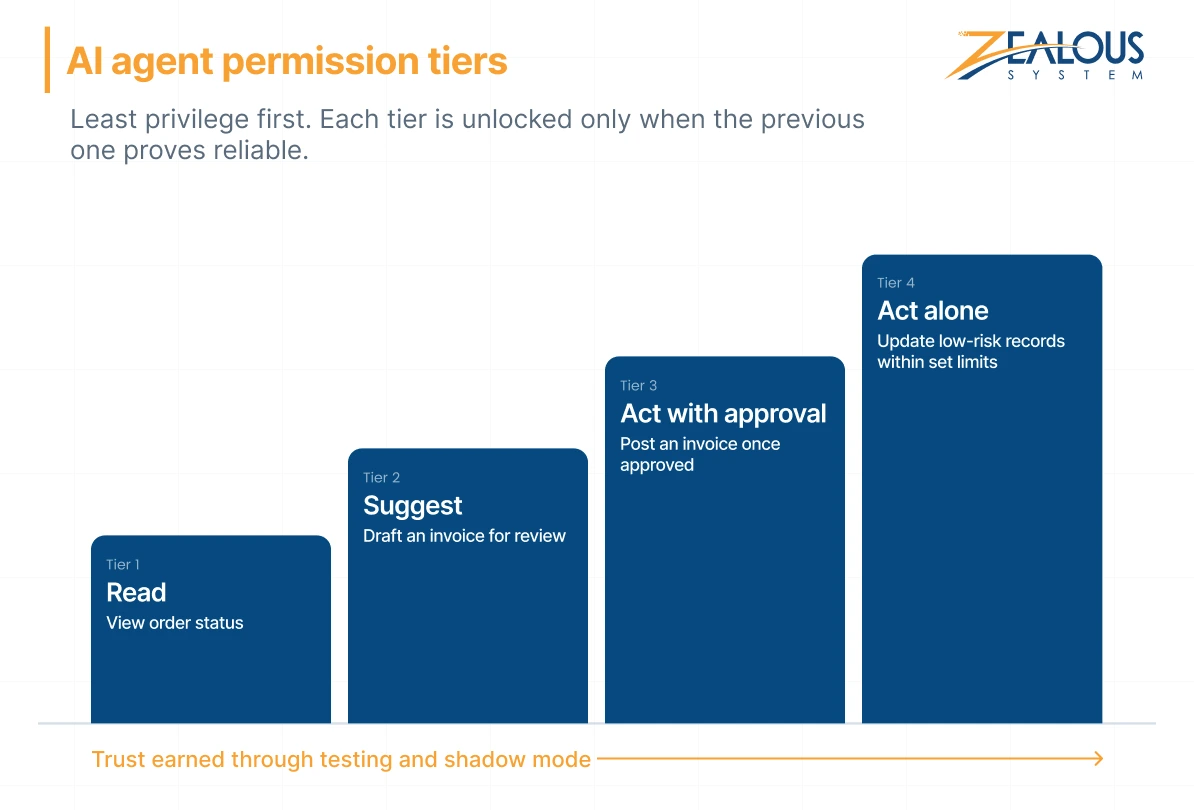
Give each agent its own identity with access to specific tools only, never a shared admin account. OWASP’s own example is telling: a feature meant only to read data connects with an identity that can also update, insert, and delete. Use role-based access control to grant permissions in tiers: read, suggest, act with approval, then act alone within set limits.
Build your human-in-the-loop approval workflow around reversibility and business impact. Anything touching money, master data, customer communication, or deletions should wait for a person who sees the agent’s reasoning and the exact change it plans to make.
Log the request, tool, parameters, system response, approver, and outcome, tied to the agent’s own identity. Auditors can then separate agent actions from human ones. Alert on unusual volumes or repeated failures.
Mask personal and regulated data before it reaches the model wherever the task allows. Confirm where your model provider processes and stores data, especially under GDPR, HIPAA, or sector rules. If data can’t leave your environment, a privately hosted model is worth considering.
Treat everything the agent reads from records, emails, and documents as data, never as instructions. Validate tool parameters server-side and allowlist values like account IDs and action types, so a manipulated prompt can’t widen the agent’s reach.
Throttle calls to protect fragile systems, and use idempotency keys so a retry never posts the same invoice twice. Every write action needs a tested reversal path, and the integration needs a kill switch someone on call knows how to use.
This sequence keeps legacy system AI integration low-risk by earning trust before granting access.
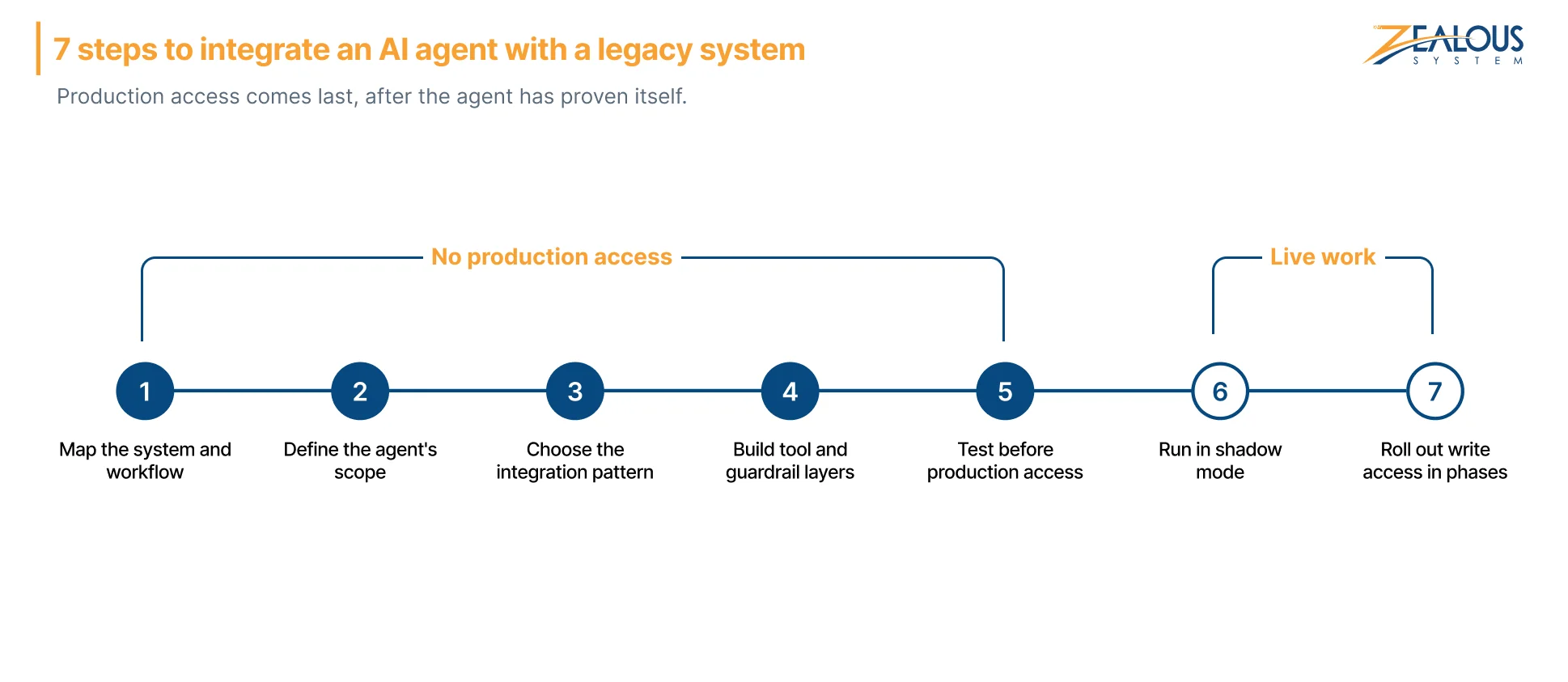
Document interfaces, data flows, business rules, owners, and known failure points. Pick one workflow with clear, measurable pain rather than a broad mandate to “add AI.”
List what the agent may do, what it must never do, and how you’ll measure success. That list shapes its tools, permissions, and approval rules.
Use the criteria and table above. When in doubt, start read-only.
Create narrow tools, wire in policy checks, and switch on logging before the agent’s first call. Guardrails added after launch tend to get postponed.
Use a sandbox with masked data and real historical cases, including edge cases. Attempt prompt injection on purpose, simulate the legacy system going offline, and confirm rollback works. Set acceptance criteria before reviewing results.
Let the agent recommend actions on live work while people keep making the decisions. Comparing the two shows where it’s reliable, with no production risk.
Start with supervised writes, then allow limited autonomy for low-risk categories that hit their targets. Keep monitoring, and widen scope only when the data supports it.
Much of our work happens inside systems that clients can’t afford to switch off. For a mid-sized UK NBFC, we built an AI fraud triage agent that works alongside its existing rule-based fraud engine, core banking platform, CRM, and card network systems instead of replacing them. The agent gathers context through API integrations, recommends whether to close, review, or escalate each alert, and leaves uncertain or high-risk cases to analysts.
It went live the way this guide recommends: validated against historical alerts, run in shadow mode, then automated one low-risk alert category at a time, with every decision recorded in an immutable audit log. Manual alert reviews dropped by 62%, and average resolution time fell from 14 hours to about 3.
On the legacy side, our work on legacy system modernization for the energy industry followed the same instinct: re-engineer an Australian client’s billing platform module by module rather than rip it out. Across projects like these, a few principles stay constant:
That sequence shapes every AI agent development engagement we run, whatever the stack.
You can still connect AI agents to legacy systems without APIs. Agents can read from a database replica, exchange files through existing batch processes, or, as a last resort, operate the interface through RPA or computer-use tools. The right choice depends on the access available and the risk the task carries.
Direct access is rarely a good idea. A safer setup gives the agent read access through a replica or curated views and routes any writes through a service layer that applies business rules, permissions, and approvals.
Usually not. Successful AI integration with legacy systems typically runs through a well-designed integration layer that works with older systems as they are, the same principle that lets teams integrate AI into existing software without a rebuild. That layer can later support application modernization, replacing old components gradually behind a stable interface (the strangler fig pattern).
It depends on the number of systems, data quality, and required approvals. A read-only pilot on one workflow moves fastest; write access across several systems takes longer, since each action needs testing, sign-off, and a rollback path.
Cost depends on the integration pattern, the number of connected systems, compliance requirements, and ongoing model usage. Our breakdown of AI agent development cost covers the main factors.
MCP is an open standard for how AI agents discover and call tools. It doesn’t reach legacy software on its own, but it works well as the agent-facing layer over an integration that does.
Give each agent its own least-privilege identity, route every action through narrow tools, require human approval for high-impact changes, and log each call. Then test for prompt injection and rollback before granting production access.
Legacy systems don’t have to sit outside your AI plans. With a controlled integration layer, permissions scoped to each task, and a rollout that proves the agent before trusting it, AI legacy system integration can move forward without putting the parts of your business that can’t afford to break at risk.
Before any agent gets production access, confirm that:
If you’re deciding which pattern fits your stack, book a scoping call with our engineers. We’ll review what your systems expose and help you plan a pilot your security team can sign off on.
Our team is always eager to know what you are looking for. Drop them a Hi!

Ruchir Shah is Technology Head at Zealous System with hands-on expertise in AI/ML, Microsoft Azure, .NET, Node.js, Python, React, and Angular. He leads enterprise software development, champions digital transformation, and mentors developers building the future of intelligent apps.




Comments