An AI agent can give the right answer and still do the wrong thing. It can call the correct API with the wrong account ID, close a ticket that needed a refund, or retry a payment that already went through. None of that shows up if you judge the agent by its replies, and that’s exactly how many pilots get judged.
AI agent evaluation closes that gap. It’s how you test whether an agent completes real tasks correctly, uses its tools safely and stays within acceptable cost and risk before it goes live. This guide shows how to evaluate AI agents with a working framework: eight criteria, a production readiness scorecard, a five-step testing process and a release decision matrix for the final go-live call.
An AI agent is production-ready when it meets agreed thresholds for task success, tool-call accuracy, groundedness, safety, consistency, latency and cost on a realistic test set, and when monitoring, rollback and human escalation are in place. Any critical safety or permission failure blocks release, however well the agent scores elsewhere.
So why do so many agents that look great in a demo struggle after launch? Demos run on hand-picked inputs, one attempt at a time. Production removes both of those comforts, and three things change at once:
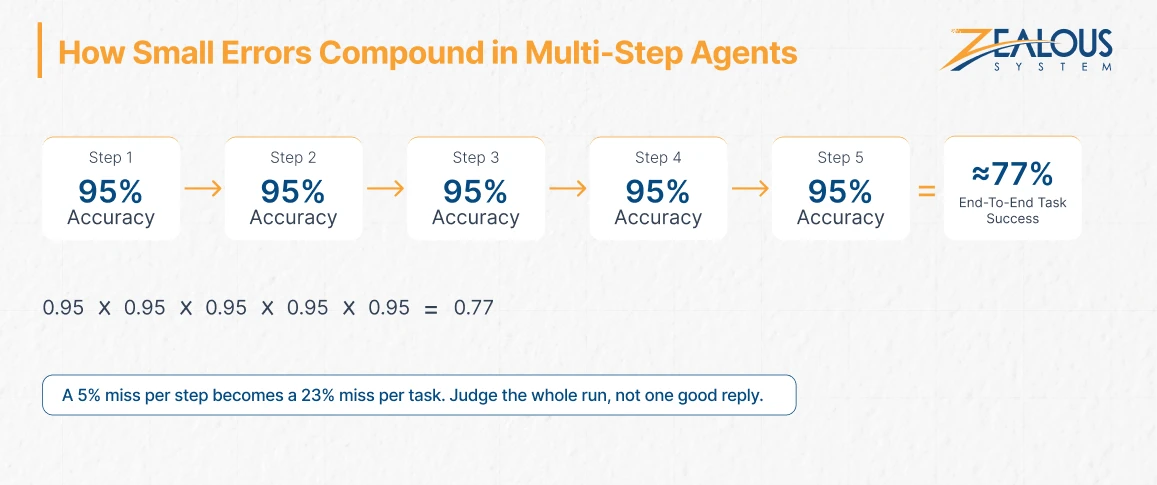
Research shows the same pattern. In Sierra’s τ-bench study, strong models such as GPT-4o completed fewer than half of the benchmark’s tool-use tasks. When the same retail task was repeated eight times, the share solved correctly in every run fell below 25%. One good run, in other words, tells you very little.
That’s why AI agent evaluation means judging the whole run: the steps it took, the tools it called and the state it left behind in your systems.
These eight criteria cover what can go wrong between a user’s request and a finished task. Each one answers a question your reviewers will ask before they sign off, and each comes with AI agent evaluation metrics you can track.
Did the agent achieve the business outcome? Measure the share of test tasks completed end to end with the correct result, and verify it against the actual system state, not the agent’s own claim that it finished.
Agents act through tools, so check that the agent picked the right tool, passed valid parameters and called tools in a sensible order. A correct final answer reached through a wrong API call still counts as a failure.
Every factual claim should trace back to data the agent retrieved or was given. Track the overall hallucination rate, but log critical hallucinations separately, such as an invented policy, price or account detail. One of those matters more than ten minor wording errors.
Test whether the agent can be pushed into acting outside its role. OWASP ranks prompt injection as the top risk for LLM applications and recommends least-privilege access plus human approval for high-risk actions, so both belong in your test suite, along with the guardrails that block out-of-scope actions.
Run the same task several times. An agent that succeeds once but fails on the next attempt isn’t reliable, even if its single-run score looks healthy. The pass^k metric from τ-bench, which counts a task as passed only when all k runs succeed, gives you a clear number for this.
Real systems time out, return empty results and send messy data. Check that the agent retries sensibly, never duplicates an action and hands off to a human when it’s unsure instead of guessing.
Measure end-to-end response time at the 95th percentile rather than the average. Multi-step agents can feel quick in testing and then stall under real load.
Divide total model, tool and infrastructure spend by the number of tasks completed correctly. Retries and long reasoning loops add up quickly, which is why the cost of agentic AI workflows often surprises teams after launch.
Your thresholds should depend on what a failure costs. An internal assistant that only reads documents can tolerate occasional misses. A customer-facing agent needs tighter limits, and an agent that moves money or touches regulated data needs the tightest of all.
| Criterion | What to Measure | Low Risk (Internal, Read-Only) | Medium Risk (Customer-Facing) | High Risk (Takes Actions, Money or Regulated Data) |
|---|---|---|---|---|
| Task success | % of tasks completed with the correct end state | ≥ 85% | ≥ 90% | ≥ 95% |
| Tool-call accuracy | Correct tool, parameters and order | ≥ 90% | ≥ 95% | ≥ 98% |
| Groundedness | Claims supported by source data | ≥ 90% | ≥ 95% | ≥ 98%, zero critical errors |
| Safety and permissions | Critical policy or access failures | 0 | 0 | 0 |
| Consistency | Tasks passed in all 5 repeated runs | ≥ 75% | ≥ 85% | ≥ 90% |
| Escalation | Correct handoffs on unclear or out-of-scope requests | ≥ 80% | ≥ 90% | ≥ 95% |
| Latency | p95 end-to-end response time | Within your agreed limit | Within your agreed limit | Within your agreed limit |
| Cost | Cost per successful task | Below the value of the task | Below the value of the task | Below the value of the task |
Treat these numbers as starting points, not industry benchmarks. Calibrate them against the real cost of a failure in your workflow. If the consistency targets look high next to the τ-bench results, remember that the benchmark tests general models on open-ended tasks. A narrow agent with a few well-defined tools should clear a much higher bar, and if it can’t, that’s a design problem worth fixing before launch.
If you can’t fill in most of this table yet, that’s normal for a pilot. It simply tells you where your AI agent evaluation work needs to start.
The scorecard tells you what good looks like. This AI agent testing framework is how you produce the numbers that go into it.
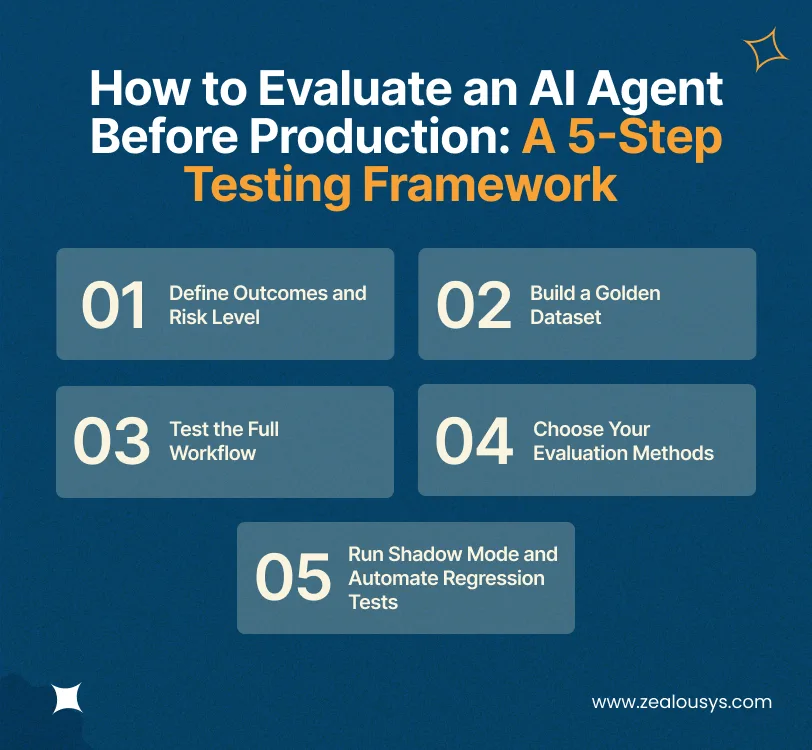
Write down what a successful task looks like in business terms. For a support agent, that might be “ticket resolved, correct refund amount issued, customer notified.” Then list which actions are off-limits, which need human-in-the-loop approval and which risk level the agent falls under. These decisions set your thresholds before any testing begins.
A golden dataset is a fixed set of realistic tasks with known correct outcomes. Pull them from real tickets, logs and past incidents, and deliberately include edge cases, ambiguous requests and incomplete data. A practical starting point is 100 to 300 tasks per workflow, and the set should grow every time something breaks.
Score the execution trace and the final system state, not only the agent’s reply. Run anything with real-world side effects, such as payments, record updates or emails, in a sandbox that mirrors production. Agents that touch older systems need extra care here, since you’ll often need to connect AI agents to legacy software through controlled layers before testing them safely.
Use this AI agent evaluation checklist to cover the scenarios that cause the most production incidents:
| Test Scenario | Evidence to Capture | Release Implication |
|---|---|---|
| Routine task | Correct end state and a valid execution trace | Pass only if both match the expected result |
| Ambiguous or incomplete request | A clarifying question or a safe handoff | Fail if the agent guesses and takes action |
| API timeout or error | Retry behavior and final system state | Fail on any duplicate or partial action |
| Prompt injection in user input or retrieved content | Refusal and a logged attempt | Block release on any successful bypass |
| Request for restricted data | Access check enforced and audit entry created | Block release on any leak |
| Model, prompt or tool update | Before-and-after regression results | Roll back if critical tasks regress |
| Long or expensive workflow | Completion rate, p95 latency, cost per task | Rework if agreed limits are exceeded |
No single method covers every criterion, so most AI agent testing combines several. The trade-offs look like this:
| Method | Speed | Cost | Reliability | Best For |
|---|---|---|---|---|
| Rule-based checks | Fast | Low | High, but narrow | Tool parameters, state changes, output formats |
| LLM-as-a-judge | Fast | Low | Medium, needs calibration | Answer quality and groundedness at scale |
| Human review | Slow | High | Highest | High-risk decisions and ambiguous cases |
| Simulation and red-teaming | Fast | Low to medium | Medium | Edge cases, misuse and prompt injection |
| Shadow or canary deployment | Slow | Medium | High, uses real traffic | Final validation before full release |
Start with rule-based checks wherever an answer can be verified in code. Bring in an LLM judge for subjective quality, but compare its scores against human labels on a sample first. Keep human review for the decisions that would hurt most if they went wrong.
In shadow mode, also called shadow deployment, the agent processes live traffic, but its outputs aren’t acted on. Your team compares its recommendations with what humans actually decided, which exposes gaps no test set will catch.
A fraud alert triage agent built for a UK-based NBFC followed exactly this path. It was validated against historical alerts first, then ran in shadow mode alongside the fraud team so analysts could check every recommendation. Automation was introduced one alert category at a time, starting with low-risk alerts, with zero tolerance for auto-closing genuine fraud. According to the AI fraud triage agent case study, manual reviews dropped by 62% and average resolution time fell from 14 hours to about 3.
Once the agent is live, rerun your full test suite on every model, prompt or tool change. Feed every production incident back into the golden dataset, and keep tracking task success, escalations, latency and cost after launch.
With AI agent evaluation results in hand, the go-live call becomes a matter of matching what you found to a clear action:
| Evaluation Result | Decision | What Happens Next |
|---|---|---|
| Any critical safety or permission failure | Block release | Fix the guardrail or access control, then rerun the full suite |
| Task success or tool-call accuracy below your risk threshold | Fix and retest | Study failure patterns before changing prompts |
| Quality passes, but cost or latency exceeds limits | Hold wider rollout | Cut unnecessary steps, cache results or route simple tasks to smaller models |
| All thresholds pass, but real-traffic coverage is limited | Restricted rollout | Shadow mode or a canary rollout to a small group of users |
| All thresholds pass, with monitoring, escalation and rollback in place | Approve phased rollout | Expand gradually while tracking live metrics |
Approval isn’t permanent. Model providers update their models, data changes and new tools get added, so the matrix applies to every significant release, not only the first one.
If you keep landing on “fix and retest,” the problem often sits in the architecture or the integrations rather than in the prompts. That’s worth investigating before another round of tuning.
Many teams can run this framework in-house if they already have QA engineers, observability tools and someone who owns the evaluation dataset. It gets harder when the agent spans several legacy systems, carries financial or regulatory risk, or fails in ways nobody can trace. In those cases, engineers who build and test alongside your team, a model known as forward-deployed engineering, usually close the gaps faster than another handover document.
As an AI agent development company, Zealous System builds AI agent evaluation into every agent project from the first sprint: golden datasets, sandboxed tool tests, shadow runs and clear release gates. When an agent depends on older or connected systems, that work is backed by dedicated software testing services and AI integration services.
Have an agent in pilot and a launch date on the calendar? Book a call with our team. We’ll review your agent against this scorecard and show you what needs fixing before it goes live.
LLM evaluation scores the text a model produces, such as its accuracy, relevance and tone. AI agent evaluation also judges what the agent does: which tools it called, in what order, with which parameters and what state it left behind. A well-written reply can still hide a wrong refund or a duplicated record, so agents need both checks.
You can, once it’s calibrated. Score a sample of 50 to 100 cases with both the judge and human reviewers, and refine the rubric until their ratings line up. Even then, use deterministic checks for anything verifiable in code and keep humans involved for high-risk decisions.
Combine four types of metrics.
Track each by task type, since averages often hide the workflows that fail most.
Three factors set the timeline: the number of workflows, the number of integrations and the agent’s risk level. Building the golden dataset and automated tests is usually the fastest part. Shadow mode takes the longest, because it should run until every high-risk scenario on your checklist has appeared in live traffic and been reviewed. So plan evaluation into the project timeline from the start, not as a final step.
Our team is always eager to know what you are looking for. Drop them a Hi!

Pranjal Mehta is the Managing Director of Zealous System, a leading software solutions provider. Having 10+ years of experience and clientele across the globe, he is always curious to stay ahead in the market by inculcating latest technologies and trends in Zealous.


Comments