
Quick Takeaways
A retailer we worked with was running 180 stores on spreadsheets and buyer intuition. Their forecast accuracy sat at 61%, which meant markdowns at the end of every season and stockouts in the middle of it. After the AI systems went live, that number reached 79%.
The interesting part was not the accuracy gain. It was that experienced buyers refused to act on the forecasts for weeks, until the system started showing its reasoning. That single detail explains more about AI agent projects than any adoption statistic.
This article covers 15 real-world use cases across customer service, finance, HR, supply chain, and engineering. Each one is deployed somewhere today, because the value of AI agents for business shows up in specifics rather than projections. Then we get into how to pick your first one and what tends to go wrong.
An AI agent is software that pursues a goal rather than responding to a prompt. It perceives its environment, decides on a sequence of steps, and then acts using the tools it has been given.
That third part matters most. A language model can draft a refund email. An agent checks the order in your commerce platform, verifies the return window, issues the refund through your payment provider, updates the CRM record, and notifies the customer. Same underlying model, completely different operational role.
Under the hood, most business agents combine four things: a reasoning model, tool calling that lets the model hit your APIs, retrieval over your own documents and data, and a set of guardrails defining what the agent may and may not do on its own. Each of those involves real architectural decisions, and building an AI agent from scratch means settling all four before a single workflow runs in production.
The distinction people find genuinely confusing is between agents, chatbots, and the RPA tools many companies already own.
| Chatbots | RPA | AI Agents | |
|---|---|---|---|
| How It Decides | Scripted flows and keywords | Fixed rules written by developers | Plans steps toward a stated goal |
| What It Does | Replies in a conversation | Repeats a recorded sequence | Calls tools, reads data, takes action |
| When It Breaks | Off-script questions | Any change to the underlying screen or form | Ambiguous cases, which get escalated |
RPA is excellent at high-volume tasks where nothing changes. Agents earn their keep on the messy remainder: the invoices that do not match, the tickets that do not fit a category, the shipments that arrive late for reasons nobody coded for.
Two comparisons come up most often. AI agents vs chatbots usually resolves quickly. AI agents vs RPA is the harder one, because the RPA already works and somebody signed off on it. That is where the trade-off between agentic AI and traditional automation actually bites: deciding what to retire, not what to add.
The line separating chatbots, LLMs, and agents blurs further every quarter, as vendors relabel existing products.
The forecast numbers are aggressive. Gartner predicts that 40% of enterprise applications will include task-specific AI agents by the end of 2026, compared with fewer than 5% in 2025.
The deployment numbers tell a different story. McKinsey’s State of AI research found 88% of organizations using AI in at least one function, but only 23% scaling agentic systems anywhere in the business. In any single function, the ceiling sits near 10%.
So why does spending keep climbing? Because the work agents handle well is work that scales badly with headcount. Support volume, invoice processing, candidate screening, exception handling in logistics: all of these grow with the business. That is the practical case for AI agents for business, because right now hiring is the only lever most teams have.
The second reason is narrower and more practical. Agents can read unstructured input, which is where most business processes actually stall. A PDF invoice with a slightly different layout stops an RPA bot cold. An agent reads it, extracts the fields, and flags the one line item it is unsure about. Our compilation of AI agent statistics covers the adoption picture in more depth.
The agentic AI use cases below follow the same structure, so you can scan for the ones relevant to your function.
AI agents in customer service are usually the first deployment, because the volume is visible and the outcome is measurable.
Deflection was the old goal: keep tickets away from humans. Resolution is the current one. The agent reads the ticket, retrieves the customer’s order and account history, decides whether it can act, and then acts: processing the return, reissuing the credential, adjusting the subscription.
Connects to: Zendesk or Freshdesk, your commerce platform, payment provider, CRM.
Best fit for: Support teams where more than half of ticket volume falls into ten or fewer categories.
Sales development reps spend most of their time on research and follow-up sequencing rather than conversation. An agent enriches inbound leads against firmographic sources, scores them against your ICP definition, drafts a first-touch message referencing something specific, and books qualified meetings straight into calendars.
Connects to: HubSpot or Salesforce, LinkedIn Sales Navigator, enrichment APIs, calendar.
Best fit for: B2B teams with inbound volume that outstrips SDR capacity.
Every sales leader knows their CRM data is unreliable. An agent runs continuously against the pipeline, filling missing fields, merging duplicates, flagging deals with no activity in 21 days, and updating account records from call transcripts and email threads.
Connects to: CRM, email, meeting recorders, data enrichment providers.
Best fit for: Teams where forecast accuracy suffers because nobody updates records consistently.
Campaign execution involves dozens of small, sequential tasks. An agent builds audience segments from behavioral data, generates variant copy for testing, schedules across channels, monitors performance daily, and reallocates spend from underperforming segments.
Connects to: Marketing automation platform, ad accounts, analytics, customer data platform.
Best fit for: Lean marketing teams running many campaigns across several channels.
In the retail programme mentioned earlier, the segmentation and personalization work produced a 31% improvement in marketing return on the same budget. Details are in the demand forecasting and customer intelligence case study.
Internal processes carry less risk than customer-facing ones, which is why most first deployments land here.
Employees ask the same questions endlessly, and the answers live scattered across Confluence, Notion, SharePoint, and people’s heads. An agent retrieves across all of it, then goes further by actually provisioning access, resetting credentials, and raising hardware requests.
Connects to: Identity provider, ITSM tool, wiki and document stores, Slack or Teams.
Best fit for: Companies past 300 employees where IT ticket volume has become a real cost.
Screening 400 applications for one role is exactly the kind of work that degrades with volume and fatigue. An agent parses applications against structured criteria, runs first-pass asynchronous screening questions, checks calendar availability, and schedules panel interviews.
Connects to: ATS, calendar, video interview platform, background check provider.
Best fit for: High-volume hiring in support, sales, or operations roles.
AP teams key data from documents that arrive in fifty different formats. An agent extracts line items, matches them against purchase orders and receipts, routes exceptions to the right approver, and posts clean entries to the ledger.
Connects to: ERP, accounting system, email, document storage, banking APIs.
Best fit for: Finance teams processing more than 500 invoices a month with manual matching.
Contract renewals get missed. Vendor performance goes unmeasured. An agent tracks renewal dates, compares current pricing against benchmarks and prior terms, monitors SLA compliance, and assembles a briefing pack before each renewal conversation.
Connects to: Contract repository, ERP, spend analytics, vendor portals.
Best fit for: Operations or finance leads managing 50 or more active vendor relationships.
AI agents in supply chain work best on exceptions rather than routine planning.
Most supply chain software tells you a shipment is late. It does not decide what to do about it. An agent evaluates the delay against inventory positions and customer commitments, identifies alternative sourcing, drafts customer notifications, and escalates only when the financial impact crosses a threshold you set.
Connects to: WMS or TMS, ERP, carrier APIs, supplier portals.
Best fit for: Distributors and manufacturers where a planner’s day is consumed by firefighting.
Forecasting at SKU and store level is too granular for humans and too variable for simple rules. Machine learning models generate the forecast; an agent acts on it by generating replenishment recommendations, flagging slow movers for markdown, and proposing transfers between locations.
Connects to: Data warehouse, ERP, point of sale, e-commerce platform.
Best fit for: Multi-location retailers and distributors carrying broad SKU ranges.
This is the use case behind the 61% to 79% forecast accuracy improvement described earlier, alongside a 41% reduction across the store network.
Regulatory processes suit agents well, because the rules are already written down.
Legal teams become a bottleneck because every NDA and vendor agreement needs eyes on it. An agent reviews incoming contracts against your clause library, marks deviations from standard terms, drafts redlines for routine variations, and routes anything genuinely unusual to counsel.
Connects to: Contract lifecycle management system, document storage, e-signature platform.
Best fit for: In-house legal teams handling high volumes of standard-form agreements.
The same pattern runs through legal document workflows generally, where volume rather than complexity creates the bottleneck.
Compliance work is continuous but staffed as if it were periodic. An agent monitors transactions against policy rules, assembles KYC documentation, generates audit trails automatically, and produces the evidence pack regulators ask for.
Connects to: Core banking or transaction systems, identity verification providers, document management, GRC platform.
Best fit for: Financial services, insurance, and healthcare organizations under regular audit.
AI agents in healthcare and insurance start where the risk is administrative rather than clinical.
Claims arrive as a mix of forms, photographs, and narrative descriptions. An agent classifies severity, checks policy coverage, cross-references similar historical claims, and routes to the right adjuster with a summary already prepared. Straightforward claims move to fast-track settlement.
Connects to: Policy administration system, claims platform, document intake, fraud detection services.
Best fit for: Insurers where triage delay is the main driver of settlement time.
Prior authorization is one of the most disliked processes in healthcare, and it is largely document handling. An agent assembles clinical documentation, checks it against payer requirements, submits the request, and tracks status until determination.
Connects to: EHR, payer portals, clinical documentation systems, scheduling.
Best fit for: Provider groups where administrative staff spend hours daily on payer paperwork.
Agentic AI in healthcare has moved fastest here, because prior authorization is high-volume, rule-bound, and fully reversible if the agent gets something wrong.
Engineering teams often build these first, since they own both the systems and the data.
When an alert fires at 2 am, the first thirty minutes go to establishing what changed. An agent correlates the alert with recent deployments, pulls relevant logs and traces, checks against similar past incidents, and posts a summary to the incident channel before a human has finished reading the page.
Connects to: Observability stack, source control, CI/CD pipeline, incident management tooling.
Best fit for: Engineering teams running on-call rotations with meaningful alert volume.
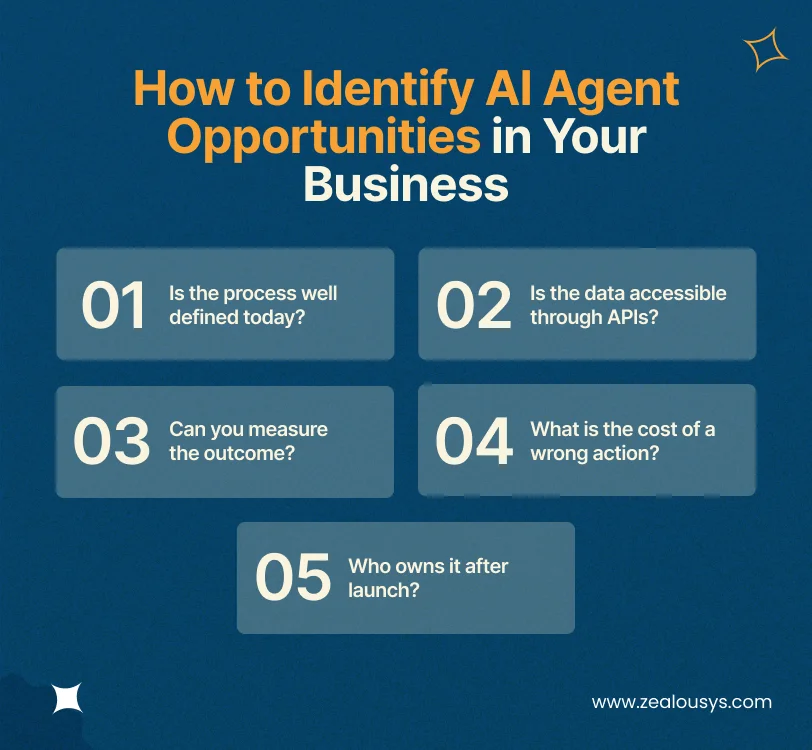
Deciding how to implement AI agents in business starts with choosing the right first process, not the right framework. Most teams choose their first use case badly. They pick the most visible process rather than the most suitable one, and then spend six months discovering why that was expensive.
A better filter is to plot candidate processes on two axes: business impact and implementation complexity. Complexity here means the number of systems touched, data quality, and how much the process varies case to case. Start in the high-impact, low-complexity quadrant, even if it feels unambitious.
Then run each candidate through five questions:
If your team cannot describe the decision rules, an agent cannot follow them. Automating a process nobody understands produces confident, fast mistakes.
If the system of record has no API and no export, integration cost may exceed the value of automating it.
If you cannot state the current handling time, error rate, or cost per transaction, you will not be able to prove the agent worked.
Sending a slightly awkward email is recoverable. Issuing an incorrect refund or filing an inaccurate regulatory report is not. That difference determines how much human approval you build in.
Agents need monitoring, evaluation, and periodic adjustment. If no named person owns the agent, it will quietly degrade.
If a process fails questions one or two, it is not an agent problem yet. It is a process documentation or integration problem, and solving that first will make the agent work later.
Six components show up in nearly every production deployment.
This layer decides what the agent does next. Frameworks such as LangGraph and CrewAI handle multi-agent orchestration, where separate agents own separate steps and hand work between them.
This is where most of the effort goes. Every action the agent takes needs a defined interface into your systems, with permissions scoped so the agent cannot exceed its remit. Emerging standards like MCP are making this less bespoke, but the integration work remains the bulk of the timeline.
Retrieval grounds the agent in your own data. Retrieval-augmented generation, or RAG, over your documentation, policies, and records is what stops the model inventing answers.
Memory lets the agent carry context across steps and sessions. A customer does not have to repeat themselves, and a multi-day workflow survives interruption.
Guardrails define the boundaries: what the agent may do alone, what needs human approval, and what it must refuse. Human-in-the-loop review is not a failure of automation. On high-stakes actions, it is the design.
These tell you whether the agent is still working. You need a test set of real cases, automated scoring against it, and traces you can inspect when something goes wrong. Teams that skip this find out about problems from customers.
Budget roughly 60% of your timeline for integration and data work, not model work. That ratio surprises people, and it is the single most common source of overrun.
Gartner projects that more than 40% of agentic AI projects will be cancelled by the end of 2027, citing escalating costs, unclear business value, and inadequate risk controls. Those failures cluster into a few recognizable patterns.
An agent executing a flawed workflow produces the same bad outcomes at higher speed. Fix the process on paper first, then automate it.
Without a test set and scoring, “it seems to be working” is the only quality signal available. That is not enough to defend the project when someone senior asks for evidence.
Start with the agent drafting and a human approving. Move to full autonomy per action type, only once accuracy on that action is proven. Gartner separately expects that by 2027, 40% of enterprises will demote or decommission autonomous agents because governance gaps only surfaced after a production incident.
In the retail programme described earlier, duplicate customer records and missing sales history across dozens of stores turned data unification into a major workstream nobody had scoped.
This is the one that catches technically successful projects. Those retail buyers did not distrust the forecast because it was wrong. They distrusted it because they could not see how it reached its conclusion. Adoption improved once the system exposed its reasoning. If your users cannot see why the agent did what it did, they will route around it.
Three factors move the number more than anything else: how many systems the agent must integrate with, how much autonomy it needs (higher autonomy means more evaluation and guardrail work), and whether you operate under compliance requirements that demand audit trails and formal validation.
Data readiness is the wildcard. If records are clean and API-accessible, integration is predictable. If they are not, cleanup can become the largest line item. For a full breakdown of pricing models and what each stage involves, see our guide to AI agent development cost.
The retail programme referenced throughout this article ran across 180 stores over 18 months, covering demand forecasting, customer intelligence, workforce scheduling, and a conversational support layer. It was built on Snowflake, Python, and XGBoost, integrated with Salesforce and Shopify Plus. Forecast accuracy moved from 61% to 79%, and marketing return improved 31% on unchanged spend.
What that project taught, more than any technical lesson, was that pilots succeed or fail on transparency and sequencing. Each workstream was piloted in a controlled subset of stores with defined success metrics before anything scaled. The ones that hit their targets were rolled out. The rest were reworked.
That approach, small validated pilots ahead of wide deployment, is what separates the 23% who scale agents from the 40% whose projects get cancelled.
AI agents are systems that pursue a defined goal by planning steps and executing them across your software. Unlike a chatbot, an agent can update a CRM record, issue a refund, or file a claim. It combines a reasoning model with access to your tools and data, operating inside limits you define.
An agent receives a goal, breaks it into steps, and executes them using tools you have connected: your CRM, your ERP, your ticketing system. Between steps, it checks the result and adjusts. Most AI agents for business run this loop inside defined limits, escalating to a person when confidence is low or the action is consequential.
RPA follows fixed rules and breaks when anything changes. Agents interpret varied inputs and decide how to proceed, which makes them suited to exceptions rather than uniform, repetitive tasks. Many organizations run both: RPA for the predictable majority, agents for the rest.
A single well-scoped agent connecting to two or three systems typically takes 8 to 16 weeks to reach production. Timelines extend when data needs cleanup, when compliance validation is required, or when the agent touches many systems.
Pick something with clear decision rules, accessible data, measurable outcomes, and a low cost of error. Internal IT support and invoice processing are common starting points because they meet all four conditions and the mistakes are recoverable.
They can be, with the right design. Regulated deployments use human approval on consequential actions, complete audit logging, and restricted permissions. The agent prepares and recommends; a person authorizes. Guardrails and evaluation matter more here than raw capability.
Not to operate them, but you do need someone who owns each agent: monitoring evaluation scores, reviewing escalations, and adjusting guardrails as the business changes. Most mid-market companies assign this to an existing engineering or operations lead rather than hiring for it.
The gap between the 88% of organizations using AI somewhere and the 23% who have scaled agents has little to do with model quality. Everyone has access to the same models. What separates working AI agents for business from stalled pilots is process clarity, integration groundwork, and whether people trust the system enough to act on it.
That points to a straightforward starting move. Choose one process where the rules are known, the data is reachable, and a mistake is recoverable. Instrument it properly. Prove it works before extending it anywhere else.
The hard part of that first project is rarely the model. It is mapping which systems hold the data, deciding where a person stays in the loop, and agreeing what “working” means before anyone writes code. That scoping work is where custom AI agent development engagements at Zealous System begin, and it is worth doing carefully whether you build the agent in-house or with a partner.
Our team is always eager to know what you are looking for. Drop them a Hi!

Mansi Prajapati is the Business Head at Zealous System. She works closely with founders, agencies, and businesses worldwide to understand their goals, challenges, and budgets before recommending the right technology solutions. With a strong focus on transparency, honest communication, and long-term partnerships, Mansi believes that building trust and delivering real business value will always matter more than simply closing a deal.


Comments