OpenAI and Meta picked the same day to go after the same customer. On September 29, 2026, OpenAI launched Dots, an always-on agent that keeps working on your goals in the background. Meta used the same day to open Muse for Small Business, a workplace version of the personal agent it released earlier in September. Overnight, OpenAI Dots vs Meta Muse became a real decision for small and mid-sized businesses.
The timing lines up with a clear gap in the market. McKinsey’s State of AI in 2026 survey found that 40% of companies with over $1 billion in revenue now scale AI agents. A year earlier, that figure was 27%. Among smaller organizations, however, it stayed flat at 22%.
If you’re weighing OpenAI Dots vs Meta Muse for your business, a harder question sits underneath. Can a general-purpose agent handle the work that matters most to you, or does that work depend on systems and rules only your company has? This guide puts both products next to a third option, a custom AI agent, and shows which job suits each.
The table compares OpenAI Dots vs Meta Muse for business alongside a custom build. Since both launches are days old, the details reflect what each company had announced as of September 30, 2026.
| Factor | OpenAI Dots | Meta Muse for Small Business | Custom AI Agent |
|---|---|---|---|
| Built For | Professionals and knowledge-work teams | Small businesses, especially social and commerce-led ones | Businesses with specific systems, data, or rules |
| Where You Use It | ChatGPT, Codex, Slack, Microsoft Teams | Muse app and web, plus Meta’s business tools | Wherever you need it: internal tools, portals, your product |
| Integrations | 4,000+ apps through OpenAI’s plugin ecosystem | Shopify, Stripe, QuickBooks, Slack, Canva, Notion and more, plus Instagram, Facebook Pages, and Meta ads | Built around the systems you choose |
| Approvals | Built-in rules on when to act and when to ask | Asks before posting, messaging, or buying | Defined by you, action by action |
| Pricing | Part of ChatGPT Pro and Business Premium; per-plan usage terms to follow | Free with usage limits; paid tiers for more | Development cost plus running costs |
| Best Fit | General delegated work across common apps | Marketing, sales, and daily operations for small teams | Core workflows, proprietary systems, customer-facing use |
Both are AI agents: they act across apps to finish tasks rather than only answering questions. Our guide to AI agents for business covers the category in depth.
Dots is OpenAI’s new personal agent, powered by GPT-6 Astra. Each Dot runs on its own cloud computer, learns from your feedback, and keeps working while you’re offline. OpenAI’s launch examples include a Dot that picks up a bug alert in Slack and starts investigating, and one that spots an invoice nobody submitted. Specialist Dots for accounting, legal research, and digital marketing are in testing.
Meta launched Muse as a personal agent on September 8, 2026, and it briefly topped app charts in the US and Canada. The business version works toward goals you set, such as finding new customers. Meta says it also learns what you sell and how your brand sounds.
Dots suits teams whose work already lives in chat threads, documents, and mainstream SaaS tools.
A Dot can watch alert channels, pull logs, and draft a first diagnosis, so developers start with context rather than a blank ticket. Start it on read-only access, though. Letting a Dot restart services or push fixes is a much bigger step.
Report drafts, competitor summaries, overdue invoices, and timesheet reminders are repetitive, low-risk places to test an always-on agent. Because the output is easy to check, you’ll quickly see whether a Dot’s work meets your standard.
Muse for Small Business is strongest when your storefront, books, and social channels all feed into one place it can see.
Meta Muse integrations with Shopify, Stripe, and QuickBooks let it work with orders, payments, and financials together. For a small online store, that means far less copying numbers between tabs.
If Instagram and Facebook drive your sales, Muse can draft campaigns, review ad performance, and build growth plans from your own numbers. For example, it can compare last month’s campaigns with your sales data and suggest where to focus next.
Packaged agents work inside the tools they support. A custom agent is built around the systems, data, and rules your business already runs on.
The economics of building have shifted, too. In the same McKinsey survey, 32% of respondents said their organizations had decided against buying at least one software product or feature. Their reason: they could build it in-house with agentic coding tools. If you’re a CTO or operations leader deciding when to build a custom AI agent, watch for these signs.
A custom ERP, a legacy CRM, or an on-premises database rarely appears on an integration list. Some older platforms need application modernization before any agent can work with them safely.
Client NDAs, financial or healthcare regulations, and data residency requirements can decide where information travels and which model may touch it. In those cases, you need control over hosting and model choice that packaged agents rarely offer.
Pricing approvals, credit limits, and dispatch rules often live in spreadsheets and senior staff’s heads. In our project on workflow automation for freight brokerages, approval logic existed only as tribal knowledge until the team mapped it into structured rules.
Once an agent talks to your customers or sits inside your product, reliability and accountability rest with you rather than a vendor. Every wrong answer reaches a customer directly, so testing and escalation paths matter more than setup speed.
In enterprise AI agent integration, most of the effort goes into application integration, not the model. That’s why good custom AI agent development projects map systems and rules first and pick the model later. The trade-off is time, upfront cost, and ongoing maintenance, which pays off when the workflow sits close to revenue or risk.
The table below lines up the practical trade-offs, from setup time to who controls your data.
| Factor | Off-the-Shelf (Dots, Muse) | Custom AI Agent |
|---|---|---|
| Time to Start | Minutes | Weeks, depending on scope |
| Upfront Cost | Free tier or subscription | Development investment |
| Maintenance | Handled by the vendor | Your team or a development partner |
| Everyday Productivity Tasks | Strong | Possible, but rarely worth building |
| Access to Proprietary Systems | Only if supported | Built for them |
| Your Business Rules | Limited to product settings | Built into the workflow |
| Data Location and Model Choice | Decided by the vendor | Decided by you |
| Exposure to Vendor Pricing or Policy Changes | Higher | Lower |
If most of your target workflow sits in the everyday productivity row, start with an off-the-shelf agent and revisit custom later.
A UK-based lender shows where that line falls. Zealous built an AI fraud triage agent for this non-bank financial company (NBFC) after its rule-based fraud system started raising more alerts than analysts could handle.
The system generated more than 12,000 alerts a month, and over 90% were legitimate transactions. Analysts spent 15 to 20 minutes per alert pulling data from four separate systems, while genuine fraud waited in the queue.
The agent had to work alongside the existing fraud engine. It also needed live data from core banking, the CRM, transaction logs, and a card network portal. Every recommendation had to be explainable to regulators and logged for audit, and it could never auto-close a genuine fraud case.
It reviews each alert as it fires, pulls context into one view, and recommends closing, reviewing, or escalating with a plain-language reason. Uncertain and high-risk cases always go to a human.
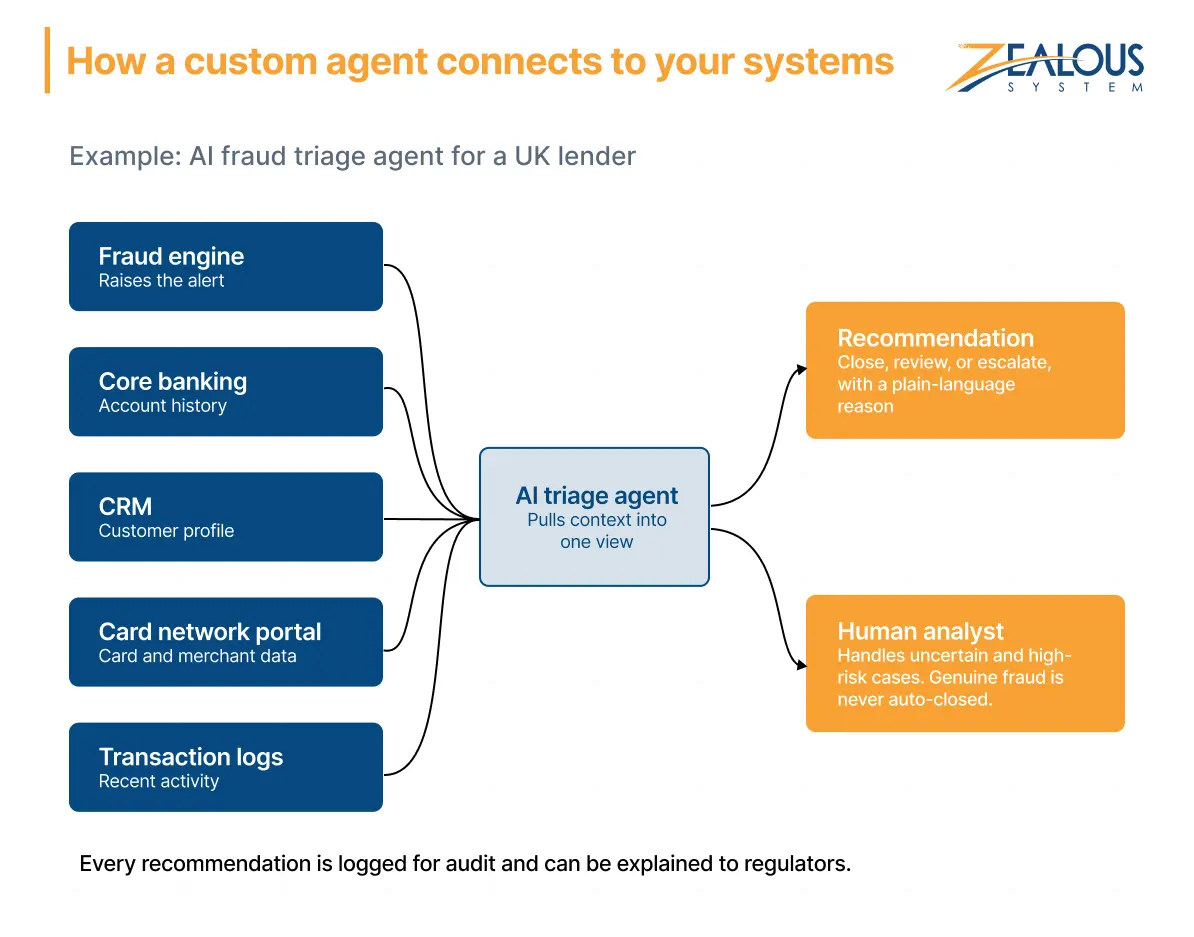
Manual reviews fell from over 12,000 to around 4,500 a month, a 62% drop. Average resolution time went from 14 hours to about 3, and analyst review time per alert fell to under 4 minutes. Those gains came from the integrations and rules built around the model, which a packaged agent’s default setup doesn’t provide.
Many businesses will likely run both kinds of agents. Dots or Muse can take on research, drafting, and everyday knowledge work from day one, while custom agents handle proprietary workflows and customer-facing processes.
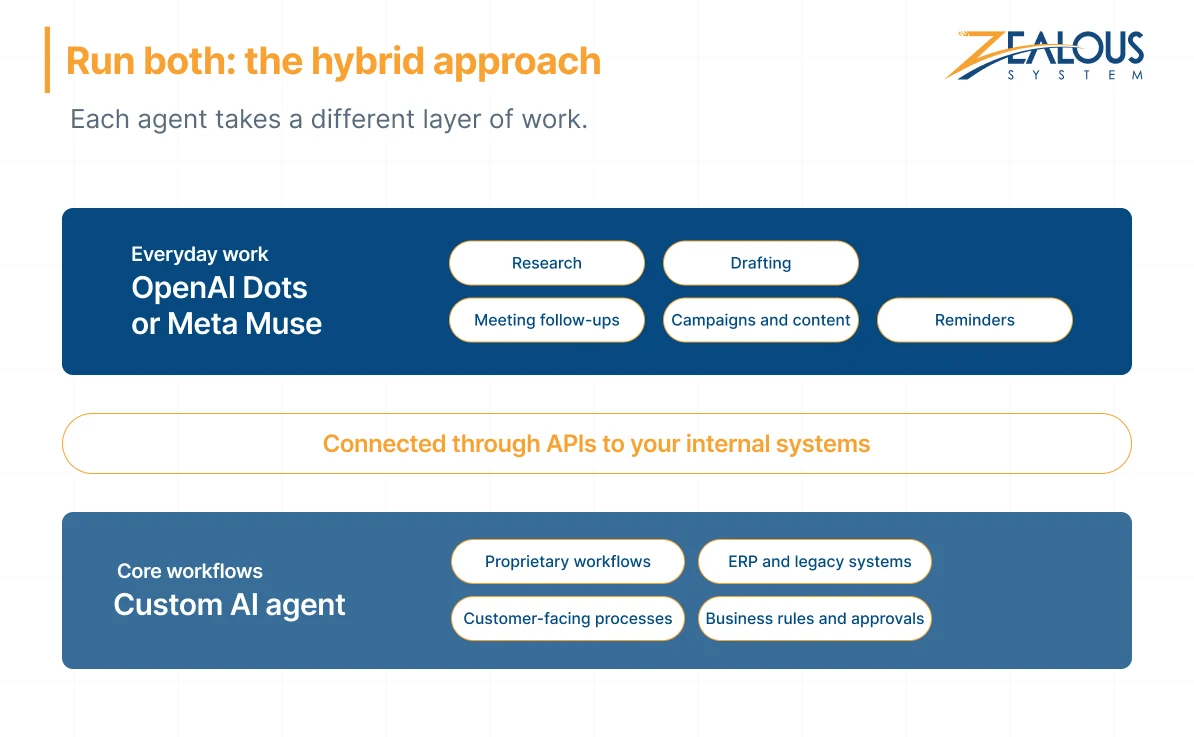
Sometimes a well-built API is enough to let a general agent reach an internal system. Our guide on how to integrate AI into existing software walks through the options.
McKinsey’s survey also found that nearly three-quarters of AI high performers have fundamentally redesigned their workflows around AI. Among other respondents, only a quarter have. That redesign starts with knowing exactly what you want an agent to do. Answer these questions for one specific workflow.
Describe the job in one sentence, such as “summarize each new support ticket and tag its urgency.” If you can’t, the agent won’t have a clear target, and results will be hard to measure.
List every app, database, and portal involved. If even one critical system is custom or legacy, plan for integration work.
When the right answer depends on your contracts, pricing logic, or internal policy, a general agent has to guess. A guess works for a draft email and fails for a credit decision.
Think about the worst mistake the agent could make. Packaged settings can handle minor, reversible errors. Costly or public ones call for approval rules designed around your roles.
An assistant can tolerate occasional errors because a person checks its work. An agent that serves customers or runs a core process needs the reliability and ownership of a custom build.
Dots can sign in to supported sites without exposing saved passwords to the model, and Muse asks before posting or buying. Your own setup still decides how much harm a wrong action can cause.
UK businesses can fold these controls into a broader AI governance framework in the UK.
The main difference between OpenAI Dots vs Meta Muse is who they’re built for. Dots is an always-on agent for teams, working through ChatGPT, Slack, Teams, and thousands of apps. Muse for Small Business targets small businesses and ties closely to Meta’s platforms plus tools like Shopify and QuickBooks.
OpenAI says Business Premium users get Dots in all supported ChatGPT regions, and India is one of those regions. Pro plans are rolling out to eligible markets, so check your account for access.
OpenAI Dots pricing is bundled into ChatGPT Pro and Business Premium, with per-plan usage terms still to be published. Muse for Small Business is free with usage limits, and paid subscriptions cover heavier use.
Dots has default rules on when to act alone and when to ask for approval. OpenAI still recommends reviewing consequential work, so apply the checklist above before connecting sensitive systems.
It depends on how many systems the agent connects to, how complex its rules are, and how much human oversight it needs. Our breakdown of AI agent development cost covers the main factors.
The right choice comes down to what you need an agent to do, and sometimes the answer is neither.
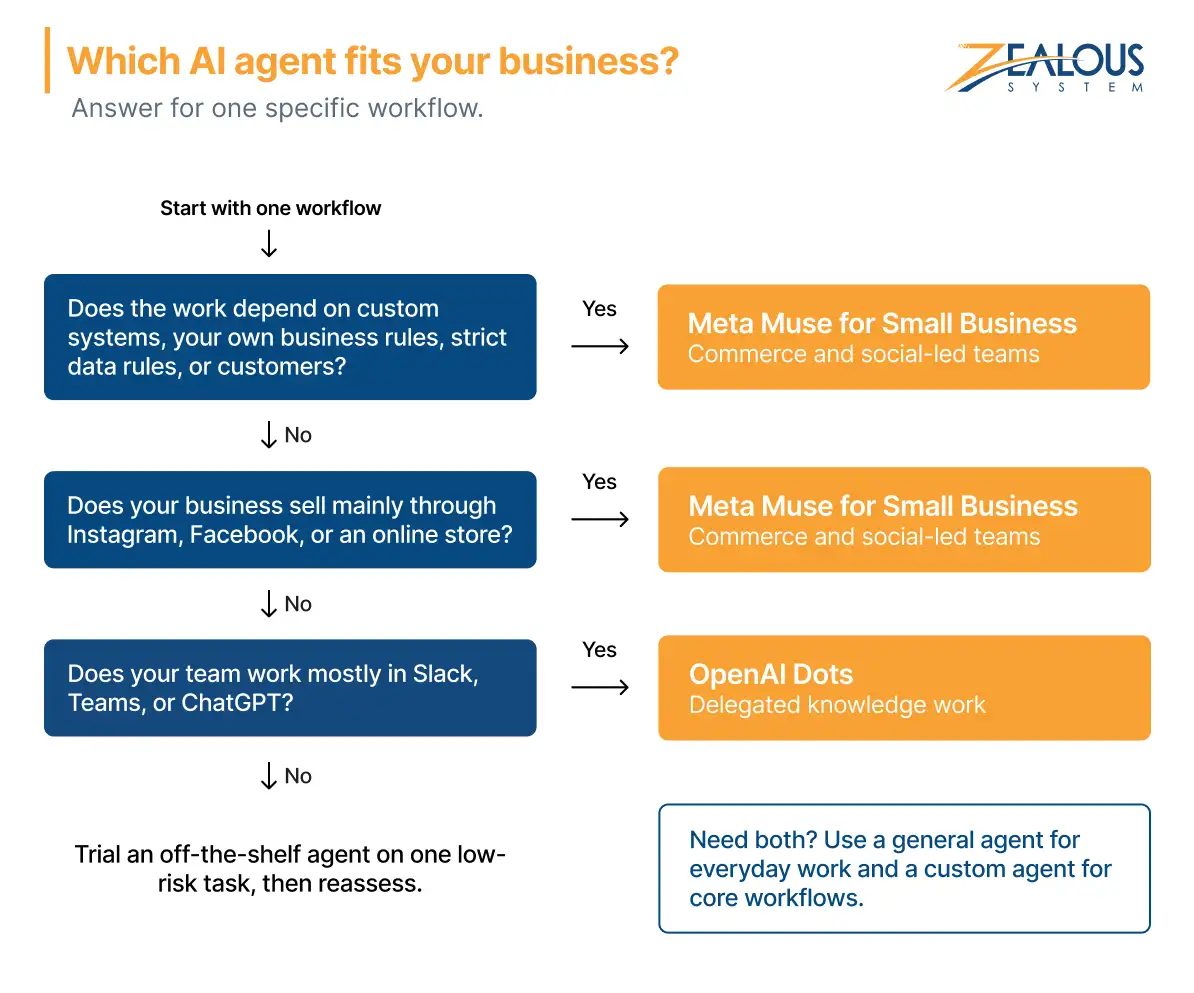
Pick one workflow and run it through the five questions. If it needs deeper integration than a packaged agent offers, Zealous System can help. As an AI agent development company based in India, we build custom agents for businesses at home and abroad. Often, one conversation about a single workflow is enough to show whether a custom build makes sense.
Our team is always eager to know what you are looking for. Drop them a Hi!

Nandini Pare is a CAPM® Certified Business Analyst at Zealous System, specializing in business analysis, Agile delivery, and helping organizations build technology solutions that solve real business challenges.




Comments