Key Takeaways:
Teams evaluating AI agents today have two credible options on the table. CRMs, help desks, and IT service platforms increasingly ship with built-in agents, while agentic coding tools have made custom development quicker to get started. McKinsey’s State of AI 2026 survey found that 32% of organizations passed on at least one software purchase because they could build the functionality in-house. With both paths looking viable on paper, the build vs buy AI agent decision deserves more scrutiny than a typical software purchase.
That extra scrutiny matters because an agent acts inside billing, CRM, or ERP systems. A poor fit shows up as incorrect refunds, stalled approvals, or compliance gaps.
Gartner predicts that over 40% of agentic AI projects will be canceled by the end of 2027, and names escalating costs, unclear business value, and inadequate risk controls as the main reasons. This guide covers when buying makes sense, when building pays off, what each option costs, and why many teams end up combining the two.
A chatbot is built to hold a conversation, while an AI agent is built to complete a task. Given a goal, an agent plans the steps, calls tools such as your CRM or billing system, checks each result, and continues until the work is finished or needs human approval. In a refund workflow, for instance, a chatbot can explain the policy, while an agent can verify eligibility against order history, issue the refund, and update the ticket.
That’s why fit matters far more with agents: the more an agent needs to touch your systems and follow your rules, the harder it is for a generic product to keep up. This breakdown of AI agents vs. agentic AI explains the terminology in more depth.
It’s also worth asking whether you need an agent at all. Gartner notes that many use cases marketed as agentic don’t actually require an agentic implementation. If a conversational assistant covers your needs, the AI chatbot build vs buy vs integrate decision is usually simpler.
Here’s how the two options compare on the factors decision-makers usually weigh: cost, speed, workflow fit, integration, data control, and long-term ownership.
| Factor | Buy (Off-the-Shelf) | Build (Custom) |
|---|---|---|
| Upfront Cost | Low: subscription plus setup | Higher: typically $15,000 to $500,000+ |
| Time to First Value | Days to weeks | Weeks to months |
| Workflow Fit | The vendor’s version of the process | Designed around your process |
| Integration Depth | Prebuilt connectors, often limited | Any system, including legacy and internal APIs |
| Data Control | Processed on vendor infrastructure | You choose hosting and data flow |
| Cost as Usage Grows | Rises with seats, conversations, or actions | Mostly model API and infrastructure costs |
| Maintenance | Vendor handles it | Your team or partner owns it |
| Vendor Lock-in | High | Low, since you own the code and logic |
| Competitive Advantage | Same tool competitors can buy | A capability unique to you |
Few use cases favor one option on every row, so identify the three or four factors that matter most to you.
For many teams, an off-the-shelf AI agent is the sensible first move. MIT NANDA’s GenAI Divide report found that AI tools bought from specialized vendors and deployed through partnerships succeeded about 67% of the time, while internal builds succeeded only about one-third as often. Buying usually works best in these situations.
FAQ tickets, meeting summaries, scheduling, and basic lead qualification look similar across most companies. Vendors have already solved them many times over, so you gain little by solving them again.
If the agent mainly needs data from a single system, like your CRM or IT service desk, that platform’s built-in agent already understands its data model and permissions. When the data sits across several systems, a data platform with a built-in MCP server, such as Peliqan, can give an agent one governed connection to all of them without a custom build.
When time to market matters more than a perfect fit, a bought tool gets something live this quarter and lets you learn what the agent should do before investing in a build.
Production agents need someone monitoring outputs, handling model updates, and fixing edge cases. If nobody on your team can own that, a vendor who does is the safer choice.
These limits tend to surface only after rollout:
Example: A support team answering order-status and return questions inside a mainstream help desk will likely get more from that platform’s built-in agent than from a custom build.
Building makes sense when the agent needs to reflect how your business actually works. These signals point toward custom AI agent development.
If the process is part of how you win, such as underwriting logic or pricing rules, placing it inside a generic tool gives that edge away.
Agents often need to write to several systems, some without modern APIs. Custom builds can include the middleware and application integration work that prebuilt connectors can’t handle.
In healthcare, finance, and insurance, you may need full audit trails, explainable decisions, and control over where data is processed. Building lets you design for HIPAA, GDPR, or SOC 2 from day one.
At tens of thousands of transactions a month, usage-based vendor pricing can outgrow the cost of running your own agent. Model that crossover point early.
If you’re adding agentic features to a SaaS product, a feature your customers pay for shouldn’t depend on another company’s pricing and roadmap.
Building means higher upfront investment, a need for specialized skills in LLM integration and evaluation, and ongoing ownership of monitoring, model updates, and security.
Faster building has limits, too. The same McKinsey State of AI 2026 survey found that only 37% of respondents report any EBIT impact from AI, a share that barely moved from the previous year. A quicker route to a working build still needs a clear business case behind it.
Example: A freight company that prices loads using contract rules, carrier scorecards, and live capacity data from three internal systems won’t find a product that fits, and its pricing logic is a competitive asset worth keeping in-house.
Setting a monthly subscription against a one-time build quote can mislead in both directions. A fairer comparison looks at total cost of ownership over three years.
| Agent Type | Typical Cost | Typical Timeline |
|---|---|---|
| Single-task Agent (MVP) | $15,000 to $40,000 | 4 to 8 weeks |
| RAG Agent Grounded in Your Knowledge Base | $30,000 to $90,000 | 8 to 14 weeks |
| Multi-agent System | $80,000 to $300,000+ | 20 to 36 weeks |
| Enterprise-grade Autonomous Agent | $150,000 to $500,000+ | 6 to 12 months |
After launch, budget for model API usage (roughly $2,000 to $20,000+ per month depending on volume), plus maintenance at about 15% to 20% of development cost per year. Timelines shrink when requirements and data are ready, and stretch when integrations are undocumented. This guide to AI agent development cost breaks down each line item.
| Cost Area | Buy | Build |
|---|---|---|
| Year One | Subscription, implementation, integration gaps | Development, infrastructure, API usage |
| Years Two and Three | Subscription, often rising with usage | Maintenance, API usage, hosting |
| Scaling Up | Grows with seats or actions | Grows mainly with model usage |
| Exit | Migration and rebuild costs | Minimal, since you own the asset |
Buying usually wins at low volume on standard tasks. Building tends to win when volume is high, integrations run deep, or vendor pricing grows with every action.
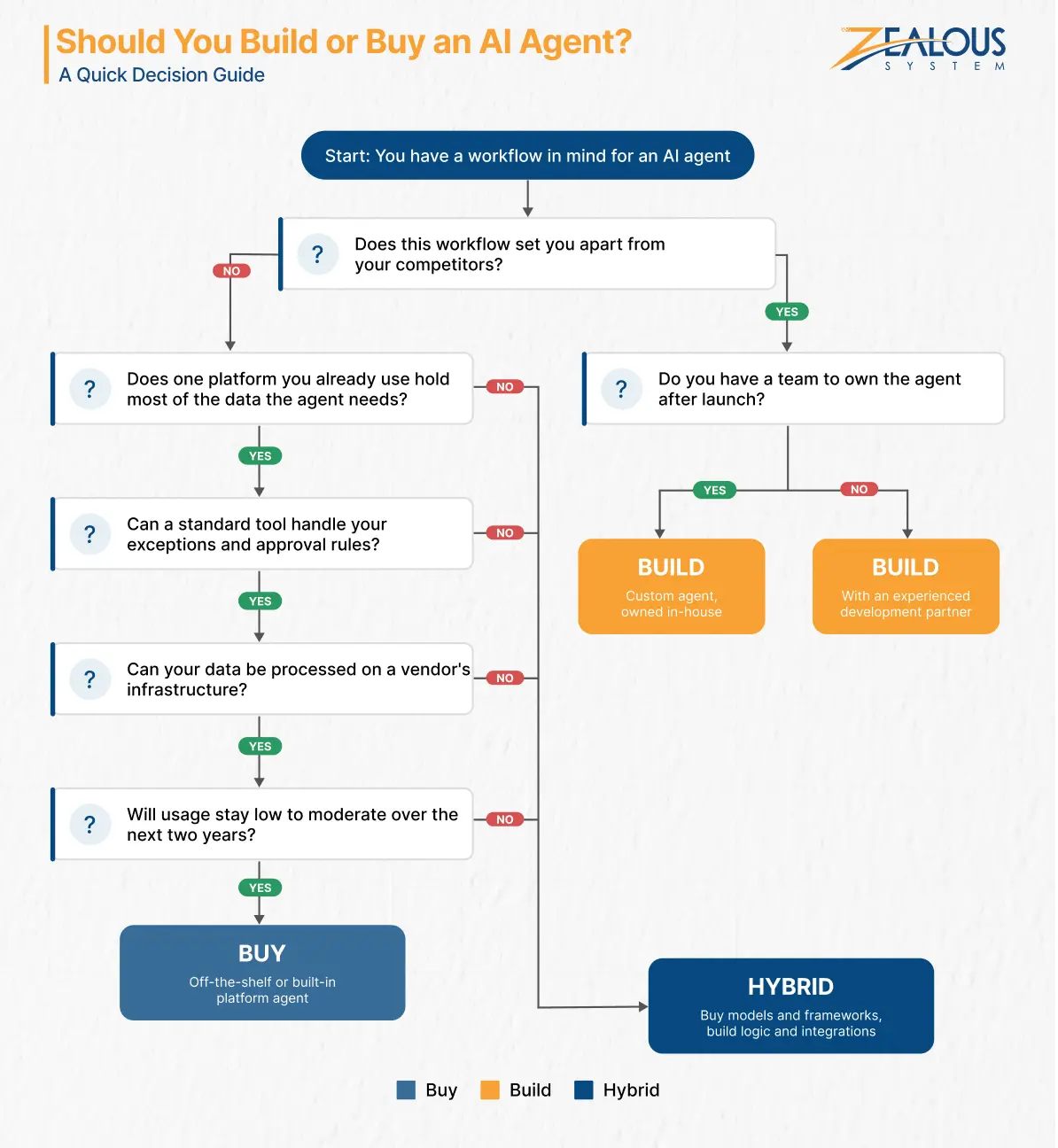
Answer these with business and technical stakeholders in the room. Together, they work as a practical AI agent build vs buy framework, and the pattern in your answers usually points to the right path.
Competitive Value: Does this workflow set you apart? If every competitor handles it the same way, buying is usually fine.
Workflow Complexity: How many exceptions and approval rules does your team handle manually today? More exceptions mean a generic tool is less likely to cope.
Integration Map: List every system the agent must read from and write to. One vendor platform favors buying. A mix of internal, legacy, and third-party systems means custom work either way.
Data Sensitivity: What data will the agent see, and where can it legally be processed? Ask compliance before procurement.
Volume Forecast: How many tasks will the agent handle monthly in two years? Price vendors against that number, not the pilot.
Post-Launch Ownership: Who will monitor accuracy, handle model changes, and respond when something breaks? Without a clear owner, you aren’t ready to build alone.
Rule of thumb: Common, single-platform, low-volume use cases point to buying. Differentiating, multi-system, sensitive, high-volume ones point to building or hybrid.
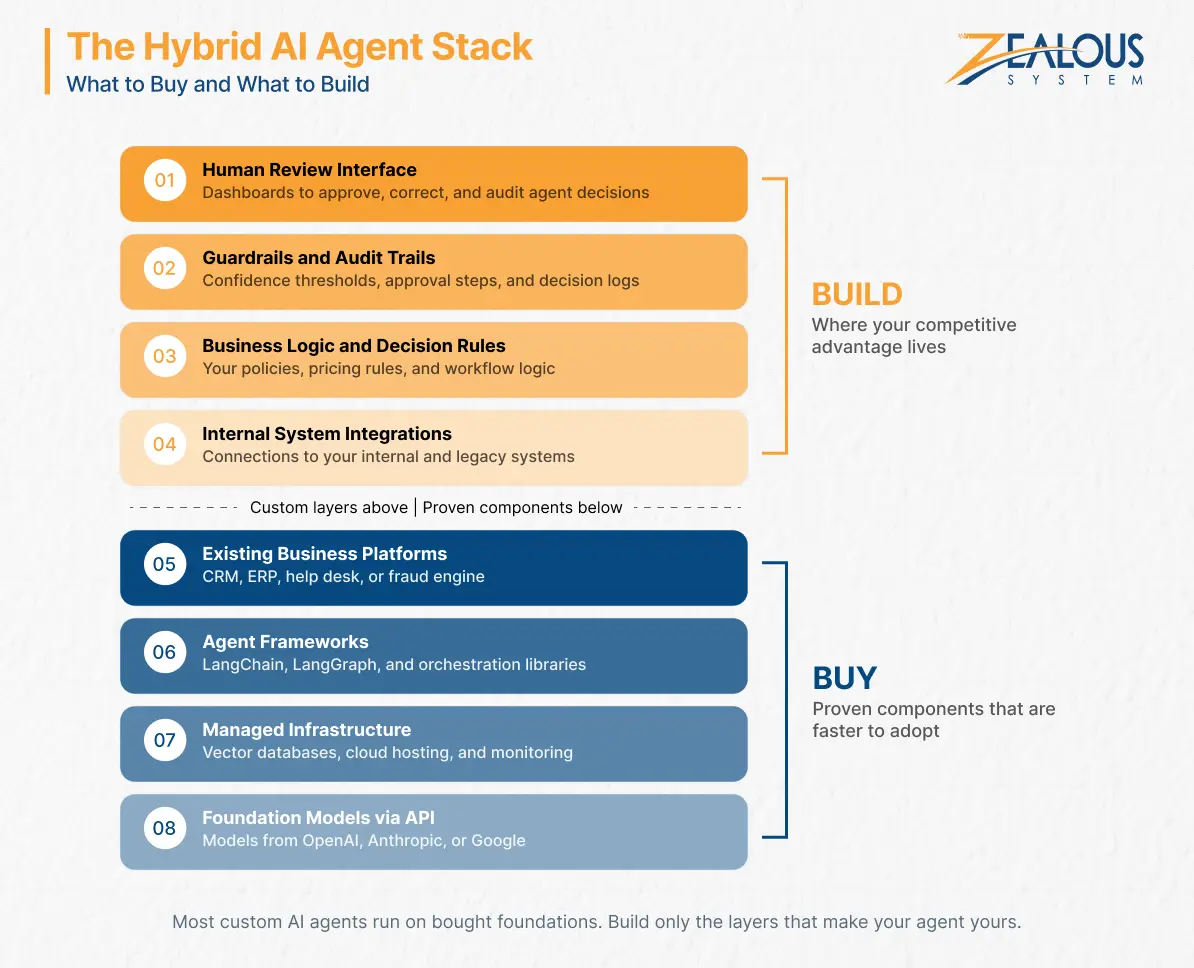
Very few companies build agents entirely from scratch. Even custom agents run on foundation models from providers like OpenAI, Anthropic, or Google, and on frameworks like LangChain or LangGraph. So the useful question in any build vs buy AI agent decision is which layers you buy and which you build.
Foundation models through APIs, agent frameworks, managed infrastructure like vector databases and hosting, and the platforms the agent works alongside, such as your CRM or ERP.
Your business logic, integrations with internal systems, guardrails and approval steps, audit trails, and interfaces for human review.
This split gives you most of the speed of buying and most of the control of building. Retrieval over your own data (RAG) covers most knowledge needs, and when it doesn’t, it makes more sense to fine-tune an LLM than to train one.
A UK-based NBFC received over 12,000 fraud alerts a month from its rule-based system, and more than 90% were legitimate transactions. Analysts spent 15 to 20 minutes per alert gathering data from four systems.
Replacing the fraud engine wasn’t practical, and no product matched the company’s policies. So the engine stayed, and a custom AI triage agent went on top. It pulls context from core banking, CRM, and transaction logs, then uses an LLM with RAG over the company’s fraud policies to recommend closing, reviewing, or escalating each alert, with a plain-language explanation for auditors. Uncertain cases always go to an analyst.
After running in shadow mode, it rolled out one low-risk category at a time. Manual reviews fell by 62%, and average resolution time dropped from about 14 hours to around 3. The full AI fraud triage agent case study covers how it was built.
The reasons Gartner gives for canceled agentic AI projects, such as rising costs, unclear value, and weak risk controls, are usually set in motion during planning. The mistakes below are the ones that most often lead there.
Demos run on clean sample data. Test the tool on your own tickets, documents, or transactions before signing.
A pilot proves the model can do the task. Production also needs integrations, error handling, monitoring, and adoption. Budget for that gap from the start.
API usage, maintenance, and security reviews continue for as long as the agent runs. Leave them out, and your ROI projections will look better than reality.
Start with recommendations and human approval. Expand autonomy only after accuracy is proven.
If a task follows fixed rules with no judgment involved, traditional workflow automation is cheaper and more predictable. Understanding agentic AI vs traditional automation helps you pick the right tool.
Zealous System works with teams on both parts of this decision: choosing the approach, then delivering it.
The first step is usually a discovery and architecture workshop, a focused AI consulting services engagement that maps your workflows, systems, and constraints. You get a scoped architecture, a cost estimate with written assumptions, and a phased delivery plan, so the build vs buy AI agent decision rests on your data rather than vendor claims. When buying is the better fit, we’ll tell you.
When custom or hybrid is the better route, the team handles AI agent implementation end-to-end: LLM integration, RAG pipelines, multi-agent orchestration with LangGraph and AutoGen, AI agent integration with enterprise systems, and human-in-the-loop interfaces. Clients across Australia, the UK, the US, and Europe work with Zealous System as their AI agent development company, from first proof of concept through production. If you’d rather keep delivery in-house, you can also hire AI developers to extend your own team.
The build vs buy AI agent choice comes down to how closely the agent must match your workflows, systems, and data rules. Standard tasks at modest volume are usually well served by a bought tool. Differentiating workflows with deep integrations and sensitive data tend to justify a build, and for many mid-market and enterprise teams, the practical answer combines both.
Before committing budget, map the workflow, forecast volume, compare three-year costs, and test on your own data. If you’d like a second opinion on your use case, the Zealous System team is happy to walk through it with you.
The cost to build a custom AI agent usually ranges from $15,000 to $500,000+. A focused single-task agent typically costs $15,000 to $40,000, while enterprise systems with multiple integrations can exceed $150,000. Add 15% to 20% of the build cost yearly for maintenance, plus model API usage.
A narrow MVP takes about 4 to 8 weeks, and a RAG-based agent takes 8 to 14 weeks. Multi-agent systems take 20 to 36 weeks, and enterprise deployments take 6 to 12 months.
Buying is usually cheaper in year one. Over three years, building can cost less when usage is high, integrations are complex, or vendor pricing scales with every action.
Yes, within limits. Most let you adjust prompts, knowledge sources, and workflows. Custom decision logic, write access to internal systems, or strict data residency usually require custom or hybrid development.
The biggest risks are underestimating post-launch work, lacking specialized AI skills, and launching without enough guardrails. MIT’s research found internal builds reach deployment far less often than partnered projects, which is why many teams build with an experienced partner.
Our team is always eager to know what you are looking for. Drop them a Hi!

Pranjal Mehta is the Managing Director of Zealous System, a leading software solutions provider. Having 10+ years of experience and clientele across the globe, he is always curious to stay ahead in the market by inculcating latest technologies and trends in Zealous.


Comments