Quick Overview:
Most major CRM vendors have introduced AI assistants and agents over the past two years. For many technology and sales leaders, the next question is how to use those capabilities effectively. Between those two facts sits a question vendor documentation does not always answer clearly: do you use what you already have, build something on top of it, or some mix of the two?
This guide covers what AI CRM integration involves in 2026, how to tell whether your current system can support it, where built-in features stop and custom work starts, the implementation sequence itself, what it costs, and the failure patterns worth knowing before you commit budget.
AI CRM integration is the process of connecting AI models, assistants, or agents to an existing customer relationship management system so they can access CRM data, generate insights or responses, and, where appropriate, take actions within defined workflows. AI integration with CRM can be shallow or deep depending on what you need.
Three common categories of AI capabilities can be used within a modern CRM, and distinguishing between them helps define the right scope. Each one asks something different of your data, your budget, and your team, so it helps to name them clearly before planning anything.
Two years ago, CRM AI meant a suggestion box: it drafted, you decided. Today it means delegated work, and the shift is happening faster than most technology waves before it. Gartner projects that 40% of enterprise applications will include task-specific AI agents by the end of 2026, up from under 5% in 2025.
Sales teams are already there. Salesforce’s State of Sales report found 87% of sales organisations now use AI in some form, and 54% of individual sellers have worked with an agent directly. If your integration plan stops at adding a chatbot, you are scoping for 2023.
There is a clear split between what runs reliably in production and what still needs a person in the chair, and it is worth knowing which side your use case falls on before you promise anything internally.
Common production use cases include: qualifying inbound leads against your criteria, researching an account before a call, drafting and sending sequenced outreach, routing and triaging support tickets, turning call notes into structured CRM fields, flagging at-risk accounts from engagement patterns, and answering internal questions about pipeline data.
Still unreliable: anything involving pricing decisions, contract terms, regulatory commitments, or sensitive customer relationships. Anything where a wrong action is expensive to undo. Those stay human-approved.
Usually, yes. In many cases, replacing the CRM is unnecessary because modern platforms provide APIs, extensions, and built-in AI capabilities that can support incremental integration. The real constraint is almost never the CRM itself. It is the state of the data sitting inside it.
Four checks will tell you most of what you need to know, and none of them require buying a tool.
These checks may seem basic, but data quality is one of the most important factors affecting AI CRM implementation outcomes. Where records are scattered across disconnected systems, a data migration or consolidation pass usually needs to happen before any AI work starts.
Most companies land in one of four positions, and the right move differs sharply between them.
| Your Situation | What to Do |
|---|---|
| Modern CRM, Standard Workflow | Turn on the built-in AI. Start there before spending anything. |
| Modern CRM, Workflow the Built-In AI Does Not Cover | Extend it through the platform’s API or an agent layer you control. |
| Heavily Customised Setup with Many Custom Fields | Custom integration. Built-in AI tends to understand standard fields first. |
| Legacy or In-House CRM | Assess modernisation. Sometimes a connection layer is enough, sometimes it is not. |
Honest scoping matters most here, because this is where projects quietly go over budget. Gartner notes that connecting agents to legacy systems is technically difficult, often disrupts existing workflows, and frequently requires costly changes to the underlying software.
If your CRM has a documented API, a connection layer sitting between the old system and a modern model can usually do the job without touching the core application. That approach, which sits behind our middleware software solutions, leaves the legacy system alone while giving the AI a clean, controlled way in.
If there is no API or reliable integration interface, the project may require application modernization or an alternative data-access layer before AI integration can begin. That is much better to discover in week one than in month four.
Before scoping anything custom, find out what you are already paying for. Teams sometimes commission custom development for capabilities that are already available through their existing CRM subscription.
Salesforce runs Einstein for scoring and forecasting, with Agentforce on top for configurable agents. Agentforce uses the Atlas Reasoning Engine, which reads a request, works out which CRM data and actions it needs, then carries them out inside your account. It is the most capable option available and also the one that demands the most setup. Pricing runs on usage rather than seats, so the bill tracks activity.
HubSpot groups everything under Breeze: Breeze Assistant for in-context help, Breeze Agents for prospecting and support workflows, Breeze Intelligence for data enrichment and buyer intent, and Breeze Studio for building agents without engineering help. Its built-in tools can support a range of sales, service, and data-enrichment workflows, including options that can be configured by business teams. HubSpot moved parts of Breeze onto a credit system in mid-2026, so check current terms.
Microsoft Dynamics 365 builds Copilot into sales and service, with Copilot Studio for custom agents. Its real advantage is reach: if your documents live in SharePoint and your logins run through Microsoft, Dynamics can see data the others cannot.
Zoho ships Zia, including its own in-house language models. That matters if you want tighter control over which model touches your customer records.
Pricing in this category has changed several times in the past year, so confirm current terms with each vendor rather than trusting any published comparison.
Five situations where built-in CRM AI may be sufficient:
If three or more apply, spend the next quarter on built-in features and data cleanup before commissioning any custom development. That advice costs us work and saves you a budget cycle.
The clearest signal is a workflow that crosses systems. CRM plus ERP plus a support desk plus billing is a common shape, and built-in agents are generally strongest when working with data and workflows within their native platform; cross-system processes may require additional integration layers.
Custom also applies when your business logic lives in custom fields, when you need a specific model for cost or data-location reasons, when you need a more detailed record of what the AI did than the platform provides, or when usage-based pricing at your volume costs more than running your own setup would. Framing that choice the way we do in build vs buy vs integrate for AI chatbots is a reasonable place to start.
If you are building a SaaS product that includes CRM functionality, the requirements are different. You are not buying CRM AI; you are the one supplying it, and your users will expect the same agent behaviour they already see in HubSpot.
Different questions follow: keeping each customer’s data properly separated, letting customers configure their own models, how you charge for AI usage without eroding your margin, and whether you build the coordination layer yourself or embed someone else’s. Our guide to AI integration in SaaS covers those product decisions, and integrating generative AI into an existing product covers the build patterns.
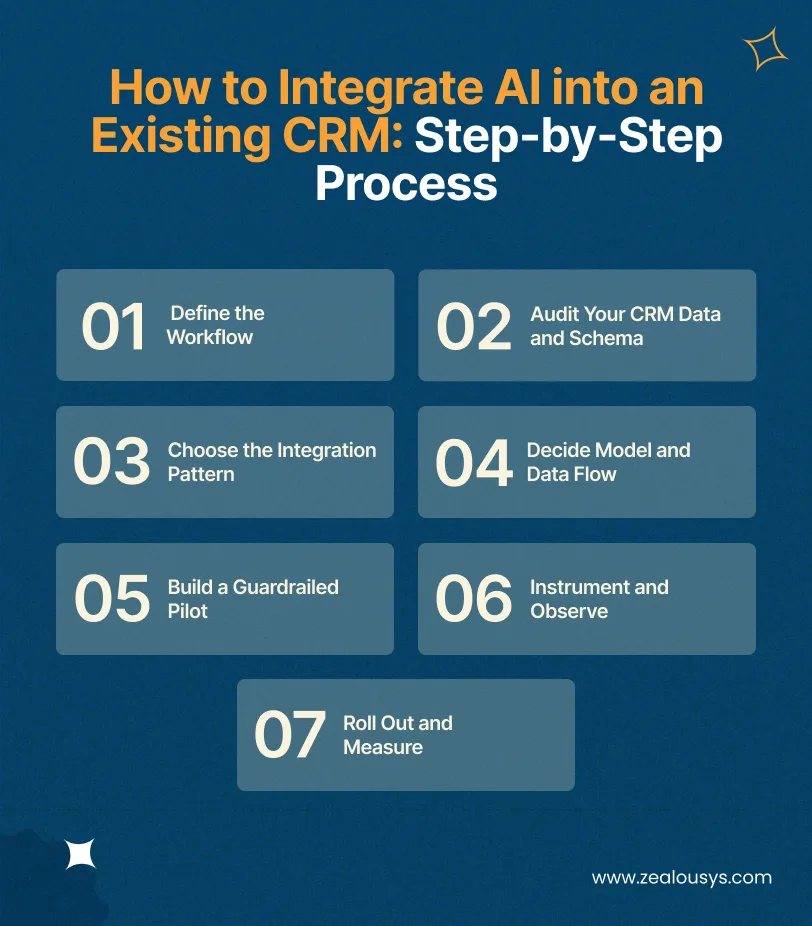
Seven steps, in order. Skipping the second one is the most common and most expensive mistake in this entire process.
Do not start with a broad AI goal, because broad goals cannot be built. “Improve sales efficiency” gives an engineering team nothing to scope against. “Cut the time between an inbound demo request and first qualified contact” gives a team something they can actually build and measure.
Pick a process with a number attached, a named owner, and enough volume that a change would show up in your reporting within one quarter. If you cannot find one, that is useful information too.
Map every field and record type the chosen workflow touches, then run them against the four readiness checks above. Document the findings clearly, including data gaps, inconsistencies, duplicates, and legacy dependencies.
Custom fields deserve particular attention. This is where built-in AI usually loses the thread, and where most of the integration effort ends up concentrating. Expect this step to surface problems that predate the AI project by years.
Three options, each trading effort for control.
Two decisions carry most of the weight here, and both are easier to make now than to reverse later.
The first is how the AI gets its facts. Retrieval-augmented generation, or RAG, means the system looks up the relevant CRM records at the moment of the question and answers from them. That suits almost every CRM use case, because your data changes hourly. Fine-tuning a model suits fixed tone or format needs, not fresh facts. We built a multilingual AI chatbot using RAG on exactly that reasoning.
The second is what leaves your systems. Decide which fields the model can see, whether requests go to an outside provider or stay in your own environment, and where the searchable copy of your CRM content lives. Answer this before writing code. Retrofitting a data boundary is genuinely painful.
Start with a focused pilot: one workflow, one team, and a representative set of CRM records. A pilot that touches everything proves nothing and breaks loudly.
Set permissions deliberately. An agent that reads widely but writes to two named fields is a manageable risk. An agent with full edit access on day one is not. Put a human approval step on anything that leaves your company or moves a deal stage, then relax those approvals selectively once you have evidence.
From the first day of the pilot, log every decision the agent makes, every action it takes, and the input that produced it. This practice, usually called agent observability, has become a baseline expectation rather than an advanced feature, and both Salesforce and HubSpot now ship monitoring tools for exactly this reason.
Without those logs, you cannot debug a bad output, prove the return to a finance team, or answer an auditor. Teams that skip this step tend to rebuild it six months later under pressure, which costs considerably more.
Expand by workflow rather than by headcount, and hold every expansion to the metric you defined in step one. Adding users to something nobody has proven is how pilots quietly become expensive habits.
Then do the part most teams avoid entirely: switch off whatever nobody uses. Unused agents still consume credits, still hold access to customer data, and still need maintaining. A quarterly review that retires dead features keeps the whole thing honest.
Cost depends far more on scope than on the AI itself. A single assistant reading standard fields and a network of agents writing across four systems are different projects that happen to share a category name.
The ranges below reflect typical market pricing for AI CRM integration work. Your actual figure shifts with region, team composition, and how much cleanup your data needs before development starts.
| AI CRM Integration Scope | Estimated Cost | Typical Timeline |
|---|---|---|
| Basic AI Feature or Assistant | $15,000–$30,000 | 6–10 weeks |
| CRM + LLM Integration with Custom Workflows | $30,000–$60,000 | 10–16 weeks |
| Advanced AI CRM with RAG, Analytics, and Automation | $60,000–$100,000 | 4–6 months |
| AI Agents and Multi-System Integration | $100,000–$150,000+ | 5–9 months |
| Enterprise AI CRM Ecosystem | $150,000+ | 9–12+ months |
Many organizations can reduce initial risk by starting with a focused implementation before expanding to broader AI agent or multi-system use cases. Starting in row four without having proven anything in row one is how budgets get spent before value gets measured.
Six factors move the number more than anything else, and you can estimate your own position on each before talking to a vendor.
Three items get missed in nearly every first estimate, and all three arrive after the invoice for the build.
Your CRM holds some of the most sensitive material in the business: contact details, commercial terms, private notes about clients, and forward-looking revenue numbers. Connecting AI to it deserves the same scrutiny you would apply to any system touching that data.
Trace the path and write it down. Which fields does the model read? Does the request leave your own environment? Which provider processes it? Do they keep anything? Where does the searchable copy of your CRM content sit, and how long do the logs stay?
If you cannot draw that diagram on a whiteboard, you cannot answer an enterprise security questionnaire, and deals will stall on exactly that page.
Sending personal data to an external AI provider counts as processing it, which brings data-protection, security, and contractual obligations. You need a lawful basis, a data processing agreement with the provider, and a defensible position on where the data physically sits.
Under India’s DPDP Act, consent and purpose limitation carry their own specifics, and the rules on moving data across borders differ from GDPR’s. Deletion deserves particular care: a request to erase a record has to reach your search index and your logs, not just the CRM entry. Our guide on how to make your software GDPR compliant covers the architecture side of that.
Give every agent the narrowest set of permissions that still lets it do the job, and make sure each action can be traced back to a specific decision.
Four things should stay outside autonomous control no matter how well the agent performs: changing pricing or contract terms, deleting records, sending anything to a regulator or legal contact, and modifying permissions. Keeping a person in the loop on those is not excessive caution; it is ordinary control design.
Gartner expects that more than 40% of agentic AI projects will be cancelled by the end of 2027, pointing to rising costs, unclear business value, and inadequate risk controls. The specific failure patterns repeat often enough that you can plan around them.
A scoring model built on incomplete history produces rankings that look authoritative and are not. Reps follow them for a quarter, results get worse, and trust in the whole system collapses well before anyone diagnoses the cause. Fix the data first.
A reading mistake is recoverable. A writing mistake spreads through reporting, forecasting, and every system downstream of the CRM, often silently. Constrain edit access and log every change the agent makes.
Five hundred clean records handled by one enthusiastic team prove less than they appear to. Production brings messy records, edge cases nobody wrote down, and volume that hits rate limits the pilot never approached. Test on representative data, not on your best data.
If you cannot show what the agent did and what changed as a result, the project loses its funding at the next budget review regardless of whether it worked. That outcome is entirely avoidable and entirely common.
The most frequent failure is also the least dramatic. Nothing breaks, no alarms go off, and the sales team simply carries on as before while the agent runs in an empty room. This almost always traces back to a workflow chosen by leadership rather than by the people who do the work. Involve them in step one.
If you hire an AI CRM integration company rather than build in-house, the selection criteria are narrower than for general software development. AI systems that write directly to a live CRM require a different level of integration, testing, governance, and production experience than read-only AI applications.
Experience with your specific CRM matters more than general AI credentials, because Salesforce and HubSpot integration work share very little in practice. Look for real data engineering capability, since that is where most of the effort lands. Look for production systems rather than prototypes, particularly ones that update records rather than only reading them. Ask about their position on logging and governance. And notice whether they are willing to tell you the work is unnecessary.
The last two questions do the most work. A team that has run these systems in production answers both quickly and with specifics. Everyone else gets vague.
Between six weeks and twelve months depending on scope. A single assistant on standard fields runs 6 to 10 weeks. A custom workflow integration runs 10 to 16 weeks. Full agent deployments across several systems run five months or more.
In most cases, yes. Modern platforms provide both built-in AI and APIs, and older systems can often be connected through a middle layer. Replacement only becomes necessary when there is no way for other software to reach the data at all.
Check four things: whether key fields are filled in, whether people enter data consistently, how many duplicate records exist, and how recent the history is. Weakness in any of them means a cleanup pass before integration rather than after.
The Model Context Protocol is an open standard for connecting AI models to outside systems and data. Applied to CRM, it offers one consistent interface instead of a separate custom connector for every platform. Vendor support is maturing at different speeds, so confirm current status before designing around it.
Two parts. The build typically falls in the $30,000 to $60,000 range for custom workflows. Usage costs are separate and depend on your model choice, request volume, and how much context each request carries, and they rise as adoption rises.
Most often, poor data quality, pilots that do not reflect production conditions, missing logging, and low adoption from teams who were never consulted about which workflow to automate.
Yes, as long as the system offers an API or a database connection point. Where it does not, modernisation generally has to come first. Application integration work often precedes AI work for exactly that reason.
Start with what you already have. Turn on your CRM’s built-in AI, run it against one workflow that genuinely matters, and find out where it stops. That costs a few weeks and tells you more than any vendor evaluation will.
If the gap turns out to be real, particularly for teams with custom fields, cross-system workflows, or specific compliance and data-governance requirements, then custom integration earns its budget. Fix the data first, ship something narrow, log everything, and expand only where the numbers hold.
At Zealous System, we build AI-integrated CRMs for teams connecting AI to systems they already run, and custom AI agents for the ones who need agents that act rather than just suggest. Our AI fraud triage agent and demand forecasting and customer intelligence projects both began the way this guide suggests: one workflow, real constraints, measured results.
If you are working through the built-in versus custom decision and want a second opinion on scope, our team is happy to talk it through.
Our team is always eager to know what you are looking for. Drop them a Hi!

Pranjal Mehta is the Managing Director of Zealous System, a leading software solutions provider. Having 10+ years of experience and clientele across the globe, he is always curious to stay ahead in the market by inculcating latest technologies and trends in Zealous.


Comments